
Hello,
Thank you for the login details.
You can check settings of all rows (and columns) in Visual Composer editor and remove values for margin-bottom as shown in the screenshot:
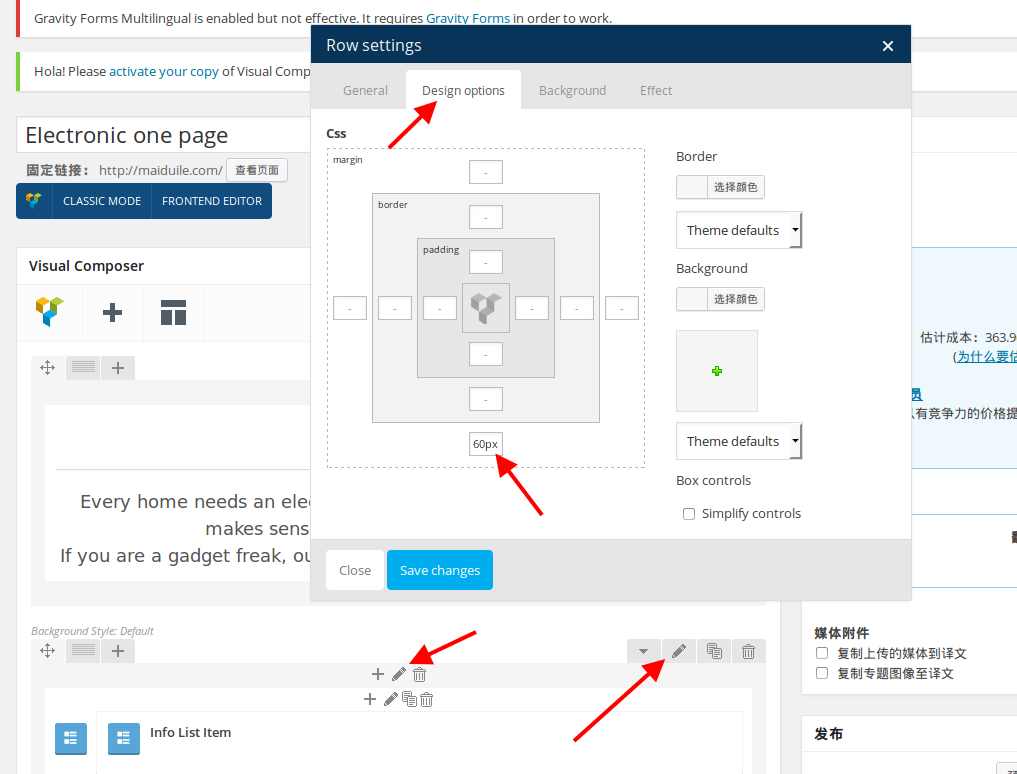
Thank you.
Regards,
Eva Kemp.

Hello,
Thank you for the login details.
You can check settings of all rows (and columns) in Visual Composer editor and remove values for margin-bottom as shown in the screenshot:
Thank you.
Regards,
Eva Kemp.
Hello,
We’re working on this problem currently and should be fixed in the next update.
Sorry for inconveniences.
Regards,
Eva Kemp.
Hello,
The font errors mean that the requested font families are not available from Google.
Concerning custom.css, it means you’ve enabled it in Theme Options > Custom CSS, but haven’t renamed default.custom.css to custom.css in the directory wp-content/themes/royal.
As I see you’re using child theme, so you can disable Custom CSS option in Theme Options.
Thank you.
Regards,
Eva Kemp.
Hello,
Please try to use this code in custom.css file:
.st-content {
   background-color: grey;
}
Thank you.
Regards,
Eva Kemp.
Hello,
You can find how to create variable products in Woocommerce documentation:
http://docs.woothemes.com/document/product-variations/
Thank you.
Regards,
Eva Kemp.
Hello,
You’re welcome.
Have a nice day.
Regards,
Eva Kemp.
Hello,
I was successfully redirected to Checkout page after adding a product to the cart.
Please try to clear your browser cache or check with some other browser.
Thank you.
Regards,
Eva Kemp.
Hello,
Sorry, but the login credentials aren’t correct.
Please check them.
Also please provide us with FTP login details.
Thank you.
Regards,
Eva Kemp.
Hello,
We’ve sent theme archive to your email address.
Please check it.
Thank you.
Regards,
Eva Kemp.
Hello,
Unfortunately we don’t have such option. Sorry.
Regards,
Eva Kemp.
Hello,
Please go to Settings > Visual Composer and select Content Types where you want Visual Composer editor to be displayed.
Thank you.
Regards,
Eva Kemp.
Hello,
You’re welcome.
I’ve added the following code into custom.css file:
.spreadplugin-checkout-link.button { background-color: white !important; }
Please check the cart icon now.
You can change color value to what you need.
Thank you.
Regards,
Eva Kemp.
Hello,
Please provide us with wp-admin panel credentials in Private Content.
Thank you.
Regards,
Eva Kemp.
Hello,
Have you regenerated thumbnails as recommended by Woocommerce team?
The plugin can be found here: http://wordpress.org/plugins/regenerate-thumbnails/
Please try it.
Thank you.
Regards,
Eva Kemp.
Hello,
To remove that description you need edit categories in Products > Categories > open a category and delete its description.
Thank you.
Regards,
Eva Kemp.
Hello,
We’re glad you’ve found the solution.
Enjoy your work.
Regards,
Eva Kemp.
Hello,
Do you wish the drop down list to be full width?
If so please add this code in custom.css file:
.slist1 {
    width: 1000px !important;
}
Thank you.
Regards,
Eva Kemp.
Hello,
Please add this code in custom.css file:
.footer-hr {
    display: none !important;
}
Thank you.
Regards,
Eva Kemp.
Hello,
Please refer to this article http://onedna.in/issue/how-to-solve-layerslider-old-jquery-issue/65/ concerning the issue.
If you have difficulties with the solution described there please provide us with wp-admin panel credentials.
Thank you.
Regards,
Eva Kemp.
Hello,
Please try to activate WordPress default theme and check it yourself. You’ll see that the issue appears there too.
So the problem occurs not only with our theme.
Thank you.
Regards,
Eva Kemp.
Hello,
Please provide us with wp-admin panel and FTP credentials. Please confirm you mean “Next” and “Previous” Arrows for the main product image.
Thank you.
Regards,
Eva Kemp.
Hello,
You’re welcome.
Regards,
Eva Kemp.
Hello,
Could you please clarify what exactly you need to do with excerpts? Do you wish to remove the breaks in posts?
Thank you.
Regards,
Eva Kemp.
Hello,
Have you tried following the instruction in our documentation:
https://www.8theme.com/demo/docs/legenda/index.html#!/footer ?
Please try it. If there are any difficulties we’ll help you.
Thank you.
Regards,
Eva Kemp.
Hello,
We’re glad you managed to fix the issue.
Enjoy your work.
Thank you.
Regards,
Eva Kemp.
Hello,
The issue with pagination has been fixed.
Please check.
To translate words you need edit .po file as described in our documentation:
https://www.8theme.com/demo/docs/idstore/#!/how_to_translate
Regards,
Eva Kemp.
Hello,
To add your links on the top panel you need edit the file wp-content/themes/legenda/framework/theme-functions.php (from line 1056 to 1090).
To translate words you can follow the instruction in our documentation:
https://www.8theme.com/demo/docs/legenda/index.html#!/how_to_translate
Thank you.
Regards,
Eva Kemp.
Hello,
You can download Woocommerce plugin via this link:
https://wordpress.org/plugins/woocommerce/
We recommend you to remove all files via FTP and start from scratch.
Thank you.
Regards,
Eva Kemp.
Hello,
As I see you have 2 Legenda versions in Appearance > Themes, but should be only one – 2.4.1 version as you had to overwrite the existing files and not create new folder.
Please fix it.
Also we recommend you to update Woocommerce plugin to the latest version.
If it doesn’t help please provide us with FTP credentials as well.
Thank you.
Regards,
Eva Kemp.
Hello,
As I see you’re using very old theme version.
Please update it to the latest one – 2.4.1, as some bugs were fixed in there.
Now Visual Composer is no longer built-in, but is implemented in the theme as a separate plugin, which is suggested to be installed immediately after the theme installation. The plugin archive is included in the theme archive and to start working with it you just need to click “Install plugin” button.
Also delete wpbakery folder from wp-content/themes/legenda before update.
Don’t forget to create a backup of all your files and databases before upgrading, and read instructions carefully on how to update your template properly: https://www.8theme.com/demo/docs/legenda/index.html#!/installation
Thank you.
Regards,
Eva Kemp.









