
Hello,
You’re welcome.
Regards,
Eva Kemp.

Hello,
You’re welcome.
Regards,
Eva Kemp.
Hello,
You can add margin values for images only in custom.css and if you know image class, for example, in Chrome browser you can click on the image with right mouse button and select Inspect element. You’ll see such window:

The class for that image is “img.alignleft.wp-image-2817.size-full” and you can write margins for it as I’ve shown on a screenshot. So the code
img.alignleft.wp-image-2817.size-full {
margin-right: 50px;
}
should be added into custom.css file.
Thank you.
Regards,
Eva Kemp.
Hello,
I’ve added the following code into custom.css file:
body {
    background-image: url('http://www.nextgennutritionals.com/wp-content/themes/legenda/images/background_page.jpg') !important;
    background-repeat: repeat-x !important;
    background-size: auto !important;
}
Please check the background now and clear browser cache.
Thank you.
Regards,
Eva Kemp.
Hello,
I’ve added the following code in CSS editor in Visual Composer on the Home page:
.wpb_teaser_grid .et_isotope .et_isotope-item .post-thumb .block-mask {
    display: none;
}
Please check the page now and clear browser cache before.
Thank you.
Regards,
Eva Kemp.
Hello,
Try to use this code to create margins between the buttons:
.button.white {
    margin-bottom: 10px;
}
To add margins for images you need know what element to edit. You can check it in Chrome browser, click right mouse button on the element you need to modify and select Inspect element from the list. In the appeared console you’ll see its id or class.
Thank you.
Regards,
Eva Kemp.
Hello,
Please describe your problem with more details. Is the menu not clickable at all?
Thank you.
Regards,
Eva Kemp.
Hello,
I’ve edited the path to background image you wrote in Theme Options > Color Scheme.
Please check your site now.
Thank you.
Regards,
Eva Kemp.
Hello @mindthesign,
The slider can’t be imported because ZipArchive extension is not enabled on a server at your hosting provider. Please contact them concerning this issue.
To make the background color black you need add this code in custom.css file:
.st-content, .header-type-7 .top-bar, .fixed-header-area {
    background: #000 !important;
}
a {color: white !important;}
Thank you.
Regards,
Eva Kemp.
Hello @ziloub,
Please add this code in custom.css file to change the background color:
.st-content {
    background: #CECECE !important;
}
Thank you.
Regards,
Eva Kemp.
Hello,
We’ve fixed the issue.
Please check the site now.
Thank you.
Regards,
Eva Kemp.
Hello,
A product should be added to Products in wp-admin panel and there you’ll see its ID.
Sorry, but we can’t guarantee full compatibility of that plugin and our theme because we didn’t test it.
Regards,
Eva Kemp.
Hello,
Currently we don’t see any problems with the products slider.
Have you already resolved the issue?
Also please provide us with the correct login details.
Thank you.
Regards,
Eva Kemp.
Hello,
Please add this code to change the buttons color:
a.button.white:hover {
background-color: #6f6f6f !important;
}
Please specify between what images you want to add gaps.
Thank you.
Regards,
Eva Kemp.
Hello,
Are you talking about this error?
http://imgur.com/SBCKMiq
It means you don’t have custom.css file. To create it you need rename default.custom.css to custom.css via FTP in the directory wp-content/themes/legenda.
Also the login details to wp-admin panel are incorrect.
Please check them.
Thank you.
Regards,
Eva Kemp.
Hello,
Could you please provide us with a page link where the images are displayed? Also please provide us with wp-admin panel credentials in Private Content.
Thank you.
Regards,
Eva Kemp.
Hello,
Have you tried to check the site with another Internet provider?
Thank you.
Regards,
Eva Kemp.
Hello,
Thank you for the feedback.
We really appreciate it!
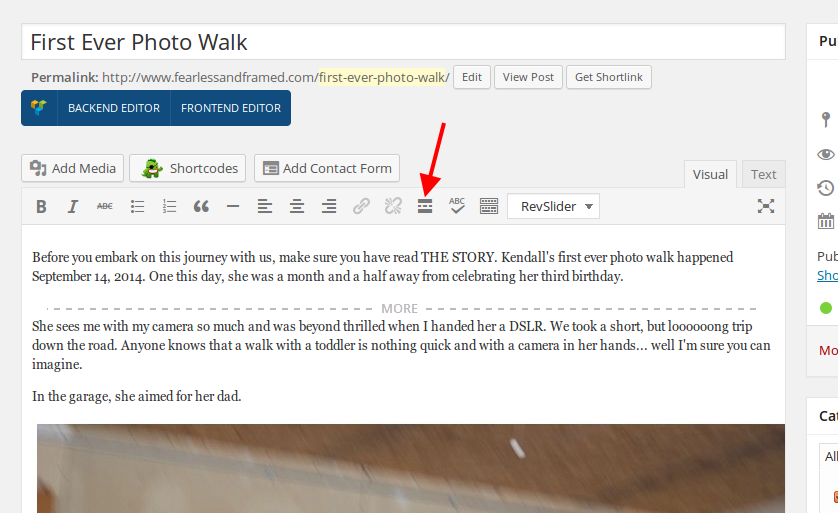
To fix the issue with blog categories you need add “more” tag to your posts to any part of your text where you want it to be stopped to place “Read more” button. Please see a screenshot how I’ve made for the post “First Ever Photo Walk”:
Regards,
Eva Kemp.
Hello,
I’ve edited custom.css for the site “zellirock2” and now the header is in black and images are aligned in centre.
Concerning Punch fonts you need update Essential Grid plugin to the latest version. Its archive is placed in the theme package in royal/framework/plugins folder.
We’ve checked your site on mobile and the video is loading fine on the home page with 1.4 theme version:

Could you please show a screenshot of what you’re getting?
Thank you.
Regards,
Eva Kemp.
Hello,
Looking forward to your reply.
Thank you.
Regards,
Eva Kemp.
Hello @ryanjohnsonnc,
This issue is being worked on by our developers and it will be fixed in the next theme update.
We’re sorry for inconveniences.
Thank you for your patience.
Regards,
Eva Kemp.
Hello,
To achieve what you want you need customize a template. In this case you should contact web developers or freelancers.
Thank you.
Regards,
Eva Kemp.
Hello,
I’ve added the following code in custom.css:
@media (max-width: 1200px) {.fixed-header-area .menu {
    width: 840px !important;
}}
Please check the site.
Thank you.
Regards,
Eva Kemp.
Hello @commersant19,
Have you added a product ID to the link?
Please provide us with wp-admin panel credentials.
Thank you.
Regards,
Eva Kemp.
Hello,
Please add this code in custom.css:
ul {
    list-style: disc outside none;
    color: black;
}
Thank you.
Regards,
Eva Kemp.
Hello @Tim1212,
Could you please clarify your question?
Thank you.
Regards,
Eva Kemp.
Hello,
Could you please specify full names of the widgets?
As I know default WordPress installation doesn’t have such widgets.
Thank you.
Regards,
Eva Kemp.
Hello,
Sorry, we’ve reverted changes back.
Please check the site now.
Concerning the Register link we need more time to investigate it.
We’ll let you know as soon as possible.
Has your programmer made any other changes in the theme files?
Thank you for your patience.
Regards,
Eva Kemp.
Hello,
I’ve removed the code from custom.css and placed it only for the Blog page in Visual Composer editor:
http://imgur.com/H0p3MQj
Now posts are being shown well on the Home page.
Please check.
Thank you.
Regards,
Eva Kemp.
Hello,
Sorry, but concerning this issue you need contact your hosting provider as this is not the theme problem.
Thank you.
Regards,
Eva Kemp.
Hello,
As I see your blog posts are shown fine and instagram photos too:
http://imgur.com/eNkAvnr
http://imgur.com/tU7N9I1
Please try to check the site in some other browser.
Thank you.
Regards,
Eva Kemp.









