Forum Replies Created

Viewing 30 posts - 24,331 through 24,360 (of 31,382 total)
  • Avatar: Eva
    Eva Kemp
    Participant
    December 4, 2014 at 20:57

    Hello,

    I’m able to log in to your wp-admin panel.
    You’re using WordPress 3.9.3 and there is a new version 4.0.1.
    Please update it and create a back up before.
    Or we can do this for you, but confirm you have a back up of the site.

    Thank you.
    Regards,
    Eva Kemp.
    Avatar: Eva
    Eva Kemp
    Participant
    December 4, 2014 at 19:41

    Hello,

    You’re welcome.

    Regards,
    Eva Kemp.

    Avatar: Eva
    Eva Kemp
    Participant
    December 4, 2014 at 19:38

    Hello,

    Please add this code into custom.css file:

    @media (max-width: 480px) {.wpb_single_image img {
        width: auto !important;
    }}

    How to create custom.css you can watch in this tutorial (it’s for Legenda theme but the process is the same).

    Thank you.
    Regards,
    Eva Kemp.

    Avatar: Eva
    Eva Kemp
    Participant
    December 4, 2014 at 19:30

    Hello,

    Unfortunately there are no such options and features.
    Sorry.

    Regards,
    Eva Kemp.

    Avatar: Eva
    Eva Kemp
    Participant
    December 4, 2014 at 19:22

    Hello,

    Sorry, but this question is related to your hosting provider. They need check mail logs.

    Thank you.
    Regards,
    Eva Kemp.

    Avatar: Eva
    Eva Kemp
    Participant
    December 4, 2014 at 19:21

    Hello,

    Please update the theme to the latest 1.5.1 version:
    https://www.8theme.com/demo/docs/royal/#!/installation_upgrade (paragraph 1.5 Theme Upgrade).

    Thank you.
    Regards,
    Eva Kemp.

    Avatar: Eva
    Eva Kemp
    Participant
    December 4, 2014 at 19:03

    Hello,

    Unfortunately there is no such option for Info List.
    Sorry.

    Regards,
    Eva Kemp.

    Avatar: Eva
    Eva Kemp
    Participant
    December 4, 2014 at 19:00

    Hello @rdrdrd23,

    You’re using php version 5.2. Please ask your host to update it to 5.3 and the theme will work.

    Thank you.
    Regards,
    Eva Kemp.

    Avatar: Eva
    Eva Kemp
    Participant
    December 4, 2014 at 18:50

    Hello,

    What browser are you checking in?
    I see your site correctly.
    Otherwise you can remove the code I’ve posted and contact developers to change page template.

    Sorry for inconveniences.

    Regards,
    Eva Kemp.

    Avatar: Eva
    Eva Kemp
    Participant
    December 4, 2014 at 18:38

    Hello,

    Please provide us with wp-admin panel credentials in Private Content.

    Thank you.
    Regards,
    Eva Kemp.

    Avatar: Eva
    Eva Kemp
    Participant
    December 4, 2014 at 18:22

    Hello,

    I’ve edited the code for Shop page products.
    Please check now.

    Regards,
    Eva Kemp.

    Avatar: Eva
    Eva Kemp
    Participant
    December 4, 2014 at 17:23

    Hello @hartleyjewelers,

    You installed the theme incorrectly.
    I’ve reuploaded the theme package.
    But you have php version 5.2 and must update it to 5.3 version to make the theme active.
    Please ask your host to change php version.

    Thank you.
    Regards,
    Eva Kemp.

    Avatar: Eva
    Eva Kemp
    Participant
    December 4, 2014 at 16:20

    Hello,

    I’ve installed the most usable plugins for you and updated Ultimate VC Addons plugin.
    Please check your site.

    Regards,
    Eva Kemp.

    Avatar: Eva
    Eva Kemp
    Participant
    December 4, 2014 at 16:15

    Hello,

    Please provide us with a link to your home page.

    Thank you.
    Regards,
    Eva Kemp.

    Avatar: Eva
    Eva Kemp
    Participant
    December 4, 2014 at 16:04

    Hello,

    To remove one of those buttons you need edit the file content-grid.php in wp-content/themes/royal directory via FTP (line 61).
    To have excerpts shown you need use “Read more” tag in your posts:
    https://www.8theme.com/knowledge-base/using-read-more-button-on-wordpress-blog/

    Regards,
    Eva Kemp.

    Avatar: Eva
    Eva Kemp
    Participant
    December 4, 2014 at 15:50

    Hello,

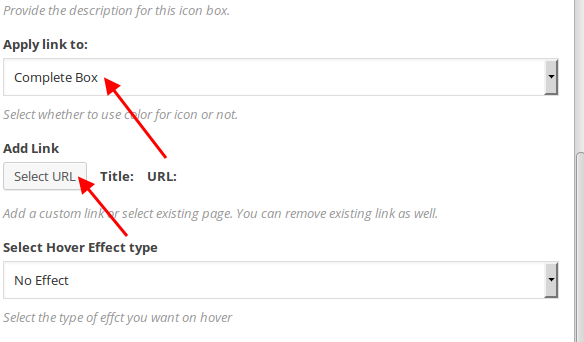
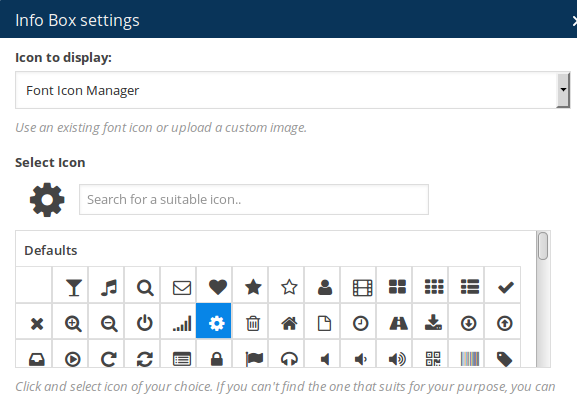
    At first select an icon in Info Box element settings:

    Then scroll down and you’ll see “Apply Link to” field, select “Complete Box” and set URL:

    Thank you.
    Regards,
    Eva Kemp.

    Avatar: Eva
    Eva Kemp
    Participant
    December 4, 2014 at 15:23

    Hello,

    Ok, we’re looking forward to your reply.

    Thank you.
    Regards,
    Eva Kemp.

    Avatar: Eva
    Eva Kemp
    Participant
    December 4, 2014 at 14:55

    Hello @creeb,

    Are you using Legenda theme?
    Please provide us with wp-admin panel and FTP credentials in Private Content.

    Thank you.
    Regards,
    Eva Kemp.

    Avatar: Eva
    Eva Kemp
    Participant
    December 4, 2014 at 14:53

    Hello,

    You’re welcome.

    Regards,
    Eva Kemp.

    Avatar: Eva
    Eva Kemp
    Participant
    December 4, 2014 at 14:51

    Hello,

    Please update the theme to 1.5.1 version:
    https://www.8theme.com/demo/docs/royal/#!/installation_upgrade (paragraph “1.5 Theme Upgrade”)

    Thank you.
    Regards,
    Eva Kemp.

    Avatar: Eva
    Eva Kemp
    Participant
    December 4, 2014 at 14:08

    Hello,

    As I see your menu is shown now.
    Are you unable to add more items to the menu with default WordPress theme as well?

    Please check it.

    Regards,
    Eva Kemp.

    Avatar: Eva
    Eva Kemp
    Participant
    December 4, 2014 at 14:03

    Hello,

    Sorry, but you’re using shortcode of a 3rd-party plugin for your map. We don’t provide customization for 3rd-party plugins. If you want to have a map for full width you need use Google Map element of Visual Composer editor:
    http://imgur.com/uMeHkmS

    Thank you.
    Regards,
    Eva Kemp.

    Avatar: Eva
    Eva Kemp
    Participant
    December 4, 2014 at 13:57

    Hello,

    Are you talking about these products numbers?
    http://imgur.com/ajkbzxf

    Where do you want them to be displayed?

    Could you please show a screenshot how you’d like to change checkout page layout?

    Thank you.
    Regards,
    Eva Kemp.

    Avatar: Eva
    Eva Kemp
    Participant
    December 4, 2014 at 13:49

    Hello @kandika,

    Please provide us with FTP access as well. We’ll update Ultimate VC Addons plugin for you.

    Regards,
    Eva Kemp.

    Avatar: Eva
    Eva Kemp
    Participant
    December 4, 2014 at 13:39

    Hello,

    Could you please show a screenshot what products aren’t shown?
    As I see the products on the Home Page are displayed.

    Thank you.
    Regards,
    Eva Kemp.

    Avatar: Eva
    Eva Kemp
    Participant
    December 4, 2014 at 13:27

    Hello,

    You can change the title in wp-content/themes/royal/woocommerce/single-product/up-sells.php
    You will find the code:
    etheme_create_flex_slider($args, __('Our offers', ETHEME_DOMAIN), false, true);
    and change “Our offers” title to anything you want.

    Thank you.
    Regards,
    Eva Kemp.

    Avatar: Eva
    Eva Kemp
    Participant
    December 4, 2014 at 13:25

    Hello,

    You need use Visual Composer editor and select Info Box element among VC elements list:
    http://i.imgur.com/bHrNADK.png

    Regards,
    Eva Kemp.

    Avatar: Eva
    Eva Kemp
    Participant
    December 4, 2014 at 13:16

    Hello,

    Please check if categories items are added to the menu with default WordPress theme.

    Thank you.
    Regards,
    Eva Kemp.

    Avatar: Eva
    Eva Kemp
    Participant
    December 4, 2014 at 13:14

    Hello,

    You need use Links element to create menu items for your sections, not Pages element.
    Please read our documentation carefully:
    https://www.8theme.com/demo/docs/royal/#!/3_one_page

    Regards,
    Eva Kemp.

    Avatar: Eva
    Eva Kemp
    Participant
    December 4, 2014 at 13:07

    Hello @UrbnDesignz,

    We also need your site link and FTP access. Please provide us with the info.

    Thank you.
    Regards,
    Eva Kemp.

  • 1 2 3 811 812 813 1,045 1,046 1,047
    Viewing 24,360 results - 24,331 through 24,360 (of 31,382 total)
Viewing 30 posts - 24,331 through 24,360 (of 31,382 total)
We're using our own and third-party cookies to improve your experience and our website. Keep on browsing to accept our cookie policy.