
Hello,
The problem may be related to your host:
https://wordpress.org/support/topic/site-doesnt-work-with-www-does-without
https://wordpress.org/support/topic/www-doesnt-work-but-http-does
Please check it with them.
Thank you.
Regards,
Eva Kemp.

Hello,
The problem may be related to your host:
https://wordpress.org/support/topic/site-doesnt-work-with-www-does-without
https://wordpress.org/support/topic/www-doesnt-work-but-http-does
Please check it with them.
Thank you.
Regards,
Eva Kemp.
Hello,
I’ve checked your site and haven’t seen the errors you described.
Could you please clarify with more details how we can replicate the issue?
Thank you.
Regards,
Eva Kemp.
Hello,
You’re welcome.
Try to check your site in some other browser.
Thank you.
Regards,
Eva Kemp.
Hello,
Your site qidontdekt.nl has theme with 2.3 version installed.
Please updated the theme to 2.4.1 version.
Thank you.
Regards,
Eva Kemp.
Hello,
I’ve updated Revolution Slider plugin to the latest version, but the problem is with one of the plugins, some of them creates a conflict with Revolution Slider plugin. Please disable them one by one to find out what plugin is causing the issue.
Thank you.
Regards,
Eva Kemp.
Hello,
I’ve checked your site and the Cart page isn’t empty. Products are displayed there.
Also the cart is shown in sidebar because you might have added Woocommerce Cart widget into Shop sidebar in Appearance > Widgets.
Please provide us with FTP and wp-admin panel credentials in Private Content and clarify how we can replicate the issue.
Thank you.
Regards,
Eva Kemp.
Hello,
Sorry for misunderstanding.
Unfortunately there is no possibility to change main image sizes for a single product page. An image is resized accordingly to image block which max width is 570px (if sidebar is enabled), height is unlimited.
So if you want to make smaller height you need upload a wider image.
Sorry for inconveniences.
Regards,
Eva Kemp.
Hello,
You’re welcome.
We’d be thankful if you leave a comment on our site http://themeforest.net/item/legenda-responsive-multipurpose-wordpress-theme/5888906
We really appreciate it.
Thank you.
Regards,
Eva Kemp.
Hello Christian,
You’re welcome.
Regards,
Eva Kemp.
Hello,
The information about the latest update is written on our site: http://themeforest.net/item/royal-multipurpose-wordpress-theme/8611976 (scroll down to the section “Update”).
Thank you.
Regards,
Eva Kemp.
Hello,
I’ve enabled Page Heading in “Agency one page” page and now it’s transparent.
Unfortunately there is no possibility to place logo in the center of menu.
If you want to have logo centered above the menu you can use other header type in this case.
Thank you.
Regards,
Eva Kemp.
Hello @creeb,
You can find category ID in the address bar:
http://imgur.com/zDiFQjW
You need enter them in Products element.
Thank you.
Regards,
Eva Kemp.
Hello,
Please provide us with wp-admin panel and FTP credentials in Private Content.
Please write the translation you want to use.
Thank you.
Regards,
Eva Kemp.
Hello @creeb,
You can try to use Products element from Visual Composer editor and there is a field “Categories IDs”. Enter category id you want to display.
Thank you.
Regards,
Eva Kemp.
Hello,
You’re welcome.
Regards,
Eva Kemp.
Hello,
We’re unable to open your site. It isn’t loading.
Are there any problems at your host?
Regards,
Eva Kemp.
Hello,
Do you want to change background color of the buttons or font color of the text in the buttons?
Please provide us a link to your site.
Thank you.
Regards,
Eva Kemp.
Hello,
We’re sorry for a long delay.
You can create pages “Special Products” and “New products” and add them as menu items to your main menu. In the “New Products” page add shortcode [etheme_new], which inserts the slider of new products. For “Special Products” page use this shortcode [etheme_products ids="" skus=""] shows multiple products by ID or SKU.
Thank you.
Regards,
Eva Kemp.
Hello,
Have you made any changes in original theme files?
Regards,
Eva Kemp.
Hello,
Please add this code into custom.css file:
.product-grid .product-name {
    text-overflow: ellipsis;
    white-space: nowrap;
    overflow: hidden;
}
Thank you.
Regards,
Eva Kemp.
Hello,
Have you made any changes in the original theme files?
Please provide us with FTP login details.
Thank you.
Regards,
Eva Kemp.
Hello,
You’ve been replied in the previous topic.
Please check. This topic will be closed.
Thank you.
Regards,
Eva Kemp.
Hello,
Sorry for a delay.
I’ve written your site url as http://www.borntobeman.com in wp-admin panel > Settings > General.
Please check your site now and clear browser cache before.
Thank you.
Regards,
Eva Kemp.
Hello,
Are you using the latest version of Chrome?
Regards,
Eva Kemp.
Hello,
To enable sidebar on My Account page go to Theme Options > Shop > Enable sidebar on “My Account” page > On.
Also you need select what menu to show in the sidebar. Go to Appearance > Menus and at the bottom under the menu you’ll find “Menu Settings”, tick “Account menu”.
Thank you.
Regards,
Eva Kemp.
Hello,
You enabled “Just Catalog” in Theme Options > Shop. I’ve disabled it and now variations are working, but you also need set price for your variations:
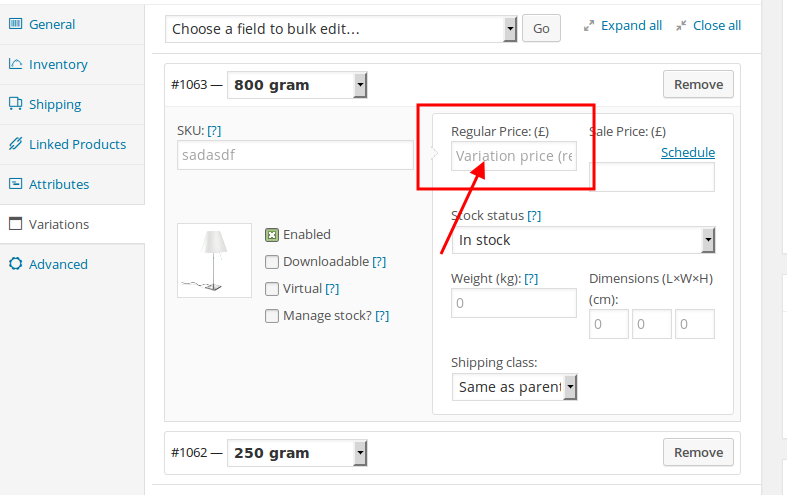
Thank you.
Regards,
Eva Kemp.
Hello,
Please disable Ajax Filter (Theme Options > Shop > Enable Ajax Filter > Off) and check filters after that.
Thank you.
Regards,
Eva Kemp.
Hello,
Please specify size you want to set for an image and provide us with wp-admin panel credentials in Private Content.
Thank you.
Regards,
Eva Kemp.
Hello,
Sorry, but this is the same as for featured image – one image can be used.
Please take our apologies for inconveniences.
Regards,
Eva Kemp.
Hello,
1. To change background color for My account link add this code into custom.css file:
.links li a {
    background-color: #0E98D8;
}
Change color value to yours.
2. Code for green color is #88BB0C .
3. You need import Corporate template. It’s located in the theme package in the folder “XML_Data” > “corporate”.
Regards.
Eva Kemp.









