Forum Replies Created

Viewing 30 posts - 23,371 through 23,400 (of 31,382 total)
  • Avatar: Eva
    Eva Kemp
    Participant
    December 31, 2014 at 09:28

    Hello,

    1. To use Prefooter from widgets you need disable “Use Prefooter” in Blanco – Theme Settings > Footer.
    2. Where do you want to display the buttons? There is Checkout page by default from Woocommerce.
    3. Your home page is located in Pages > Home page.
    4. Please clarify your 4th question. Do you want to place that shortcode somewhere on your site?

    Thank you.
    Regards,
    Eva Kemp.
    Avatar: Eva
    Eva Kemp
    Participant
    December 31, 2014 at 09:22

    Hello,

    Sorry, but I don’t see such issue. The layout I see is

    Please try to clear your browser cache and check again.

    Thank you.
    Regards,
    Eva Kemp.

    Avatar: Eva
    Eva Kemp
    Participant
    December 31, 2014 at 09:19

    Hello,

    Have you imported demo content as described in our documentation?
    https://www.8theme.com/demo/docs/leader/#!/demo_data_installation

    Also you can set your home page in Settings > Reading, and change the “Front page displays” setting to “A static page”, set the front page to your homepage.

    Thank you.
    Regards,
    Eva Kemp.

    Avatar: Eva
    Eva Kemp
    Participant
    December 31, 2014 at 00:55

    Hello,

    As I see now there are 2 columns of products.
    Could you please show a screenshot what issue you’re talking about?

    Thank you.
    Regards,
    Eva Kemp.

    Avatar: Eva
    Eva Kemp
    Participant
    December 31, 2014 at 00:52

    Hello @jlsiefert,

    As I see demo pages are created on your site.
    Please clarify your issue with more details.

    Thank you.
    Regards,
    Eva Kemp.

    Avatar: Eva
    Eva Kemp
    Participant
    December 30, 2014 at 23:59

    Hello,

    I’ve changes images dimensions in Woocommerce settings and regenerated thumbnails. Also I’ve added this code into custom.css file:

    img.hide-image {
    height: 300px;
    }

    Please check products now and clear browser cache before.

    Thank you.
    Regards,
    Eva Kemp.

    Avatar: Eva
    Eva Kemp
    Participant
    December 30, 2014 at 23:38

    Hello,

    To change logo size add this code into custom.css file:

    .header-vertical-enable .page-wrapper .header-type-vertical2 .container .header-logo img {
       width: 200px !important;
    }

    How to create custom.css you can watch in this tutorial (it’s for Legenda theme but the process is the same).

    Thank you.
    Regards,
    Eva Kemp.

    Avatar: Eva
    Eva Kemp
    Participant
    December 30, 2014 at 23:34

    Hello @jlsiefert,

    What is your site url?

    Thank you.
    Regards,
    Eva Kemp.

    Avatar: Eva
    Eva Kemp
    Participant
    December 30, 2014 at 22:37

    Hello @jlsiefert,

    Please provide us with wp-admin panel credentials in Private Content.

    Thank you.
    Regards,
    Eva Kemp.

    Avatar: Eva
    Eva Kemp
    Participant
    December 30, 2014 at 22:35

    Hello,

    Please show a screenshot for what elements you want to change font size.

    Thank you.
    Regards,
    Eva Kemp.

    Avatar: Eva
    Eva Kemp
    Participant
    December 30, 2014 at 22:15

    Hello,

    Yes, IDStore theme is compatible with SSL certificates.

    Regards,
    Eva Kemp.

    Avatar: Eva
    Eva Kemp
    Participant
    December 30, 2014 at 22:14

    Hello,

    Yes, that’s right.
    We’ll send a new plugin version to your email address or update it for you ourselves.

    Thank you.
    Regards,
    Eva Kemp.

    Avatar: Eva
    Eva Kemp
    Participant
    December 30, 2014 at 22:12

    Hello,

    Please check the list style via proxy service http://anonymouse.org/cgi-bin/anon-www.cgi/http://www.cappica.com/product/capa-shaker/
    Do you not see “bullets” there?

    To remove the second price go to Woocommerce > Settings > Tax tab and remove Price display suffix {price_excluding_tax}.

    Thank you.
    Regards,
    Eva Kemp.

    Avatar: Eva
    Eva Kemp
    Participant
    December 30, 2014 at 22:02

    Hello,

    I’ve added the code to functions.php file.
    Please check your site.

    Regards,
    Eva Kemp.

    Avatar: Eva
    Eva Kemp
    Participant
    December 30, 2014 at 21:51

    Hello,

    I’ve checked pagination with default WordPress theme and the issue persists there too. So the problem is related to Woocommerce plugin.
    You need contact Woocommerce support team concerning this issue.

    Thank you.
    Regards,
    Eva Kemp.

    Avatar: Eva
    Eva Kemp
    Participant
    December 30, 2014 at 21:06

    Hello,

    To translate “Categories” add Woocommerce Product Categories widget to Shop Sidebar widget area and write your translation there.
    “Show quickly” font size is changed on our side:
    http://imgur.com/c8Cb6ps

    Please clear your browser cache and check again.

    Thank you.
    Regards,
    Eva Kemp.

    Avatar: Eva
    Eva Kemp
    Participant
    December 30, 2014 at 20:40

    Hello,

    Please read our documentation how to use static block with pop up:
    https://www.8theme.com/demo/docs/royal/#!/1_static_blocks

    Thank you.
    Regards,
    Eva Kemp.

    Avatar: Eva
    Eva Kemp
    Participant
    December 30, 2014 at 20:02

    Hello,

    You need disable “Ajax “Add to Cart”” in Theme Options > Single Product Page.
    Please try it.

    Regards,
    Eva Kemp.

    Avatar: Eva
    Eva Kemp
    Participant
    December 30, 2014 at 19:43

    Hello,

    You need add background image to the row in Visual Composer editor.
    Please refer to VC documentation:
    https://wpbakery.atlassian.net/wiki/display/VC/Element+Design+Options

    Thank you.
    Regards,
    Eva Kemp.

    Avatar: Eva
    Eva Kemp
    Participant
    December 30, 2014 at 19:38

    Hello,

    The new plugin version has been sent to your email address.
    Please check.

    Thank you.
    Regards,
    Eva Kemp.

    Avatar: Eva
    Eva Kemp
    Participant
    December 30, 2014 at 18:57

    Hello @Qefx,

    You’re welcome.

    Happy New Year!

    Regards,
    Eva Kemp.

    Avatar: Eva
    Eva Kemp
    Participant
    December 30, 2014 at 18:23

    Hello,

    The label “Sale” is an image and it’s located in wp-content/themes/idstore/images/sale.png.
    You need edit that file in some image editor.

    Thank you.
    Regards,
    Eva Kemp.

    Avatar: Eva
    Eva Kemp
    Participant
    December 30, 2014 at 18:21

    Hello,

    Do you mean there is some space between submenu and main menu item?

    Thank you.
    Regards,
    Eva Kemp.

    Avatar: Eva
    Eva Kemp
    Participant
    December 30, 2014 at 18:19

    Hello,

    I’ve imported demo content.
    Please check your site now.

    Thank you.
    Regards,
    Eva Kemp.

    Avatar: Eva
    Eva Kemp
    Participant
    December 30, 2014 at 17:52

    Hello,

    You’re welcome.

    Regards,
    Eva Kemp.

    Avatar: Eva
    Eva Kemp
    Participant
    December 30, 2014 at 17:52

    Hello @webzan,

    You’re welcome.

    Regards,
    Eva Kemp.

    Avatar: Eva
    Eva Kemp
    Participant
    December 30, 2014 at 16:12

    Hello @tbijeux,

    Please provide us with all details: your site url, login info for wp-admin panel, FTP host, FTP login and FTP password.

    Thank you.
    Regards,
    Eva Kemp.

    Avatar: Eva
    Eva Kemp
    Participant
    December 30, 2014 at 16:10

    Hello,

    You’re welcome.

    Regards,
    Eva Kemp.

    Avatar: Eva
    Eva Kemp
    Participant
    December 30, 2014 at 16:09

    Hello,

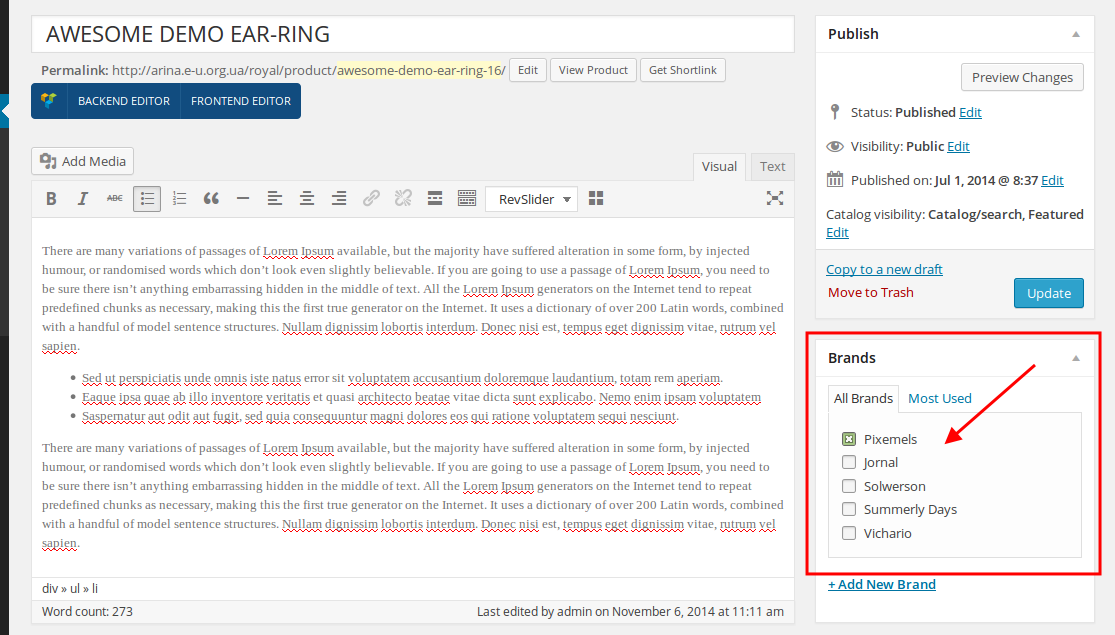
    When editing a product select a brand for it:

    Thank you.
    Regards,
    Eva Kemp.

    Avatar: Eva
    Eva Kemp
    Participant
    December 30, 2014 at 14:35

    Hello @webzan,

    All plugins are external extensions which are included into theme because for each product we purchase “Extended license” and that’s why we are able to include it into them. These plugins work fine without activation and you can always get actual version if you want directly from us. Just ask and we’ll send a current version to you. We update plugins with theme updates from time to time so plugins will be also updated with each next theme update. The option with registering of the plugins has been already added to plugin and this only allows you to get automatic updates and support for these plugins directly from an author if you need. You don’t need to register the products because it is not required but if you want to get those features, then you need to purchase the plugins directly from the author. This is how it works for all themes on Themeforest and not only in our case.

    Thank you.
    Regards,
    Eva Kemp.

  • 1 2 3 779 780 781 1,045 1,046 1,047
    Viewing 23,400 results - 23,371 through 23,400 (of 31,382 total)
Viewing 30 posts - 23,371 through 23,400 (of 31,382 total)
We're using our own and third-party cookies to improve your experience and our website. Keep on browsing to accept our cookie policy.