
Hello,
You need use this shortcode [share] in Text widget and add it to “Place in header top bar” widget area in Appearance > Widgets.
Regards,
Eva Kemp.

Hello,
You need use this shortcode [share] in Text widget and add it to “Place in header top bar” widget area in Appearance > Widgets.
Regards,
Eva Kemp.
Hello,
Sorry but unfortunately there is no such filter as you wish. It can be done only by specifying products IDs for each page.
Please take our apologies for inconveniences.
Regards,
Eva Kemp.
Hello,
To add watermark in background you need edit this template http://allstatesmovingstorage.com/wp-content/uploads/2014/12/bg.jpg with some image editor and place your logo in there.
To change paragraph color add this code into custom.css:
p {color: black !important;}
To move top bar text to the right add the following code into custom.css:
.languages-area {
    float: right;
}
Thank you.
Regards,
Eva Kemp.
Hello,
Have you removed the original Royal theme? I don’t see it in Appearance > Themes.
Please upload it and check the mobile menu with original theme.
Thank you.
Regards,
Eva Kemp.
Hello,
Please provide us with wp-admin panel and FTP credentials in Private Content to check this issue.
Thank you.
Regards,
Eva Kemp.
Hello,
You’ve been replied in other topic concerning your request.
Please check.
Thank you.
Regards,
Eva Kemp.
Hello,
You need edit the row where you added Teaser box element and set background for it.
Thank you.
Regards,
Eva Kemp.
Hello,
Could you please clarify your question?
As I see banners are shown fine.
Also you didn’t provide permissions for us to be able to work in wp-admin panel. Please provide us with full access.
Thank you.
Regards,
Eva Kemp.
Hello,
You’re welcome.
Regards,
Eva Kemp.
Hello,
You can change the code in custom.css file to this one:
img.hide-image {
    height: 200px;
}
Please try it.
Thank you.
Regards,
Eva Kemp.
Hello @candaceljoseph,
Google fonts code is placed in the file wp-content/themes/royal/framework/shortcodes.php (find the section “! Google Font”).
Thank you.
Regards,
Eva Kemp.
Hello,
Please provide us with FTP credentials as well.
Thank you.
Regards,
Eva Kemp.
Hello,
Unfortunately there is no pinterest button. You can find the code of it in helpbase of pinterest site or use some plugin.
Slider images on our demo are 960px × 400px.
Regards,
Eva Kemp.
Hello,
You can write your font in custom.css file for the elements you need, for example:
.price {
    font: Aerial !important;
}
How to create custom.css you can watch in this tutorial (it’s for Legenda theme but the process is the same).
Thank you.
Regards,
Eva Kemp.
Hello,
You can create separate pages and add this shortcode [etheme_products title=" " ids="" skus="" type=" " products=" " limit=" " columns=" " categories="" desktop="" notebook="" tablet="" phones=""] https://www.8theme.com/demo/docs/royal/#!/7_royal_shortcodes , write products IDs you need to be displayed on each page.
Regards,
Eva Kemp.
Hello,
You’re welcome.
Regards,
Eva Kemp.
Hello,
Please provide us with wp-admin panel and FTP credentials in Private Content to check why the themes can’t be deleted.
Thank you.
Regards,
Eva Kemp.
Hello,
In this case you should disable zoom effect in Theme Options > Single Product Page.
Thank you.
Regards,
Eva Kemp.
Hello,
Please add this code into custom.css file:
.mailchimp-inline input[type="submit"] {
    margin-top: -17px !important;
}
How to create custom.css you can watch in this tutorial (it’s for Legenda theme but the process is the same).
Thank you.
Regards,
Eva Kemp.
Hello,
Sorry, but we don’t have any developers documentation.
To make changes in the theme you need create child theme as described in the documentation and use this code @import url("../idstore/style.css"); in a child theme style.css file.
Thank you.
Regards,
Eva Kemp.
Hello,
You’re welcome.
Thank you.
Happy New Year!
We’d be thankful if you leave some comments on our site http://themeforest.net/item/blanco-responsive-wordpress-wooecommerce-theme/2755246
Regards,
Eva Kemp.
Hello,
Are you unable to edit the page in wp-admin panel > Pages > Delivery?
Please check it.
Thank you.
Regards,
Eva Kemp.
Hello,
It’s displayed because you marked to show menu on the Account menu:
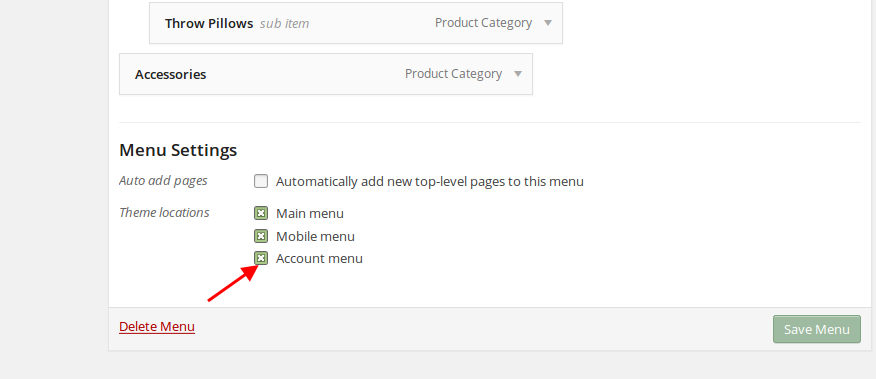
Thank you.
Regards,
Eva Kemp.
Hello,
Your original single product image is too small. You need upload an image at with the dimensions 1 425px × 1 900px or disable zoom effect in Theme Options > Single Product Page.
Regards,
Eva Kemp.
Hello,
Go to wp-admin panel > Woocommerce > Settings > Checkout tab > Checkout Pages > delete a page for “Terms and Conditions”.
Thank you.
Regards,
Eva Kemp.
Hello,
Thank you for congratulations.
Happy New Year!
Could you please clarify what you want to modify? Provide us with a page link.
Thank you.
Regards,
Eva Kemp.
Hello,
As this symbol is used for shortcodes there may be misconfiguration. So you have to replace it with the code shown in the previous post.
Thank you.
Regards,
Eva Kemp.
Hello,
Please provide us with wp-admin panel and FTP credentials in Private Content.
Thank you.
Regards,
Eva Kemp.
Hello,
We can send Home demo pages to your email address. Please provide us with it.
Thank you.
Regards,
Eva Kemp.
Hello,
There is an error for the folder with your images:
“GET http://u-r-server.pw/wp-content/uploads/2013/05/ 403 (Forbidden)”
The problem may be caused by permissions or incorrect owner set to the folder or some rules are written in .htaccess file. Please contact your host to check it.
Thank you.
Regards,
Eva Kemp.










