There you go
Anything else ?
Feel free to ask me any time

Man that is awesm! Pretty damn thank you. I’m making some modifications and researches so please don’t close the topic for posts yet. I really think this might be a very useful to your theme. Let me post what I’v found about the plug-in , and how it comply with the theme.
Regards
There you go
Anything else ?
Feel free to ask me any time
Also if you upload to cpanel with FilleZilla you have to upload to the “wp-content” folder not to “public_html/wp-contetn”
Now you can close the topic and share it with other users with the same prob.
Regards
Ок, some serious work.
I updated the slider, and inserted the short code to the Main[beginning] page and everything is working like a charm. What is the big deal to update the slider?
The tutorial in the link is working but pay attention to the moment where is said to find your version and define the version of the Revolution slider plugin. Each version of the slider is updating differently. For old versions or newer versions you need FileZilla to upload the new version to your file menager in the cpanel. For the middle versions you need to pay attention to the moment where it is said “In your main plugin page” That meens not the page with your plugins where you can install or update your plugins, but from the “Revolution slider” page in the admin panel. In my case it is below the plugins page. At the very bottom is the button with wich you can update the plugin manually. I couldn’t find it for 2 days because i tought it is in the plugins page, but not in the Revolution slider page.
Otherwise thank you.
OK, it is said to make backup of the CSS folder inside the wp-content/plugins/revslider/rs-plugin/ – https://www.themepunch.com/faq/update-plugin-packaged-theme/
but, it is not said is it the public_html folder(because i have wp-content/plugins/revslider in there) or simply the wp-content/plugins/revslider folder because i have also in there – screen – http://tinypic.com/view.php?pic=23qhw2&s=9#.Wak5bzVBq70
Want a coffe ? I go to get some!
Thank you, ,my balls are almost saved. Will tell you if i have any other troubles. I’m updating the plugin now, it is just a bit more complecated then i thought. Here is as it goes –
”
The following information will discuss how you can update the plugin if it was included with a theme you purchased.
If you purchased the plugin individually from CodeCanyon, click here for auto-update instructions instead.
When the plugin is packaged with your theme:
Support is limited
Auto-updating functionality is not included
When you purchase a copy of the plugin separately from CodeCanyon, you get:
Premium support
Access to the plugin’s auto-update feature
So before continuing, you may want to consider purchasing a copy of the plugin from CodeCanyon here:
http://codecanyon.net/item/slider-revolution-responsive-wordpress-plugin/2751380
To update the plugin when it was included with your theme:
IMPORTANT!
Never uninstall/reinstall the plugin, as that would also delete your previously built sliders. Instead, as long as the following instructions are followed, any previously built sliders will be saved and still exist once the update process is complete.
1. Contact your theme’s author and ask them to send you a copy of the latest version of the plugin. This will be a “zip” file named “revslider.zip”.
2. Find what version of the plugin you’re currently using:
”
Is there something easy on this world, or i allways have to crash my head to do something simple!
Give me a hand please, because she will cut my balls!
I will try that for sure. ONE BIG GOD DAMN THANK YOU!
Hello, how are you today ? Hope you are fine 🙂
I really think I’m sh%ting my self, because i updated the theme to the latest version, so as i did with wooCommerce – everything to latest versions, but i still don’t get the effect i want, or said more exactly my boss lady wants. Please help me because she will cut my head off! What i am doing wrong?
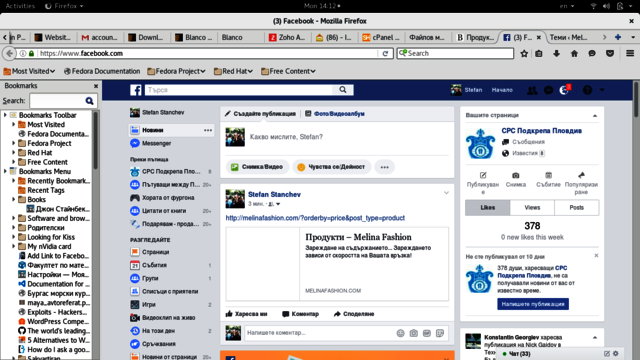
Here is a screen shot – https://www1.picturepush.com/photo/a/15867866/640/Picture-Box/melfbscreen.png – this one is from FB, after i try to make a post. Still no image displays
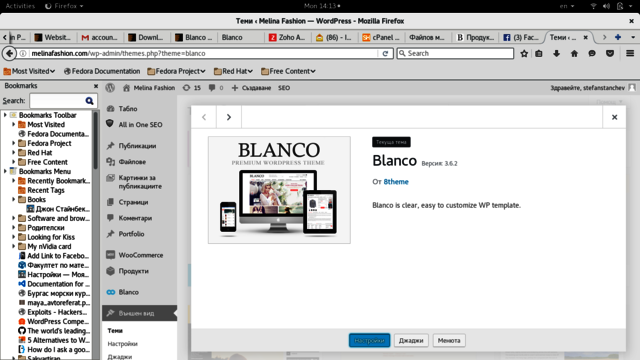
Other screen shot – https://www1.picturepush.com/photo/a/15867865/640/Picture-Box/blanco3.6.2.png – this one is from the wp-admin panel. Blanco is at the latest version.
Sadly no job done yet :[
PLease help meeee!!!!
Ok, so as it goes:
As it’s said in the first replay, I had check for plugins, and find a lot of things but nothing, that resolves my problem.
The little “Quick featured image” plugin can make featured images only for posts and pages, but the content of the page with low arrangement of the prices, is not a “In theme page created with the WP create page option”, but is a simply generated URL by it’s preference[my preferences in my case are “sort products by lower cost”].
The other thing i tried was to create a simple page and set a featured image to the page, but the “barrier” in here is that i can’t change the URL of the page to page to “lower prices arrangement”.
Another thing i had in mind was to set a tag in a widget of the footer, but it creates only image inside the home page and it displays no image in the FB profile when you create post. The effect in fact is really cute[check the home page first footer are in http://www.melinafashion.com] to see what i mean. In fact you might add this to your documentation, it is really nice trick, but it don’t resolve my problem.
So why I’m posting again here? You said that you do strictly to problems referred to your theme, and i saw a free themes that have features like that from other companies.
Here is a another website i had made – http://www.podkrepa-plovdiv.com . With it’s old theme – Catch Everest – free responsive WP theme it was displaying image without doing any set of settings, installing plugins etc. Now the website uses tCorpo – premium WP theme, and again it displays image when you post in FB the URL of the website, without making any custom settings, install plugins or whatever. You can check it if you want – copy the http://www.podkrepa-plvodiv.com URL and create a post in FB.
The trick doesn’t happends when you try to do that with http://www.melinafashion.com, witch uses Blanco theme latest version. For any page – the shop page, the home page etc.
I’m willing to try to help you with the changes of the theme, i study a bit of PHP in the moment. Just give me a starting point.
I also use a child theme cause of some custom settings we[me and you] had made in time.
Thx in advance
OK, i will try do it by my self, just stay around pls if i get stuck
Look, i wiouldn’t ask you silly questions, and i woulden’t even bother you, but i leave all by my self, and take care for my girl, dog, and my flowers, so pls if you can just give me more detailed infromation, something like step by step guid if you can.
Thx alot
Thank you, i have installed All in one SEO pack, will that do the trick ?
It worked perfectly. Thx alot
So as i go – http://www.melinafashion.com/cpanel – i enter my user and password and then go to :
public_html/wp-content/themes/blanco . I insert the code to default.custom.css file (here is a screen) – http://tinypic.com/view.php?pic=14bjoz&s=9 or http://tinypic.com/view.php?pic=rbe892&s=9 .
The option – enable custom css is ticked but no change. Or at least not yet. If it needs some time to take the changes due to the changes in cpanel, pls ignore this post when you see the web site and it have made the change.
Also, i’m very satisfyed with your theme, it’s working without any significant problems for now, so if you like the site we have made, you can add it to your portfolio or something you have.
Or please could you show me is there a simple option in the theme from where i can do this things(adding additional icons, and label the out of stock products with out of stock icon like the icon “new0”, “on sale” for
Man, your work is awesome. My gratest thanks
Thx for the reply.
I updated the theme to the latest version(3.5) as the instructions says. I also updated the woocommerce. The website was more then fine with all the setings working till today. I’v explained what my new troubles are is in another topic, and i also post in this one cause i still cant switch to my native language(Български) from Settings -> General -> Site Language. Also the note that says i no longer need the ‘WPLANG’ constant in the wp-config.php file, is stil there. I think it might be possible the woocomerce is just not set to my native language. If you think this is the problem pls can you give me link from where i can download .po and .mo file for it. The theme is 100% or 99% translated as i remember. Any help or instructions will be appritiated.
Take your time and anjoy your work. Waiting for your responce
Thx lot this is more than i need.
Regar
Your support forum is AWSM. My greates thanks to you and your team.
REGAAAARDS !
I just don’t know what do i have to do to have temrs and conditions link to the registration form as it’s shown at the screenshot. Any ideas will be appritated.
Yes it’s working great. Thx alot
And now the last thing. Where to place the html from the first post so the client can agree with the therms of the site. This is a screen shot from the registration page of another online shop. I want it to looks something like this. –> http://postimg.org/image/jbcucf3tp/9c43712d/ (img1234).
To have not the same (not necceserly with checkbox) but similiar.
Regards.
Thx for quick reply. The idea is like this. Here in the registration page http://melinafashion.com/?page_id=117 i want to add between the “reeneter your password” field and the captcha field the html code in the preview post so when somebody is registering to be sure he/she knows the rules of the website.
In this post -> https://www.8theme.com/topic/adding-link-to-registration-page/ your coworker explained me that i can do this by editing the et-registration.php file. So i’m guessing i have to paste the upper html somewhere in the file. It’s also explained that i have to do this in a child theme. The child theme is working, i can activate it from the Apperence-Themes. but i don’t know do i have to place also(if i’m gussing right about the html) the edited et-registration.php file in the child theme directory.
I’v checked the version of the theme is 2.9.4 and woocommerce is also updated to latest version. Any suggestations pls ?
Hello again.
I did as it’s shown in the video. I uploaded the archive to the file menager in the ftp and extract it to the themes foder. It didn’t asked me to overide the old folder, just extracted the files. So i’v checked the product page but still no link to the size guide. How can i check the version of the theme in the admin panel or at the ftp server, so i can be sure it’s the latest version.
Eva Kemp your knowledge is sexy. THANK YOU SO MUCH !
At any product i think. Here is this one for examp. The size guide is enabled but no link at the client side.
I’m adding the script and after that i add the function witch is enqueueing the funcion.php file to the stylesheet. So my code for now is as it goes `<?phpscript( $handle, $src, $deps, $ver, $in_footer ); ?>
add_action( ‘wp_enqueue_scripts’, ‘theme_enqueue_styles’ );
function theme_enqueue_styles() {
wp_enqueue_style( ‘parent-style’, get_template_directory_uri() . ‘/style.css’ ); wp_enqueue_ ` but this is function for 1 css file style sheet.
I’v readed the documentation but still can’t undeastand how to choose withch css files do i have to enqueue to my function.php file in the child theme directory. The parent theme have 8 css files and here is where i stuck. How to undeastand witch css file must be enqueued to the child theme.

Free AI store scan · SalesMax
Paste your store address. SalesMax AI shows which upsell moments are missing. No signup.

Free AI speed test · FlashMax
Paste your site address. FlashMax runs Google Lighthouse for phone and desktop, checks Core Web Vitals and lists what to fix. No signup.
 Marseille 02Fashion
(live demo, opens in a new tab)
 Bike StoreSports & travel
(live demo, opens in a new tab)
 MedicalBusiness
(live demo, opens in a new tab)
 Car Parts StoreCars & bikes
(live demo, opens in a new tab)
 Grocery MarketFood & drinks
(live demo, opens in a new tab)
 DesignersBusiness
(live demo, opens in a new tab)
 ChurchBusiness
(live demo, opens in a new tab)
 Handmade artisansHandmade & Crafts
(live demo, opens in a new tab)
 Industrial Power Tools StoreElectronics
(live demo, opens in a new tab)
 Home Decor 02 StoreFurniture
(live demo, opens in a new tab)
 Classic Fashion StoreFashion
(live demo, opens in a new tab)
 Coffee StoreFood & drinks
(live demo, opens in a new tab)
 Lingerie StoreFashion
(live demo, opens in a new tab)
 Phone ServiceElectronics
(live demo, opens in a new tab)
 Books StoreBooks & art
(live demo, opens in a new tab)
 Organic milk farmFood & drinks
(live demo, opens in a new tab)