Hi Jack,
The CSS works – I’ll play around with the sizes later to see what looks best to me.
Please go ahead and close this topic.
Thanks,
Mike.

Hi Jack,
The CSS works – I’ll play around with the sizes later to see what looks best to me.
Please go ahead and close this topic.
Thanks,
Mike.
Hi Jack,
I was only checking on the off-chance that you’d know what the theme flush actually does and how to replicate that manually/by-hand.
Please close this topic.
Thanks,
Mike.
Hi Jack,
The CSS is working fine.
Pease go ahead and close this topic.
Thanks,
Mike.
Oops, sorry for the typos above. The system would not let me go back and edit it.
Hi Jack,
Thanks for your super quick response.
I’ve implemented the CSS change and it works well.
Theme Cache.
When I click on Flush Theme Cache in WPEC settings the browser goes to …/wp-admin/admin.php?wpsc_flush_theme_transients=true&_wpnonce=9368b04509
Normally that would then redirect back to
…/wp-admin/options-general.php?page=wpsc-settings&tab=presentation but in the staging site it stays on …/wp-admin/admin.php?wpsc_flush_theme_transients=true&_wpnonce=9368b04509 which just displays as a blank page.
As it’s not returning to the initiating page I’m therefore assuming it’s not running successfully.
Regards,
Mike.
Hi,
I’ve FTP’d the Blanco 3.5 theme back up to the website and saved the Blanco settings.
Looking at the cart/checkout page there are some things that do not appear to be correct. I tried comparing my site with your demo at https://www.8theme.com/demo/blanco-wp/ but the demo doesn’t seem to be on Blanco 3.5?
It may be some of the differences below are new changes at 3.5 but I can’t tell.
(1) Previously the checkout page was in two parts, the cart on one ‘page’ (products-page/checkout/) and the customer and payment details on the second (/products-page/checkout/#checkout-step-2). It’s now all on one page on my site.
(2) Previously the Billing and Shipping tables were stacked on top of each other, now they are side by side.
(3) Previously the Payment Type section was below the shipping details table, on the left, now its sitting on the right below the shipping details.
(4) As the cart/checkout process now displays as one page, the “Proceed to Checkout” and “Back” buttons no longer appear.
NB. I have the Calculate Shipping Price section removed with custom CSS using the plugin Simple Custom CSS to manage that.
I’m assuming the changes above are not correct and expect that running the Flush Theme Cache utility may fix them but unfortunately that utility won’t run on my staging website.
Access details for the staging website are in the Private Content below.
Thanks,
Mike.
Oops, my fault.
It’s hosted elsewhere so you need to add the line in the private content to your PC hosts file.
Hi Jack,
I knew I’d seen it somewhere! Please go ahead and close this topic.
Thanks,
Mike.
Hi Jack,
Sorry for the delay in getting back to you about this. We’ve implemented the changes above and it working now.
Please go ahead and close this topic.
Thanks,
Mike.
Hi Jack,
I had to make the width 120px for it to line up.
It seems OK now although I can’t test it on a mobile as it requires a hosts file update to resolve the site and I don’t know how to do that on android.
Please go ahead and close this topic. If there’s any issue on mobiles/tables after the site goes live I’ll open a new topic.
Thanks,
Mike.
See private content for access details.
Hi Jack,
Thanks, Please go ahead and close this topic.
Regards,
Mike.
Hi Jack,
I have/had this issue with all three of my Blanco e-commerce sites.
With two of them fixing an ‘issue’ with the checkout forms in the WPEC settings back-end fixed the shop checkout page table alignment problem. I didn’t need to use the CSS above for these two sites.
Unfortunately one (staging5) still has a problem. It doesn’t appear to have the same back-end layout issue with the WPEC store-settings checkout form the other two had. I added your two pieces of CSS above but they haven’t helped.
If you go to the staging site detailed in the private content section you’ll see that the shipping table is not sittng under the billing table.
Regards,
Mike.
Hi Eva,
That seems to be working OK.
I needed to increase it to -50px so it would correctly display orders over $1000.00 on my mobile phone.
Please go ahead and close this topic.
Thanks,
Mike,
Hi Jack,
As requested I added the CSS to the staging site. It’s closer to being aligned but still not quite right.
Given the two tables seemed to be ‘acting’ differently I looked into the WPEC back-end checkout forms. One had a State field and one did not.
I adjusted the checkout form in the WPEC back-end settings so both tables had a State field then set them to not display. I’m pretty sure it’s not needed/used for New Zealand – but I’ll need to check with the sites operator tomorrow. This made the two tables the same layout in the back-end settings.
Now when looking at the checkout page on the staging site (and with the CSS removed) the billing and shipping tables have become correctly aligned. I’ll test it more fully tomorrow but its looks good so far.
Thanks for your help,
Mike.
Hi Eva,
You can view a scan of my mobile phone displaying the Blanco demo checkout page here http://wpbugs.com/wp-content/uploads/2015/07/Blanco-Cart-Issue.jpg
As can be seen the coupon input box is truncated at the right hand side and the cost before shipping $ amount is totally missing.
Regards,
Mike.
Hi Jack,
I’ve tried the CSS out in the staging test site.
It’s moved the shipping table a little to the left (one character I think) but its not far enough.
See the private content for the staging site access details.
Regards,
Mike.
Hi Jack,
Thanks, that seems to be working well.
Please go ahead and close this topic.
Regards,
Mike.
Hi Eva,
Please go ahead and close this topic.
I’ve put the site live with it updated to the latest WP and WPEC versions and the ‘same as billing’ works fine.
Thank-you,
Mike.
Hi Eva,
The ‘same as billing address’ option seems to be working OK now. Thanks very very much.
(1) One small issue seems to be that the shopping cart in the site header area continues to say that there is an item/s in the cart after the transaction results page is displayed when it should be empty.
(2) If I re-install the theme from my downloaded copy will it work or did you have to make changes to the theme?
(3) Did you need to make any changes to my website db, files, etc?
I’m planning to set up Blanco in another staging site for fresh testing before migrating it live in the next week or so and therefore will need to pickup any changes that you’ve made.
Thanks again,
Mike.
Hi Eva,
The code is working fine but I’m not a CSS person so didn’t know if I’d done it the right/acceptable way.
I’ve put the code live so you can go ahead and close this topic.
Thanks,
Mike.
Hi Eva,
Have you had a chance to re-look at this topic?
As I noted in my last update above my CSS looks like it works but I’m concerned it’s not the best/appropriate way to do the CSS – especially point (2).
It’s also weird that the billing part of the checkout form doesn’t match the shipping part to start with.
Thanks,
Mike.
Hi Eva,
I’ve tried the checkout ‘same as billing address’ in Chrome, Firefox and IE. I’ve also had three other people try on their pc/laptops.
In all cases it fails.
After clicking Purchase, the checkout page is redisplayed and if the ‘same as billing address’ is un-ticked below each field it says “please enter a valid nnn.”
(1) What operating system and browser are you using?
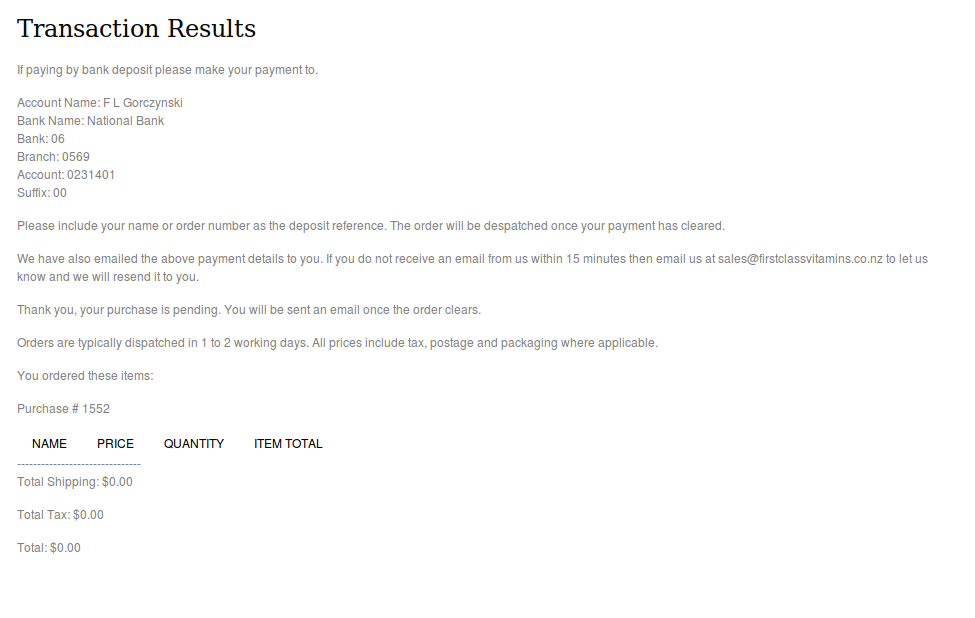
(2) In your screen print https://s3.amazonaws.com/fvd-data/notes/168674/1433160879-G3qT4t/screen.png of the transaction results for order #1552 there are no products ordered – so that’s very odd?? Your test orders 1550 and 1551 seem to be normal.
Regards,
Mike.
Hi Eva,
I cleared the cache and cookies and re-tested the checkout using firefox and chrome on my PC but the problem still exists.
I ticked the ‘Same as billing address’, selected Bank Deposit and clicked Purchase. The checkout page re-displayed and when I un-ticked ‘Same as billing address’ the shipping fields displayed ‘Please enter a valid……’.
I also tried on a Nexus 7 android tablet but it fails the same way.
When I tick ‘Same as billing address’ should I be able to un-tick it and then see the shipping details filled in? Have you changed the way it works, as I thought your Blanco WPEC demo did that? Today however it’s working differently – I no longer see the shipping details copied over but if the ‘Same as billing address’ is ticked then the transaction works.
Regards,
Mike.
Hi Eva,
Thanks for the update.
Regards,
Mike.
Hi Eva,
Have you had a chance to look into this problem?
I tested the checkout page after deactivating all plugins except WP E-Commerce but that didn’t help.
I couldn’t deactivate the LaySlider WP (it just wouldn’t deactivate) so I renamed it in cPanel file-manager but that didn’t help either.
Regards,
Mike.
Hi Eva,
I don’t know much about CSS but had a play around with firebug and the following seems to work.
(1) The billing details table is missing its bottom border and this restores it.
.wpsc_checkout_table.table-1 td { border-bottom: 1px solid #efefef; }
(2) The input fields of the billing and shipping tables are not aligned, the shipping table input fields sit further to the right. This seems to be because shipping table field names are in a container (tr/td???) that’s wider than for the billing field names. I don’t know why (and I suspect its not the right way to do it) but this resolves that problem.
.wpsc_checkout_table.table-2 td { width: 1px; }
(3) Widen the input fields of both tables to be more like the demo.
.wpsc_checkout_table.table-2 textarea, .wpsc_checkout_table.table-2 input[type="text"], .wpsc_checkout_table.table-1 textarea, .wpsc_checkout_table.table-1 input[type="text"] {
    width: 250px !important;
}
With this CSS applied checkout form now appears normal in that it closely matches the Blanco demo checkout form.
However, I’ve left the CSS un-applied as I’d like to get the correct CSS from someone who knows what they are doing (ie. you).
Regards,
Mike.
Hi Eva,
The FTP details are in the private content section.
If you make any changes I will need to know what/how to replicate those as this staging site will be deleted once it’s working OK. A new staging site will then be created which will be used to overwrite the live site.
Please note that as this is a staging site there are some differences to usual website file and folder locations e.g. it’s not in the public_html folder. The WordPress side of things is standard as far as I’m aware except for a couple of things in the database.
Regards,
Mike.
Hi Eva,
That’s looking good now. Please go ahead and close this topic.
Thanks for your help,
Mike.
Hi Eva,
The goal here is to make the shopping cart widget when placed in either the Product Page Sidebar or the Single Product Sidebar to look the same, including the Empty Cart and Checkout buttons having the left/right pointing arrows.
Your second CSS statement beginning
.widget_wpsc_shopping_cart .button.active {..........
did not work as well as the first version so I’ve gone back to that. The second version removed the Checkout arrow.
The current CSS being used is:-
(1) My CSS to add blank space/lines under the cart total in the single product page sidebar so it matches the layout of the cart in the product page sidebar.
#product-page .totals {
    margin-bottom: 20px;
}
(2) Your CSS to add/restore the arrow to the Checkout button and align it tidier.
.button.emptycart {
 right: 8px !important;
}

.widget-container.widget_wpsc_shopping_cart {width: 95%;}

.widget_wpsc_shopping_cart .button.active {
  background-image: url('http://staging1.firstclassvitamins.co.nz/wp-content/themes/blanco/images/arrow_1_2.png');
  background-repeat: no-repeat;
  background-position: right;
}
The only thing outstanding is that text and arrow in the Checkout button in the sidebars is still bit too far to the right – it’s not the same as the Checkout button in the header shopping cart.
Regards,
Mike.