

Hello Awais,
thank you for the help …
I have to learn more about the topic,
Wish you a good day
Oliver

Hello Awais,
thank you for the help …
I have to learn more about the topic,
Wish you a good day
Oliver
Heay….. Thank you…..
Hmmmm… I did not checked it after I moved to cloudways…. Maybe in this case…its damaged my themen vision….. …I dont know…
I glade you helped me…. Wish you a good Day and stay healthy….
Hello Rose,
thank you for your feedback. Yesterday I somehow had with it, because it was mobile always slightly shifted to the right…. Today it is normal. 🙂
would the code be correct if I include it in the customizer at mobile?
`tab-et_custom_tab_01 { padding-left: 3% ; padding-right: 3% ! important }
Many Thanks
Oliver
would that be correct ?
.tab-additional_information { padding-left: 3% ; padding-right: 3% ! important }
Thank you…:)
okay
aha……..
i changed it myself..:)
Hallo Awais,
achsooo okay…
Wish you a nice Weekend
Oliver
Hello Olga,
the shortcode is displayed here:
https://www.optimumcore.eu/wp-content/uploads/2022/07/shortcodes.png
https://www.optimumcore.eu/running-socks-kompressions-laufsocken-damen/
I use the plugin Germainzed and the shortcodes are provided by them.
Their Feedback:
—————————————————————————————————-
I received this feedback from Germainzed.
unfortunately it’s not that simple, because these elements are both included with a p-tag. You could e.g. put an inline-block for the elements. So this is very theme dependent. You’d probably have to make some changes via CSS
———————————————————————-
Their Homepage
https://vendidero.de/dokument/preisauszeichnungen-anpassen
Paragraph page builder
Wish you a good day
Hello Olga,
the data is assigned to all products.
I have added the shortcodes for both in your product page builder, but I don’t know how to put it side by side.
See screenshot. hmmmm
https://www.optimumcore.eu/wp-content/uploads/2022/07/shotcodes.png
https://www.optimumcore.eu/running-socks-kompressions-laufsocken-damen/
Many thanks ..
Hi,
nope, it´s not so easy…… Shit 🙁
i need some proffesional help, because i have to change the code a little bit.
I would like to have the VAT and shipping costs in one line next to each other, like in the screenshot. Acutely it is in the html block under each other
I received this feedback from Germainzed.
unfortunately it’s not that simple, because these elements are both included with a p-tag. You could e.g. put an inline-block for the elements. So this is very theme dependent. You’d probably have to make some changes via CSS
———————-
I would be happy if you could support me here, because I currently have no plan how I have to program it.
Many thanks in advance
Oliver
I have solved the problem with shortcodes 🙂
heay Awais,
That’s not what I meant either. You have adjusted something for me in the past, for the reason it appeared twice… Since I used elementor before. I did not mean you personally. 🙂
Thanks for your help and have a nice weekend
awww… no…….. This whole rating area is there twice not just the stars…. Look….. i think you changed something for me when i used elementor. but i don’t work with elementor anymore ….on the product page.
But I don’t need the rating area twice….
It should be removed once….
Otherwise it looks weird….. 🙁
Best regards Oliver
Yes I did 🙂 Thank You
Heay thank you for your fast feedback :))
Hello sorry for the late reply.
Yes, the error is fixed…….
but unfortunately now the whole pre footer and footer is broken…..
What have you changed the……. I do not know how to fix it :((
lg Oliver
Thank you:)
yes… of course….. it is unfortunately not as easy as it used to be
cloudways.com it´s a bit different …..
They told me you need this guide……..
many thanks and apologies for the hassle
Oliver
Yes! thank you …… now it looks more clean 🙂 Wish you a good day
Heay… the code does not work..
I do not know why 🙁
cache I have deleted everywhere..
Can you check again please
Thank you Olga. 🙂
yeah… you made it ….
thanks a lot for all the help :))
Was there any error. that it did not work ? or had I set something wrong ?
stay healthy and all the best
Oliver
heay…. yes you are right !
and i have never created a ticket there i will do that right now. 😀
wish a nice evening
Oliver
heay…. achsoo
i thought…if i activate this funtion ( see screenshot ) the rating form and the ratings will be shown outside the tabs see screenshot ?

2. i can’t adjust the stars from the position.
there is an error… i tried in cutomizer and in elementor … they should be just aligned like the product title with the text but it always stays on center…… can you look please

Hello Olga , thanks a lot 🙂
lg Oliver
hello unfortunately nothing has changed… everything is as before…
the problem is when I choose in cutomizer , the function… show ratings outside the tabs
nothing works :((
– above the link to the rating does not work under the product title
– under the tabs the field to write a rating is not present and the existing rating can not be read
I need help again
Many thanks
lg Oliver
hello
yes … you have looked at a variant product….
the problem only exists with a simple product without varinate
you had already created code for this, but the code somehow does not work anymore ….. 🙁
Hello Olga ,
Thank you….
You find everyrthing in the private area .. Wish you a good week:)
lg Oliver
heay…. thanks….
This one is with a rating……… but the link does not work , when you click on the stars….. :(((
https://optimumcore.eu/zehensocken-herren-five-socks/
i miss this area, see Image below….
if i want to have there rating outside the tabs….
so people can write a rating:/
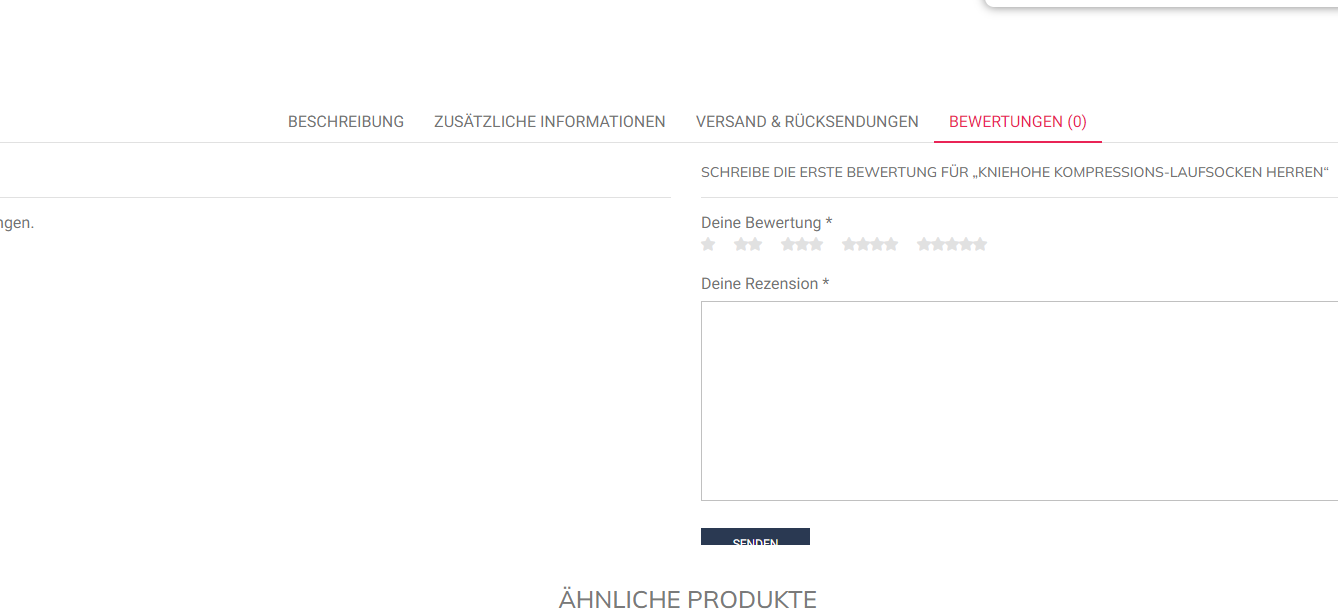
I wish you a nice weekend 🙂
me again………..
okey….. hmmmmm sometimes it is not easy
text color: #FFFFFF aktiv text color #2A3952
bg #FA9800
can you please make the gray lines also white and circles …
bottom and top a light border in white
think that would be okey :))
2….i have one more thing….. :/
you ..provided me code…that in the mobile view the buy now button and shopping cart button are 100%…on a single product page…… i have not removed the code ..but it is somehow no longer active…that is strange…. could you look in my backend in the cutomizer … the code is actually there … hmmm
thank you and have a nice weekend 🙂
Oliver











