Mr. Tony, you are extraordinary! I am glad to receive your answers, you are so efficient. I really appreciate you. Fantastic!

Mr. Tony, you are extraordinary! I am glad to receive your answers, you are so efficient. I really appreciate you. Fantastic!
Hello Ms. Rose
Thank you for your attention.
But the link you sent doesn’t work: https://www.8theme.com/taskboard/
In addition, the option to add videos with a link does exist.
Why don’t the youtube links work? What links work here please?
Attached photos: https://postimg.cc/gallery/FYqvyW3
Apologies. I am not a specialist in editing websites. I’m just a businesswoman. Also I don’t speak English. I have a lot of things to do: edit the website, attend to clients, participate in meetings. I do everything alone. That the forum sends me I am very lost.
I need timely answers so I can move forward how Mr. Tony was helping me. With him he was able to advance well.
I have many doubts, I do not have time to read and understand the documentation, for this reason, if it is you or someone else who is going to attend to me, please be patient and send me the specific answers as before.
I appreciate.
Hello Mr. Tony!
For this option my website will stay very heavy > add videos to media carousel element, you have to upload the video on your site in the media section. * that’s why I would like to put youtube links.
This link is not working > https://www.8theme.com/taskboard/
I would appreciate if you could send me a good link.
best regards
Dear Ms. Rose, we appreciate your attention and support.
I really need to add videos to the video carousel. Youtube links don’t work. I attached a photo of the problem.
Dear Ms. Rose
I have problems with a block that is in the products:
When we download the page, the block is also downloaded and a white line appears in the middle of the black button.
Below it is also observed that the text overlaps the green button and the link does not work.
Please help me with this.
Thank you so much.
I appreciate your support so much!
Happy Women’s Day! Event!
https://i.postimg.cc/8cJcTHx6/FTA.jpg
Please try again with the attachment.
Blessings.
please dear!
I appreciate your support Mr. Andrew. I send the accesses.
Already solved. It was a hosting problem. Thank you for your attention.
Dear Mr. Tony, thanks to you, he made it. Thank you so much.
One question please: how do I improve the view of the videos on the product pages? I would like the video to appear in the photo gallery and have a better view.
eg: add below a video with the url, but it doesn’t work. Could you please tell me why? Maybe I’m doing something wrong. I also uploaded the video to the library, but I think it will take up a lot of space.
Attached photo https://i.postimg.cc/zG66h671/videos.jpg
Dear Mr. Tony
I hope you are in good health.
I am very grateful for his excellent care and support.
A favor: How to hide these labels please? I attach a photo. https://i.postimg.cc/XYQBGbf2/tags.jpg
Thank you
Thank you very much Mr. Tony!
We are moving forward with your support. Excellent!
One question: how do I make these changes on the blog? I know that I asked you at the beginning, but as I progress, I get lost with so much information.
Look, I managed to edit the page, but this photo is missing in the attachment and I can’t locate the categories: https://i.postimg.cc/q7hqJ1Y6/blogo.jpg
Thank you very much once again.
Hi Mr. Tony!
How do I change this photo? https://i.postimg.cc/13d70hWT/Sin-t-tulo-2.jpg
The most I got was to change the text, but the photo, I don’t see how to change it. Please tell me. Thank you so much
Excellent!
I appreciate your support and attention. They are very well prepared to attend to all the needs of the clients.
One question: how to find machine icons? https://i.postimg.cc/vBs1CTqV/22.jpg
Thank you
Dear Mr. Tony,
I really appreciate his support and attention, but I am a little disappointed with this block. Not being able to change the photos easily, the photos do not match the corresponding size. Also not being able to add the links to the tabs makes it inefficient for me.
https://i.postimg.cc/c1R0QG8C/Sin-t-tulo-1.jpg
Please let me know what would be a complete replacement for this block. Which can add tabs and links.
Dear Mr. Tony,
I hope you are in good health.
Thanks to your support, I am progressing very well in the edition of the web.
A favor: How to change the links and photos of these tabs so that it opens in the corresponding page of the product?
https://i.postimg.cc/c1R0QG8C/Sin-t-tulo-1.jpg
Thank you so much.
Hello Mr. Tony!
I really appreciate his support and attention.
As requested, I send the data privately.
Thank you so much.
Dear Mr. Tony
I greatly appreciate your excellent care and support.
Please, this update is appearing * I send a photo
https://i.postimg.cc/kMZp58jw/Sin-t-tulo-1.png
but I don’t know how to do it myself by looking at the tutorial. Please help me with this issue. Thank you so much.
Dear Mr. Tony, thank you very much for your attention and support.
Please tell me why I can’t add the products on this page? https://grupomorbeck.com/extrusoras-de-ladrillos-arcilla/
I’m adding the clay extrusion products, but it doesn’t show up here.
The machines do appear on the concrete block manufacturing machine page. https://grupomorbeck.com/product-category/edificacion-obras/produccion-de-materiales-de-construccion/maquinas-bloqueras/
Help us please. Thank you
Plase
How do I manage this category?
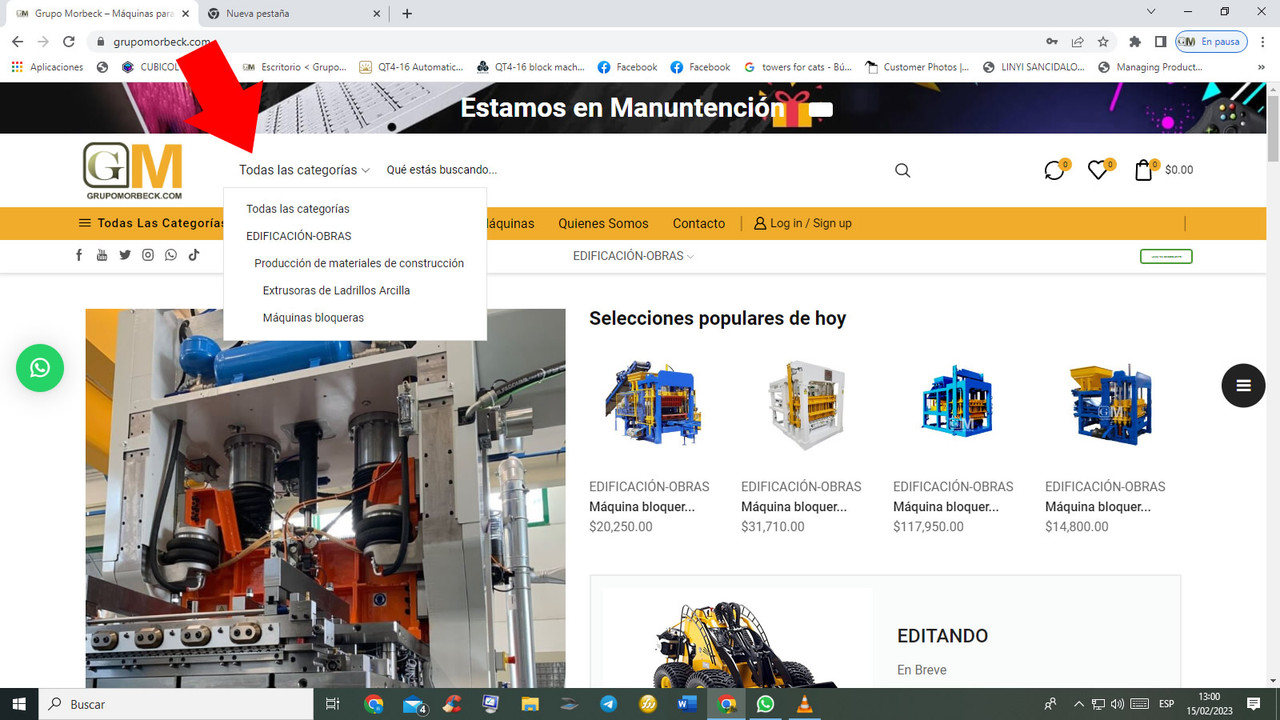
Why don’t all the options appear?
If I want to delete this category from here, where do I do it please?
Thank you
Mr. Tony, you are the best!
Thank you so much. Individual tabs work fine!
Just the explanation you gave me about the BLOG, I didn’t see a way to modify or use a template from the library, it doesn’t open to edit. Please help me. Thank you so much
Dear Mr. Tony
I am extremely grateful for your patience, attention and always supports. You are a inspiration. I appreciate you sharing your knowledge.
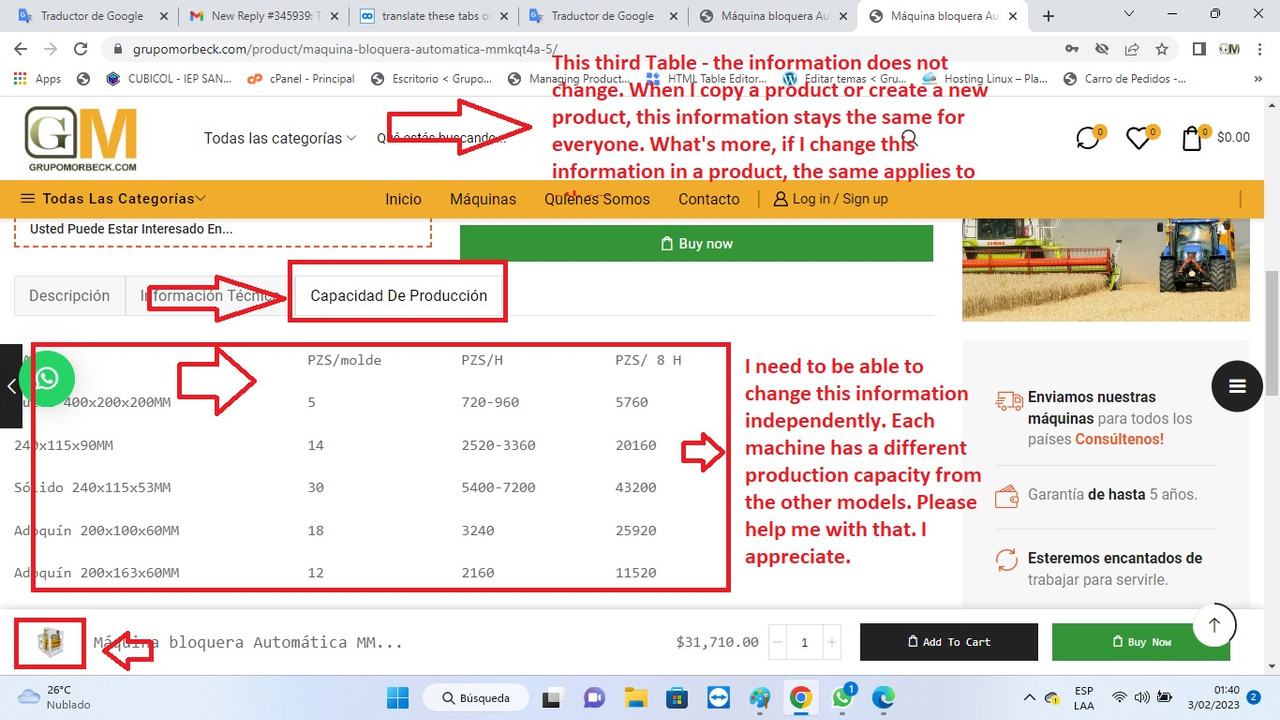
This third Tab is called: Production capacity. On the Web the information that I place on the products does not change. I attach a photo.
https://i.postimg.cc/bNDrfMZX/problema-tab.jpg
I need the information on the tabs to be able to change since each machine has a different production capacity.
Please help me with that, I need to move on! I appreciate.
mr tony
We appreciate your excellent attention and supports!
I have 3 new situations that I need, please, your usual support:
1 – How do I edit the blog page, and how do I index the web and mobile menu?
2 – I also have problems with the contact form of the cell phone menu. error appears.
3 – In web and cell phone login, the option to create a new account does not appear.
Please help me with these issues, I don’t know how to do it.
Dear Mr. Tony
Thank you very much for his attention and support.
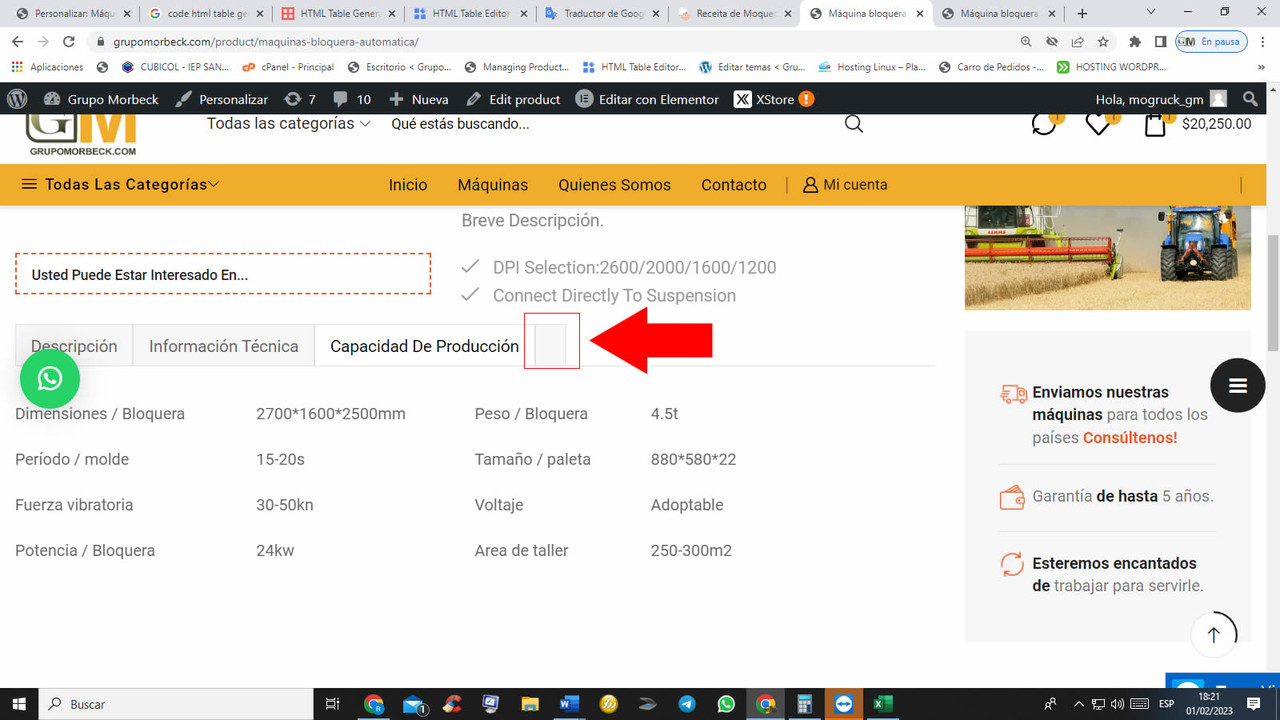
I decided to remove a tab, but a mini button remained. Please tell me how to remove it? Well, I have deleted all the text and the mini button is still there. I attach a photo.
https://i.postimg.cc/63nSGCGw/mini-boton.jpg
Regards
Dear Mr. Tony,
I hope you are in good health.
I have created a tab of: Production capacity and I need to add a table with information. How to create a table with contents to be placed on a stick block or directly on the tab please? I send a photo attached.
https://i.postimg.cc/1zD2wtKZ/tablas.jpg
Thank you for your support.
Dear Mr. Tony
I’m not saying I’m dissatisfied. It is not the case. I have not the slightest intention of requesting a refund, at least not for now.
Only for me, who has no knowledge in editing templates, there are things that seem difficult to me. Also, how do you know that you found some problems that you have very carefully checked?
So I just have to thank you.
Also, I still recommend your template to everyone. Is beautiful! The best I found.
I really appreciate your attention and patience. Things in life are the same, not everyone has the same knowledge of other people. Nothing is easy! But here I am to keep trying and I hope to achieve it with your always support.
Hello Mr. Tony
I have sent you the WordPress key to help me fix the problem described above please. So far I have not received your communication. I’ll start working on it in a while, I need this problem fixed please. I need to move on. From November, until today I only have 1 online machine of more than several that I need to upload.
We greatly appreciate your attention and support.
Dear Mr. Tony,
I appreciate his attention and support.
It is that there is nothing to show in the quick view of the products
https://i.postimg.cc/xTydPfhq/Sin-t-tulo.jpg
The publication details do not appear, because I have deactivated as you said before in Quick view.
When enabled it displays Elementor texts. I need the publication details to be activated in the quick view. I can’t move forward because of this problem.
I need you to please help me with that.
Follow the access information in private.
I await your confirmation, thank you.
I did the two ways indicated:
1 option: I have not seen changes.
Option 2: I disabled the More details link, but I don’t like it because no more information appears for the client.
How do I remove the tags from the description? I prefer to try this option to see how it stays.
I think it is because of the stacks blocks that I put in the tabs. Well, Elementor information appears, I think it refers to the templates I put. I dont know. Please confirm me. I’m already getting tired. when I think we are making progress, I find more of a problem. Please give me a solution. I don’t want to waste another day without work. I cannot move on and leave these problems. I want to move smoothly.
Thanks