

Forum Replies Created

Viewing 30 posts - 121 through 150 (of 418 total)
  • Avatar: laranz
    Laranz
    Participant
    August 26, 2017 at 03:08

    Hi,

    4. That is for HTML website, still you can do that for WordPress site, you can put that in header.php file. But I suggest you this way, add this in your functions.php

    add_action( 'wp_enqueue_scripts', 'YOURTHEMENAME_enqueue_styles' );
    function YOURTHEMENAME_enqueue_styles() {
       	wp_enqueue_style( 'YOURTHEMENAME_googleFonts', '//fonts.googleapis.com/css?family=Raleway' );
    }

    or Use some Google fonts plugin.

    Let us know,

    Thanks,
    laranz.
    Avatar: laranz
    Laranz
    Participant
    August 26, 2017 at 02:36

    Hi,

    In the mean time, try this.

    That hooks runs only under these condition..

    1. 8Theme Options -> E-Commerce -> Single Product Page -> Layout is other than Large
    2. 8Theme Options -> E-Commerce -> Single Product Page -> Location of product tabs = Under Content

    If both these option matches then that hook runs, if you still want to run that hook, copy content-single-product.php into your child theme, and remove the condition around line #61.

    Let us know,

    Thanks,
    laranz.

    Avatar: laranz
    Laranz
    Participant
    August 26, 2017 at 02:01

    Hi,

    You’re using any plugin’s for redirecting? In that case I suggest you to check that plugin settings. Or double check this link https://activation.isrefer.com/go/tincnat/VitalVibe/ Maybe check this link, where you copy this, make sure it still points to the right URL.

    I am sure that this isn’t a theme’s issue.

    Let us know,

    Thanks,
    laranz.

    Avatar: laranz
    Laranz
    Participant
    August 26, 2017 at 01:46

    Hi,

    1. Use this Cusotm CSS to hide the text,

    p.cart-empty {
        display: none;
    }
    

    2. To override or change the icon, use this Custom CSS.

    .cart-design-1 .shopping-cart-widget .ico-sum {
        background-image: url("http://example.com/userimage.jpg");
     }

    If you want to change that to something like fontawesome, then copy the function “etheme_top_cart” in wp-content/themes/xstore/framework/woo.php and change the name <i class='ico-sum'></i> to a fontawesome equivalent.

    3. That is the default browser behavior, you can override that using this CSS,

    .vc_single_image-img {
        pointer-events: none;
    }

    4. Which file or code snippet you want to copy? I didn’t understand that part.

    Let us know,

    Thanks,
    laranz.

    Avatar: laranz
    Laranz
    Participant
    August 26, 2017 at 01:20

    Hi,

    Yes it is somehow missing in the demo import I will report that to the developers.

    It is just the row background: http://take.ms/HjC1p

    Make sure you choose the row style -> General -> Row stretch -> Stretch row, and then upload a background in the Design Options.

    Let us know,

    Thanks,
    laranz.

    Avatar: laranz
    Laranz
    Participant
    August 25, 2017 at 23:28

    Hi,

    Keep the login intact, I forward this issue to our development team.

    Thanks for your patience.

    Regards,

    Avatar: laranz
    Laranz
    Participant
    August 25, 2017 at 06:05

    Hi,

    The WP Login didnt’ work, can you try that: also what happens if you turn of WP_DEBUG in wp-config.php https://codex.wordpress.org/WP_DEBUG

    Let us know,

    Thanks,
    laranz.

    Avatar: laranz
    Laranz
    Participant
    August 24, 2017 at 17:28

    Hi,

    No problem. 🙂

    Let us know if you have any other questions,

    Thanks,
    laranz.

    Avatar: laranz
    Laranz
    Participant
    August 24, 2017 at 14:33

    Hi,

    Instagram don’t have any option like that, for sharing user links. So, we can’t able to implement that.

    Let us know if you have any other questions,

    Thanks,
    laranz.

    Avatar: laranz
    Laranz
    Participant
    August 24, 2017 at 14:13

    Hi,

    It seems it is related to some URL issues, what happen if you using parent theme or a default storefront theme https://wordpress.org/themes/storefront/ ? Still it has the same error?

    Can you pass us the WP and FTP Login details, so that we can check what is going wrong.

    Let us know,

    Thanks,
    laranz.

    Avatar: laranz
    Laranz
    Participant
    August 24, 2017 at 13:13

    Hi,

    I tried to access the website admin page, but it says some error like this, “ขอโทษครับ คุณไม่ได้รับอนุญาตให้เข้าถึงหน้านี้”

    Let us know,

    Thanks,
    laranz.

    Avatar: laranz
    Laranz
    Participant
    August 24, 2017 at 11:43

    Hi,

    Can you show us the URL of that page where no related articles image shows, so that we can check what is going wrong.

    Let us know,

    Thanks,
    laranz.

    Avatar: laranz
    Laranz
    Participant
    August 24, 2017 at 11:40

    Hi,

    In that case, I suggest you to contact the hosting guys, maybe they can limit using the wp-config.php way.

    Or I suggest you to disable all the plugins and see this error goes away, after that enable plugins one by one to find what cause the issue.

    Let us know,

    Thanks,
    laranz.

    Avatar: laranz
    Laranz
    Participant
    August 24, 2017 at 11:38

    Hi,

    Glad you got it working the XML way. 🙂 Can you tell us which images? So that we can help you with that.

    Let us know,

    Thanks,
    laranz.

    Avatar: laranz
    Laranz
    Participant
    August 24, 2017 at 11:36

    Hi,

    Can you double check the Login, I can’t able to login to the website. It is under construction.

    Let us know,

    Thanks,
    laranz.

    Avatar: laranz
    Laranz
    Participant
    August 23, 2017 at 15:06

    Hi,

    No, we don’t add anything. Please check back with your hosting team.

    Let us know,

    Thanks,
    laranz.

    Avatar: laranz
    Laranz
    Participant
    August 23, 2017 at 07:27

    Hi,

    It seems that is coming from the customization you did. Can you try activate the parent theme and see that solves the issue. In that case the customization you did on your child theme cause the issue. Or try disable all the plugins related to Woocommerce.

    Let us know,

    Thanks,
    laranz.

    Avatar: laranz
    Laranz
    Participant
    August 23, 2017 at 07:04

    Hi Ton,

    You’re welcome. 🙂

    Let us know if you have any other questions,

    Thanks,
    laranz.

    Avatar: laranz
    Laranz
    Participant
    August 23, 2017 at 06:56

    Hi,

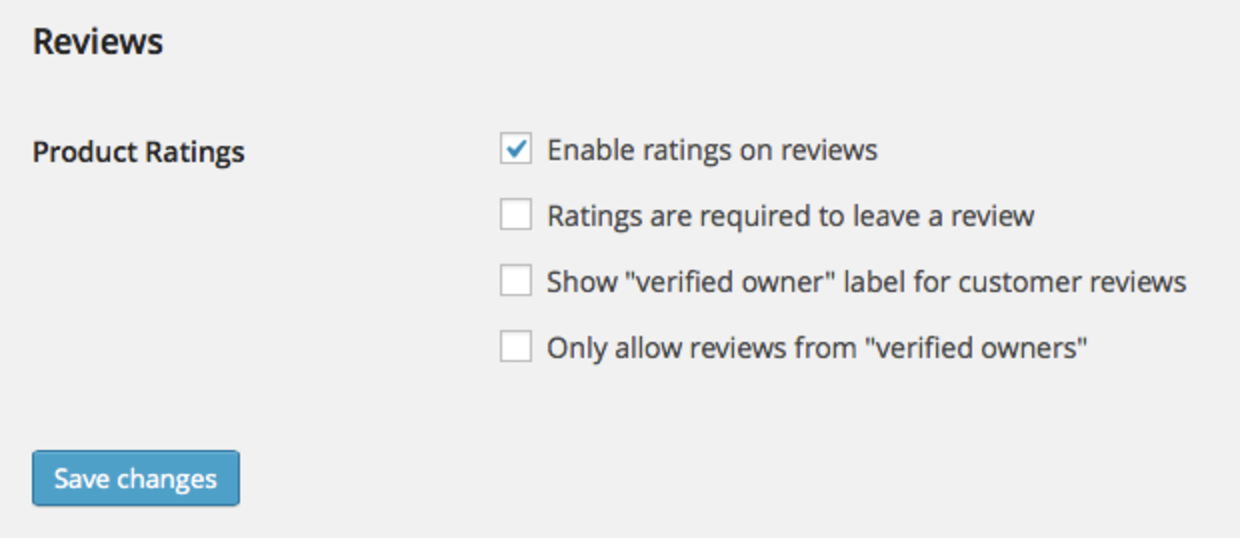
    Did you check the value “Enable Review” in Woocommerce -> Settings -> Product.?

    review

    Let us know,

    Thanks,
    laranz.

    Avatar: laranz
    Laranz
    Participant
    August 23, 2017 at 06:43

    Hi,

    1. You meant the top bar or the content right side of Logo? Also the crendential fails so I couldn’t able to adjust the value.

    You can adjust the header type in 8theme Options -> Header Type -> Header Type -> and choose Variant standard.

    1a. & 1b. Use the child theme, and in the child theme create the file like this headers/standard.php and copy the code from parent theme headers/standard.php and do the editing like your needed.

    2.

    1. I didn’t understand the question, can you be more specific, you can share us a screenshot, so that we can understand better.

    2. Use this Custom CSS in 8Theme Options -> Stylings -> Custom CSS,

    .single-product .product_title {
        left: -100%;
        position: absolute;
    }

    3. Use this Custom CSS, something like this, you can adjust the value according to your needs.

    .single-product .product_title {
    color: #ff0000;
    font-family: Arial;
    font-size: 22px;
    }

    4. “See wishlist” Can you show us the website URL, that this string appears, so that I can give you Custom CSS.

    5. Use this Custom CSS,

    .etheme_widget_socials i { color: #ff0000; }

    6. Fixed menu font size,

    .fixed-header .menu a { font-size: 12px; }

    7. 8Theme Options -> General -> Header Settings, there you can edit the background color of the fixed header.

    8. 8Theme Options -> General -> Header Settings -> Header Custom HTML: and paste this content https://gist.github.com/laranz/6b7b0cf9ffbe751426fee43144062233

    9. Already answered in point #2.
    10. You mean the menu and logo area? when you open up the website, in that case transparent is not possible.

    Let us know,

    Thanks,
    laranz.

    Avatar: laranz
    Laranz
    Participant
    August 23, 2017 at 05:41

    Hi,

    Like Rose said you’re hitting the limit of number of variable, it seems the value isn’t increased, https://in.godaddy.com/community/Managing-WordPress/How-to-change-my-PHP-limit-max-input-vars/td-p/10706 contact your hosting if that still didn’t increase, so that they can increase that for you.

    After that, change this http://take.ms/pqWG2 in the menu, that will do the trick.

    Let us know,

    Thanks,
    laranz.

    Avatar: laranz
    Laranz
    Participant
    August 23, 2017 at 05:17

    Hi,

    Please follow the steps here https://codex.wordpress.org/Editing_wp-config.php#Increasing_memory_allocated_to_PHP to increase the memory it will fix the issue. Give some bigger values like 256M. If that still didn’t work contact your webhost support, they may restrict you to access certain memory, they can elevate the memory value for you.

    Let us know,

    Thanks,
    laranz.

    Avatar: laranz
    Laranz
    Participant
    August 23, 2017 at 05:15

    Hi,

    If this is just a test site, then I suggest you to try the following.

    1. Disable all the plugins other than xstores recommended plugin.
    2. Delete all the data using this plugin https://wordpress.org/plugins/wordpress-database-reset/
    3. Go to 8Theme Options -> and press “Reset All”.

    After that try to import the landing demo.

    Let us know,

    Thanks,
    laranz.

    Avatar: laranz
    Laranz
    Participant
    August 23, 2017 at 04:39

    Hi,

    Go through the Yoast plugin kb articles about this issue, For instance try this: https://kb.yoast.com/kb/why-doesnt-facebook-display-an-image/ if nothing helps I suggest you to contact them, they can help you with the issue.

    Let us know,

    Thanks,
    laranz.

    Avatar: laranz
    Laranz
    Participant
    August 23, 2017 at 04:18

    Hi,

    1. Create a child theme.
    2. Create a folder woocommerce in your child theme, and then create a new file named single-product-content.php and paste this content in it. http://take.ms/eciN5

    That way you can achieve your requirement.

    Let us know,

    Thanks,
    laranz.

    Avatar: laranz
    Laranz
    Participant
    August 18, 2017 at 10:47

    Hi,

    I update the theme and the xstore core plugin, and still it shows wrong text.. Did you have any customization in the child theme? Try to activate the parent theme and see that fixes anything, OR I doubt it’s something with some plugin, can you try disable all the plugins including cache plugin ( clear cache before disable ) and see that fixes anything?

    Let us know,

    Thanks,
    laranz.,

    Avatar: laranz
    Laranz
    Participant
    August 18, 2017 at 09:16

    Hi,

    You can access the menu items using the arrow in the right corner: http://take.ms/nwIp2 for mobile menu. Is that not working? in that case can you give us in which mobile you’re testing?

    Let us know,

    Thanks,
    laranz.

    Avatar: laranz
    Laranz
    Participant
    August 18, 2017 at 09:08

    Hi,

    For the second error, try disable all the plugins that are not recommended by 8theme. It seems some plugin cause this.. If you’re using child theme temporarily switch to parent theme and see that fixes the issue.

    Let us know,

    Thanks,
    laranz.,

    Avatar: laranz
    Laranz
    Participant
    August 17, 2017 at 07:57

    Hi,

    Go to Ultimate Addons -> Modules -> And try to disable the Woocomposer, and refresh the cache and see that fixes the issue.

    Screenshot: http://take.ms/JcO1G

    Let us know,

    Thanks,
    laranz.

    Avatar: laranz
    Laranz
    Participant
    August 11, 2017 at 14:17

    Hi,

    Sorry, I fixed that now in the header.php of your child theme.. I forget to tell you about the endif.. now it will be like,

    
    <?php if(!function_exists('dynamic_sidebar') || !dynamic_sidebar('mobile-sidebar')): ?>
    <?php endif; ?>

    and it will work now. 🙂

    Let us know if you have any other questions,

    Thanks,
    laranz.,

  • 1 2 3 4 5 6 12 13 14
    Viewing 150 results - 121 through 150 (of 418 total)
Viewing 30 posts - 121 through 150 (of 418 total)
We're using our own and third-party cookies to improve your experience and our website. Keep on browsing to accept our cookie policy.






