

Forum Replies Created

Viewing 30 posts - 91 through 120 (of 129 total)
  • Avatar: Jennifer
    Jennifer
    Participant
    January 4, 2023 at 12:25

    Hello!
    Yes! of couse!

    Sochic is woking without checking the ¨Hide Out of Stock item¨

    Here is the producto showing the out of stock product without hidding it.

    And the product inventory:

    Here is a link to the product.
    You must see it logged out. Other wise, it will show you a variable grid table.
    https://sochic.com.ar/shop/pantalon-kim/

    Regards,
    Avatar: Jennifer
    Jennifer
    Participant
    January 3, 2023 at 15:29

    Oh wait!
    So sorry! but I just realized that when we check ¨Hide out of stock items from the catalog¨ on Woocommerce Product configuration, the swatch disappears from the single product page.
    Is there a way to make it stay. When clients don´t see the product, they think its an error on the site and they contact us asking about it. And when it is shown Out of Stock, then then know.

    On maysix.com.ar and sochic.com.ar it is working perfectly.
    I checked and the ¨Hide out of stock items from the catalog¨ is not checked.

    I can give you admin access to those sites if needed.

    Please contact administrator
    for this information.
    Avatar: Jennifer
    Jennifer
    Participant
    January 3, 2023 at 14:41

    Thank you!
    I will have that in mind! 🙂

    Avatar: Jennifer
    Jennifer
    Participant
    January 2, 2023 at 19:47

    Hi Rose!
    Happy new year!

    No, we weren´t able to solve the problem. For the swatches to appear crossed, the prices have been erased.
    We need the variation to appear crossed when the product is set as Out of Stock without erasing the price. Specially because we use Inventory management, and when the products get to 0, the swatches should appear crossed.
    We are using the same theme on other sites and it works perfectly. I don´t know if we modify something or we need to configure something differently.

    Thanks in advanced,

    Avatar: Jennifer
    Jennifer
    Participant
    January 2, 2023 at 12:41

    Hi Tony,

    Happy new year!
    So, we were checking on the solution yo provided, but I dont think we can work with that.
    Changing the product status to Out of Stock and deleting the product price is doble the work, because we use inventory control, and the product get to be out of stock automatically. If we have to be checking every variation that is out of stock and deteling the product price, it is just not eficient.

    Also, we do have many other sites created with Xstore like sochic.com.ar maysix.com.ar and the Swatches work correctly when Out of Stock.

    Is there a way of making it work as it was before?

    regards,

    Avatar: Jennifer
    Jennifer
    Participant
    September 2, 2022 at 13:48

    Thanks a lot!
    As always, works great!
    kind regards,

    Avatar: Jennifer
    Jennifer
    Participant
    June 23, 2022 at 14:33

    Thanks a lot!

    Avatar: Jennifer
    Jennifer
    Participant
    June 8, 2022 at 12:07

    Hello,

    Thanks a lot for the help!
    I finally find where to change the color.

    Best regards

    Avatar: Jennifer
    Jennifer
    Participant
    June 8, 2022 at 12:06

    Hello Rose,

    Thanks a lot for the help!
    As always, it works perfectly fine!

    Best regards

    Avatar: Jennifer
    Jennifer
    Participant
    June 8, 2022 at 12:06

    Hello Rose,

    Thanks a lot for the help!
    As always, it works perfectly fine!

    Best regards

    Avatar: Jennifer
    Jennifer
    Participant
    May 13, 2022 at 13:16

    Hello,

    Greate! thank you very much!

    regards,

    Avatar: Jennifer
    Jennifer
    Participant
    April 18, 2022 at 11:59

    Hello!

    Made ir work.
    Thanks a lot!

    regards,

    Avatar: Jennifer
    Jennifer
    Participant
    March 19, 2022 at 13:12

    Hello,

    Thank you for the help.
    Worked as a charm.

    regards,

    Avatar: Jennifer
    Jennifer
    Participant
    February 4, 2022 at 11:59

    Hi there!
    I was able to fix this.
    I had the page as boxed.

    Thnx

    Avatar: Jennifer
    Jennifer
    Participant
    January 25, 2022 at 22:30

    Hi Olga,

    thank you for your reply.
    I think a height of 14px would be okey.
    Something like 16px x 14px?

    Thanks in advance,
    Jenn

    Avatar: Jennifer
    Jennifer
    Participant
    January 15, 2022 at 14:03

    Hi Rose,

    Thank you.

    regards,

    Avatar: Jennifer
    Jennifer
    Participant
    January 12, 2022 at 18:05

    Thank you Rose!
    Kind regards,

    Avatar: Jennifer
    Jennifer
    Participant
    January 12, 2022 at 12:03

    Hello Rose,

    Thanks for the help.
    I was able to fix the first and second issue. But not the 3rd.
    Lightshot is not loading the image.

    regards,

    Avatar: Jennifer
    Jennifer
    Participant
    January 11, 2022 at 19:09

    Thank you,

    Kind regards,

    Avatar: Jennifer
    Jennifer
    Participant
    January 11, 2022 at 11:46

    Hi Rose,

    My apologies. I changed the role to admin.

    regards,

    Avatar: Jennifer
    Jennifer
    Participant
    January 6, 2022 at 15:33

    Hi Olga,

    Thank you for your reply.

    kind regards,
    Jenn

    Avatar: Jennifer
    Jennifer
    Participant
    December 30, 2021 at 20:01

    Hi Olga,

    Thanks for the reply.
    I checked the files and was able to fix the issue.
    Thank you!

    regards,

    Avatar: Jennifer
    Jennifer
    Participant
    December 24, 2021 at 14:08

    Hi Rose,

    Thank you very much!
    Works as a charm as expected.
    Many thanks and happy holydays.

    kind regards,

    Avatar: Jennifer
    Jennifer
    Participant
    December 23, 2021 at 12:38

    Hi,

    Okey. As always, thanks for the help.

    Happy holidays! 🙂

    Avatar: Jennifer
    Jennifer
    Participant
    December 22, 2021 at 13:02

    Hi Rose and thank you,
    I checked and it was because I was in incognito.
    Thank you for your time
    Best regards,

    Avatar: Jennifer
    Jennifer
    Participant
    December 22, 2021 at 12:37

    Hello Olga,

    Thanks for the help.
    I changed the number of products in the mini cart as you told me.
    For the mobile version, I wanted to have different settings when adding to cart.
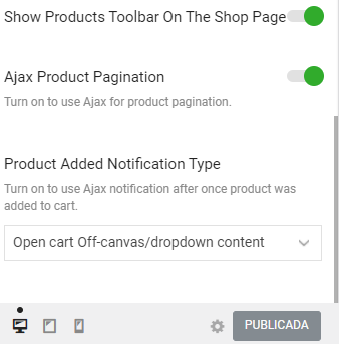
    On shop page layout, For desktop I want the off canvas option after adding to cart, but for mobile I just want the ¨Alert¨option. I only see a global option for both mobile and desktop.
    Is there a way of having different configuration?

    config

    regards,

    Avatar: Jennifer
    Jennifer
    Participant
    December 20, 2021 at 22:50

    Hello Olga,

    I see. Thank you very much for the help

    Kind regards,

    Avatar: Jennifer
    Jennifer
    Participant
    December 17, 2021 at 15:10

    Hi,
    Thanks for the reply.

    regards,

    Avatar: Jennifer
    Jennifer
    Participant
    December 13, 2021 at 01:21

    I removed the redirection and the plugin works as expected.
    Thank you for the help!

    kind regards

    Avatar: Jennifer
    Jennifer
    Participant
    December 11, 2021 at 13:08

    So, if we fix this, the plugin should get fixed?

    The site that has the theme in wordpress is cremabasics.com/wp-admin
    not cremamoda.com

    But the homepage of cremabasics.com is going to redirect to cremamoda.com
    Thats why you need to log from cremabasics.com/wp-admin

  • 1 2 3 4 5
    Viewing 120 results - 91 through 120 (of 129 total)
Viewing 30 posts - 91 through 120 (of 129 total)
We're using our own and third-party cookies to improve your experience and our website. Keep on browsing to accept our cookie policy.









