


Hello,
We’re sorry but we provide support only in English. Please describe your problem in English. Also provide us with wp-admin access and link to the page with problem.
Regards,
Jack Richardson
Hello,
We’ve made some changes in blanco/js/script.js. Please check it. Is it working fine now?
Regards,
Jack Richardson
Hello,
We’re sorry but we provide support only in English. Please describe your problem in English. Also provide us with wp-admin access and link to the page with problem.
Regards,
Jack Richardson
Hello,
Your question is unclear for us. Could you please clarify us with more details?
Regards,
Jack Richardson
Hello,
Unfortunately this is theme bug. Please add this code into the custom.css to fix it manually:
.columns2-left > .content {
width: 100%;
}
Regards,
Jack Richardson
Hello,
The issue causes the following code in the custom.css:
@media (max-width: 979px) {
.slide-item .product:hover .product-image-wrapper .slider-counter, .slide-item .product:hover .product-image-wrapper .small-slider-arrow, .slide-item .product:hover .product-image-wrapper .show-quickly, .products-grid .product:hover .product-image-wrapper .slider-counter, .products-grid .product:hover .product-image-wrapper .small-slider-arrow, .products-grid .product:hover .product-image-wrapper .show-quickly, .products-list .product .product-image-wrapper:hover .slider-counter, .products-list .product .product-image-wrapper:hover .small-slider-arrow, .products-list .product .product-image-wrapper:hover .show-quickly {
display: none;
} }
Regards,
Jack Richardson
Hello,
The font used in the logo is Georgia. Yes, the logo images are licensed and you should buy them in order to use.
Regards,
Jack Richardson
Hello,
You’re welcome!
Regards,
Jack Richardson
Hello,
You’re welcome!
Regards,
Jack Richardson
Hello,
We’re glad to hear it.
Regards,
Jack Richardson
Hello,
We’re sorry but this is a bug. It should be fixed in the next theme release.
You can change the background color manually. For this add the following code into the custom.css:
.page-wrapper {
background: #ccc;
}
And change “#ccc” to your desired color.
Sorry for inconvenience!
Regards,
Jack Richardson
Hello,
You’re welcome!
Regards,
Jack Richardson
Hello,
You’re welcome!
If you have any questions feel free to contact us.
Regards,
Jack Richardson
Hello,
As we can see you didn’t rename default.custom.css to custom.css. We’ve renamed it to custom.css and added this code body { color: #ff0000 !important; }. You can edit the custom.css file and change the color to your desired.
Also we’ve edited theleader/framework/theme-functions.php file and replaced “Blog” with “Articles” (keep safe this file to don’t lose changes after theme upgrading).
Regards,
Jack Richardson
Hello,
Please provide us with FTP and wp-admin credentials.
Regards,
Jack Richardson
Hello,
This is additional customization and it’s paid service.
Regards,
Jack Richardson
Hello,
You have to edit archive-product.php file in the idstore/woocommerce/ directory. Find the following line <p><a class="button active arrow-left" href="<?php echo get_permalink(woocommerce_get_page_id('shop')); ?>"><span><?php _e('Return To Shop', ETHEME_DOMAIN) ?></span></a></p>
and replace this <?php echo get_permalink(woocommerce_get_page_id('shop')); ?> with your desired link.
Also to save your changes after the theme upgrading we recommend you to create a Child theme and copy there archive-product.php file with changes .
Regards,
Jack Richardson
Hello,
You’re welcome!
Regards,
Jack Richardson
Hello,
You have to create variable product. More information about WooCommerce Variable Products you can read here: http://docs.woothemes.com/document/product-variations/.
Regards,
Jack Richardson
Hello,
You can download the latest theme version at this link http://themeforest.net/item/idstore-responsive-multipurpose-ecommerce-theme/4792186 , just log in to your themeforest account.
About “how to upgarde” you can read in our documentation: https://www.8theme.com/demo/docs/idstore/#!/upgrade.
Regards,
Jack Richardson
Hello,
You should to go to Revolution Slider -> Edit Slides (of required slider) -> Edit Slide (edit required slide) in the slide editor click on the text to be changed and change it in the text field below the slide.
Regards,
Jack Richardson
Hello,
We’re sorry but we can’t do anything. IE 8 just doesn’t recognize the most of nowadays properties.
Regards,
Jack Richardson
Hello,
We didn’t declare The Leader theme compatibility with Internet Explorer 8.
http://themeforest.net/item/the-leader-ecommerce-responsive-mpurpose-theme/5493981?WT.ac=search_item&WT.oss_phrase=leader&WT.oss_rank=2&WT.z_author=8theme
Regards,
Jack Richardson
Hello,
You’re welcome!
Regards,
Jack Richardson
Hello,
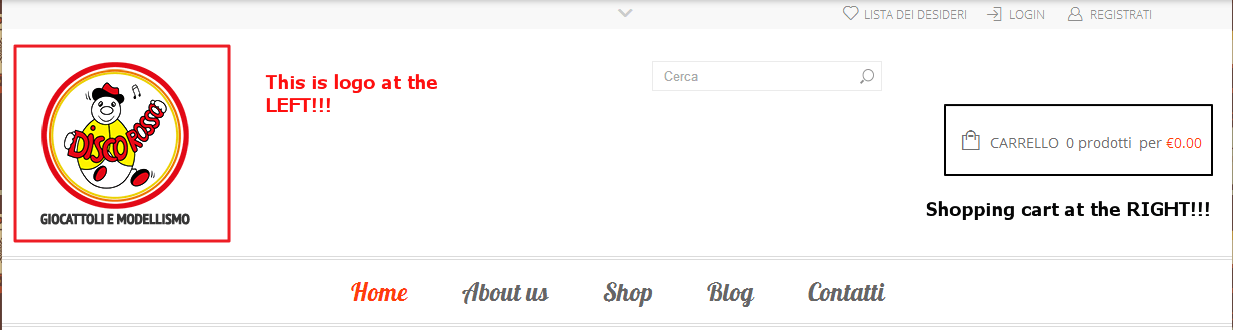
Your request is still unclear for us.
So the search box should be above the logo at the left or above the shopping cart at the right?
Regards,
Jack Richardson
Hello,
You should rename default.custom.css to custom.css in order to make it work.
Regards,
Jack Richardson
Hello,
Please check the provided credentials. We’re unable to connect.
Regards,
Jack Richardson
Hello,
Please provide us with FTP and wp-admin credentials and show us the page with the translation issue example.
Regards,
Jack Richardson
Hello,
We’re sorry but we’re a bit confused. You told that you want to place the search box at the left above the shopping cart, but on your site shopping cart is located at the right. Could you please clarify us with more details?
Regards,
Jack Richardson
Hello,
Please provide us with FTP and wp-admin credentials.
Regards,
Jack Richardson

Free AI store scan · SalesMax
Paste your store address. SalesMax AI shows which upsell moments are missing. No signup.

Free AI speed test · FlashMax
Paste your site address. FlashMax runs Google Lighthouse for phone and desktop, checks Core Web Vitals and lists what to fix. No signup.
 PerfumeBeauty
(live demo, opens in a new tab)
 KidsstoreBusiness
(live demo, opens in a new tab)
 Home Decor 02 StoreFurniture
(live demo, opens in a new tab)
 PhotographerPortfolio
(live demo, opens in a new tab)
 WeddingBusiness
(live demo, opens in a new tab)
 SkateBusiness
(live demo, opens in a new tab)
 Fashion StoreFashion
(live demo, opens in a new tab)
 Sneakers StoreSports & travel
(live demo, opens in a new tab)
 DeliveryWPBakery
(live demo, opens in a new tab)
 Business 02Elementor
(live demo, opens in a new tab)
 Makeup StoreBeauty
(live demo, opens in a new tab)
 FishingPortfolio
(live demo, opens in a new tab)
 SunglassesFashion
(live demo, opens in a new tab)
 Painting studioElementor
(live demo, opens in a new tab)
 DesignersWPBakery
(live demo, opens in a new tab)
 Shoes StoreFashion
(live demo, opens in a new tab)