Hello,
Sorry,but we don’t recommend to delete this code and custom.css file as well, because style changes must be written in this file if you decide to edit some styles.
Regards,
Eva Kemp.

Hello,
Sorry,but we don’t recommend to delete this code and custom.css file as well, because style changes must be written in this file if you decide to edit some styles.
Regards,
Eva Kemp.
Hello,
I’m unable to access your site at all. The page is blank. Are there any issues on your server?
Regards,
Eva Kemp.
Hello,
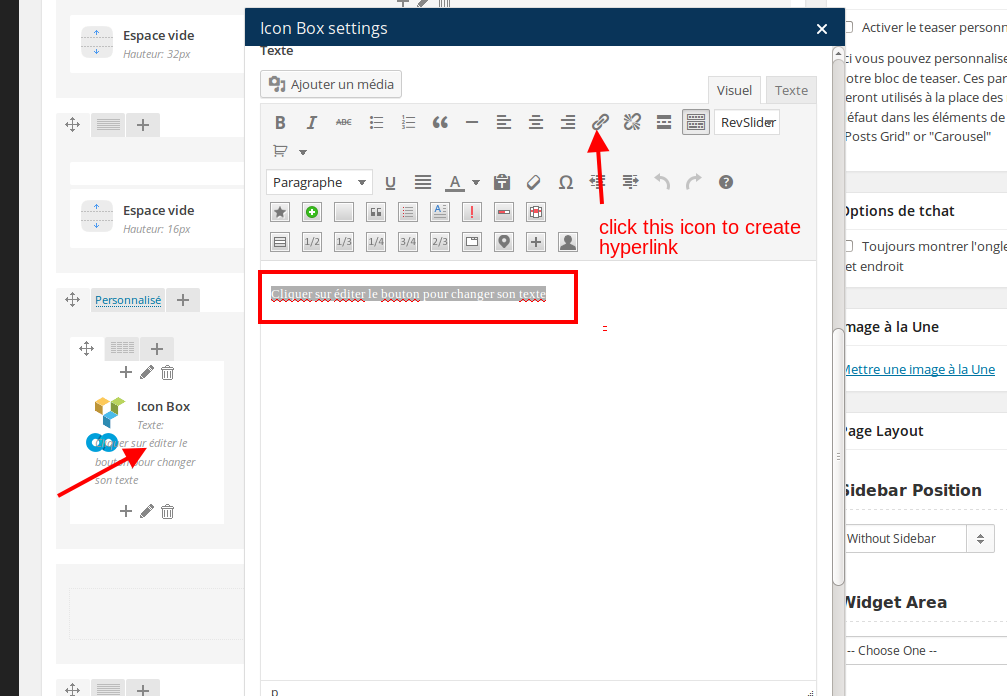
You need edit the icon element in Visual Composer editor and select the text you want to create hyperlink for and click “Insert link” icon:
Regards,
Eva Kemp.
Hello,
You can change the link in the file wp-content/themes/legenda/framework/theme-functions.php. Find the code echo '<a href="'.$shop_url.'" class="show-all-posts hidden-tablet hidden-phone">'.__('View more products', ETHEME_DOMAIN).'</a>'; (line 2191) and replace '.$shop_url.' in href="'.$shop_url.'" to the link you wish.
Regards,
Eva Kemp.
You’re welcome.
If there are still some questions feel free to ask us.
Regards,
Eva Kemp.
Hello,
We’ve made some modifications.
Please check your site now.
Regards,
Eva Kemp.
I’ve checked the attributes with default WordPress theme and such issue persists there too.
Did you install Woocommerce plugin after the theme activation? Please note Woocommerce plugin must be installed before the theme installation. So in this case we recommend you to reinstall the theme and the plugins. Don’t forget to install Woocommerce at first.
Regards,
Eva Kemp.
Hello,
You have default.custom.css file but you must rename it to custom.css for the changes to take effect. You can do this via FTP in wp-content/themes/idstore directory.
Revolution Slider sample is placed in the theme archive, which you downloaded, in Documentation folder.
Regards,
Eva Kemp.
Hello,
You need add this code into page.php file in wp-content/themes/xmarket/ directory. Find the line 18, the code <h1><?php echo $title; ?></h1> and after this code add the one from Yoast plugin. If you have any issues please provide us with wp-admin panel and FTP credentials.
Regards,
Eva Kemp.
You’re welcome.
Regards,
Eva Kemp.
Hello,
Please provide us with FTP credentials as well.
Did you install 2.3 version of the theme as a new theme or update it from 2.2 version?
Thank you.
Regards,
Eva Kemp.
Hello,
I’ve added the following code into custom.css file:
.sidebar-position-without .products-grid.product-count-3 .product {
width: 298px !important;
}

img.hide-image {
height: 300px;
}
Please check the site now and clear browser cache before.
Regards,
Eva Kemp.
Hello,
I’ve reinstalled the theme and now it’s working fine. Please check and clear browser cache before. Also there are some problems with your server configuration where your site is located. The function file_get_contents() which downloads the data via HTTP from our server, doesn’t work. That’s why you are unable to install theme variants. You need to check this issue at your hosting provider if you’re using shared hosting.
Regards,
Eva Kemp.
Hello,
The values L | M | S | XL | XXL that are written for your products can be also set in this way. But if you want to add them like in the new Woocommerce version you should create such values at first. Please go to Products > Attributes, select Size attribute and you’ll see that you don’t have such values created, so add them.
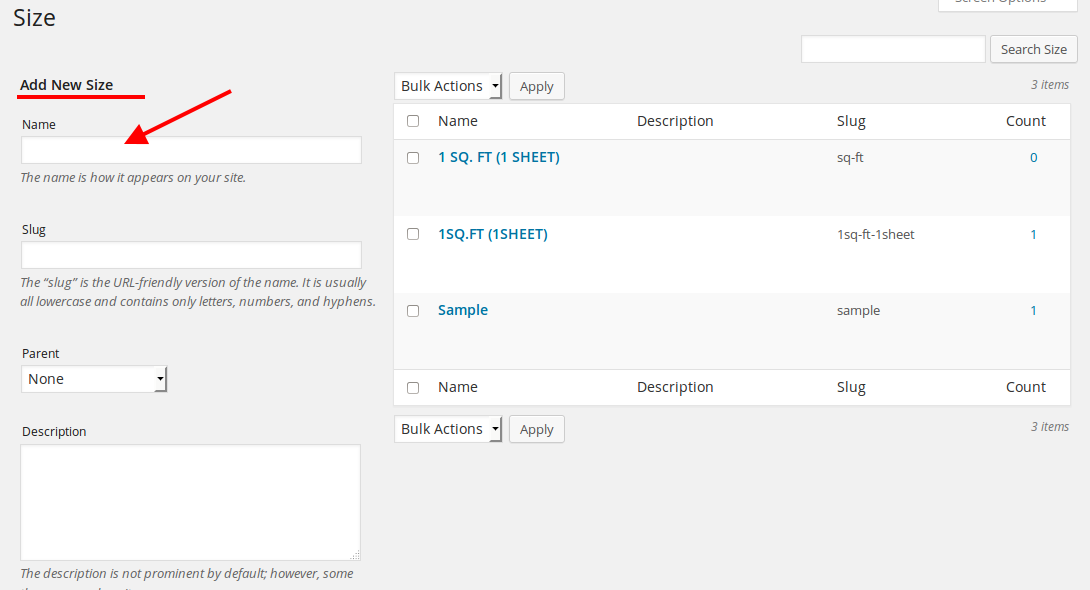
Then remove the current attributes from the products editor and create new ones.
Regards,
Eva Kemp.
Hello,
Sorry, but your question is a bit unclear. Are you talking about the page http://www.kahveperest.com/kahveler/ ? I don’t see any problems there. Could you please show a screenshot to have a clear understanding of the issue?
Thank you.
Regards,
Eva Kemp.
Hello,
Please provide us with FTP credentials as well.
Thank you.
Regards,
Eva Kemp.
Hello,
Please provide us with wp-admin panel credentials as well.
Regards,
Eva Kemp.
Hello,
Sorry, but this requires additional customization and isn’t for free. If you agree you can create a ticket at http://support.8theme.com/ and our developers will look into your request.
Thank you.
Regards,
Eva Kemp.
Hello,
There was an error in the checkout.min.js file in woocommerce plugins directory. I’ve replaced it. Please check the site now and clear browser cache before.
Regards,
Eva Kemp.
Hello,
Install base demo content button installs products, categories, posts, projects, some pages. Please note before installing base content you must gave all required plugins activated.
If you want to install more content you can select one of theme variants and press Install Version button:
https://www.8theme.com/demo/docs/royal/#!/demo_data_installation
Regards,
Eva Kemp.
Hello,
The following articles may help you:
http://wpsites.net/seo/how-to-fix-duplicate-title-tags-detected-in-google-webmaster-tools/
http://webmasters.stackexchange.com/questions/50568/duplicate-title-tags-in-google-webmaster-tools
Regards,
Eva Kemp.
Hello,
Please provide us with wp-admin panel credentials in Private Content.
Thank you.
Regards,
Eva Kemp.
Hello,
As we can see from you previous answers in the ticket you had a problem with database, not with our theme, didn’t you?
Please clarify.
Thank you.
Regards,
Eva Kemp.
Hello,
Please add this code into custom.css file:
.side-area-icon i:before, .menu-icon i:before {
    color: #000;
}
Regards,
Eva Kemp.
Hello,
1. Please provide us with the link of your site and show us a screenshot of what you want to remove.
2. You need install SSL certificate. Your hosting provider should help you with it.
3./4. Please provide us with wp-admin panel credentials to check the issue.
5. Sorry, but there is no such feature in our theme. You may try to use some plugins.
Regards,
Eva Kemp.
Hello,
Could you please show on a screenshot what icon you want to link?
Thank you.
Regards,
Eva Kemp.
Hello,
We’ve already had such discussion on our forum.
We’ve improved our theme as much as we could. And we have already emphasized if someone of our customers has experience in development and has proposals concerning changes in the theme (we mean only specific changes in the code in particular files, rather than general phrases like “Reduce CSS File” etc), we are asking to declare them here or contact us via the contact form https://www.8theme.com/contact-us/
If the recommended changes are effective and reduce time load of the theme, you will receive financial compensation.
Thank you for understanding.
Regards,
Eva Kemp.
Hello,
How did you add attributes, via Products > Attributes or editing some product in Products > Products?
Please provide us with wp-admin panel credentials as well.
Regards,
Eva Kemp.
Hello,
We’ve tested Legenda 2.3 version with WordPress 4.0 and haven’t found any problems, so you can proceed with the update.
Don’t forget to create backup of the files and database before update.
Regards,
Eva Kemp.
Hello,
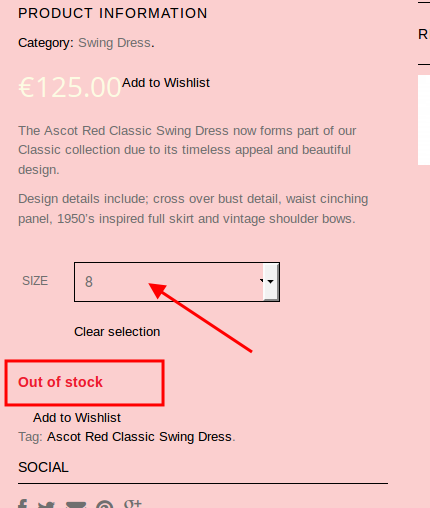
“Out of stock” is visible when size is selected:
https://s3.amazonaws.com/fvd-data/notes/168674/1410204325-TnpZ3M/screen.png
Regards,
Eva Kemp.