Forum Replies Created

Viewing 30 posts - 25,501 through 25,530 (of 31,382 total)
  • Avatar: Eva
    Eva Kemp
    Participant
    November 10, 2014 at 17:09

    Hello,

    Please add this code into custom.css file:

    .slider-container .show-all-posts {
        display: none !important;
    }
    .owl-controls .owl-buttons div, .owl-controls .owl-page span, .owl-controls .owl-page.active span {
       background: #FFF !important; 
    }

    Regards,
    Eva Kemp.

    Avatar: Eva
    Eva Kemp
    Participant
    November 10, 2014 at 17:00

    Hello,

    I’ve added the following code into custom.css file:

    .payment_method_paypal label { margin-top: -15px;
    }
    .payment_method_paypal img {
       width: 150px;
       margin-right: 110px;
    }

    Please check the page now.

    Thank you.
    Regards,
    Eva Kemp.

    Avatar: Eva
    Eva Kemp
    Participant
    November 10, 2014 at 16:42

    Hello,

    Have you created back up before upgrade?
    Please provide us with FTP and wp-admin panel credentials in Private Content.

    Thank you.
    Regards,
    Eva Kemp.

    Avatar: Eva
    Eva Kemp
    Participant
    November 10, 2014 at 16:40

    Hello,

    What is the username for your site?
    We’re unable to log in. Please provide us with wp-admin panel credentials in Private Content.

    Thank you.
    Regards,
    Eva Kemp.

    Avatar: Eva
    Eva Kemp
    Participant
    November 10, 2014 at 16:37

    Hello,

    Do you want to have border around the Testimonials block?
    I’ve created one more border to the Newsletters box added “back-white” class into “Extra class” field of Widgetised Sidebar as described in our documentation: https://www.8theme.com/demo/docs/legenda/index.html#!/newsletters

    Regards,
    Eva Kemp.

    Avatar: Eva
    Eva Kemp
    Participant
    November 10, 2014 at 15:08

    Hello,

    I’ve added the following code into custom.css file:

    .recent-post-mini > a.postimg img {
       width: 100px;
    }
    .footer .widget-title {
        font-size: 18px;
        font-weight: normal;
    }

    Please check the footer block now.

    Regards,
    Eva Kemp.

    Avatar: Eva
    Eva Kemp
    Participant
    November 10, 2014 at 14:41

    Hello,

    You added unnecessary symbols to the code for social media icons.
    I’ve corrected it and added the following code into custom.css file:

    .prefooter .custom-info-block {
       width: 50%;
    }
    .top-bar .languages-area .custom-info-block {
        width: 100%;
    }

    Please check the page now.

    Regards,
    Eva Kemp.

    Avatar: Eva
    Eva Kemp
    Participant
    November 10, 2014 at 14:06

    Hello,

    Please add this code into custom.css file:

    img.hide-image {
    height: 300px;
    }

    How to create custom.css you can watch in this video tutorial:
    https://www.youtube.com/watch?v=Qok2zRedRMY

    Thank you.
    Regards,
    Eva Kemp.

    Avatar: Eva
    Eva Kemp
    Participant
    November 10, 2014 at 14:03

    Hello,

    As I see the arrows are there:

    Please provide us with the link where you don’t have the arrows.

    Thank you.
    Regards,
    Eva Kemp.

    Avatar: Eva
    Eva Kemp
    Participant
    November 10, 2014 at 13:46

    Hello,

    Please provide us with wp-admin panel credentials in Private Content and describe your issue with more details (what footer number you’re using and the name of static block).

    Thank you.
    Regards,
    Eva Kemp.

    Avatar: Eva
    Eva Kemp
    Participant
    November 10, 2014 at 13:44

    Hello @DylansTrading,

    Please provide us with wp-admin panel credentials as well.
    Also we are unable to connect to your FTP account.
    Please check the credentials.

    Thank you.
    Regards,
    Eva Kemp.

    Avatar: Eva
    Eva Kemp
    Participant
    November 10, 2014 at 13:42

    Hello @LukeMitsumine,

    You’re welcome.

    Regards,
    Eva Kemp.

    Avatar: Eva
    Eva Kemp
    Participant
    November 10, 2014 at 13:38

    Hello,

    Please try to regenerate thumbnails with this plugin: http://wordpress.org/plugins/regenerate-thumbnails/

    Thank you.
    Regards,
    Eva Kemp.

    Avatar: Eva
    Eva Kemp
    Participant
    November 10, 2014 at 13:34

    Hello,

    You can delete favicon in Theme Options > Header.
    Sorry, but every time you update the theme the files are overwritten and favicon is reuploaded.
    So you have to remove it manually.

    Sorry for inconveniences.
    Thank you for understanding.

    Regards,
    Eva Kemp.

    Avatar: Eva
    Eva Kemp
    Participant
    November 10, 2014 at 13:32

    Hello,

    We’re glad you managed to fix the issue.

    Enjoy your work!

    Regards,
    Eva Kemp.

    Avatar: Eva
    Eva Kemp
    Participant
    November 10, 2014 at 13:30

    Hello,

    Sorry, there is a bug in the theme with Woocommerce shop page. We’ll try to fix it in the next update.

    Sorry for inconveniences.

    Regards,
    Eva Kemp.

    Avatar: Eva
    Eva Kemp
    Participant
    November 10, 2014 at 13:22

    Hello,

    Our single product page uses Woocommerce template.
    Please clarify what exactly you want to achieve.

    Thank you.
    Regards,
    Eva Kemp.

    Avatar: Eva
    Eva Kemp
    Participant
    November 10, 2014 at 13:10

    Hello,

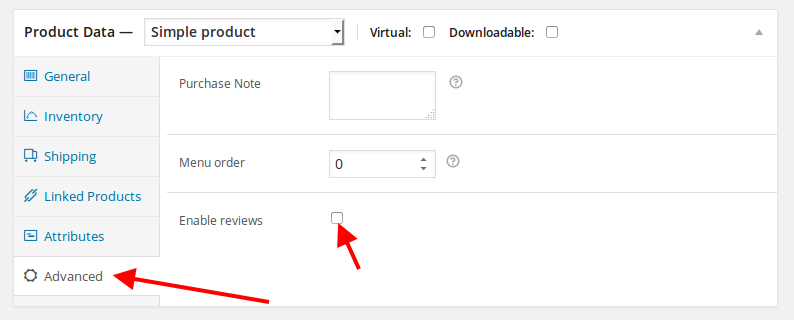
    To enable reviews go to Products, select a product to edit and edit its settings:

    The image on the Shop page can be changed in Theme Options > Shop > Products Page Banner.

    Thank you.
    Regards,
    Eva Kemp.

    Avatar: Eva
    Eva Kemp
    Participant
    November 10, 2014 at 13:05

    Hello,

    Please provide us with the link to a page where you’re using icon links and wp-admin panel/FTP credentials in Private Content.

    Thank you.
    Regards,
    Eva Kemp.

    Avatar: Eva
    Eva Kemp
    Participant
    November 10, 2014 at 13:02

    Hello,

    Some plugins are causing conflict with the theme.
    Please try to disable them one by one to find out what plugin is causing the issue.

    Thank you.
    Regards,
    Eva Kemp.

    Avatar: Eva
    Eva Kemp
    Participant
    November 10, 2014 at 10:34

    Hello,

    Please provide us with the link where you placed counter element and wp-admin panel/FTP credentials in Private Content.

    Thank you.
    Regards,
    Eva Kemp.

    Avatar: Eva
    Eva Kemp
    Participant
    November 10, 2014 at 10:32

    Hello,

    You can use Tabs element in Visual Composer editor.

    Thank you.
    Regards,
    Eva Kemp.

    Avatar: Eva
    Eva Kemp
    Participant
    November 10, 2014 at 10:31

    Hello @antiguanice, @smyliekylie29,

    You need create the footer as described in our documentation to be able to edit it.
    Sorry for inconveniences.

    Regards,
    Eva Kemp.

    Avatar: Eva
    Eva Kemp
    Participant
    November 10, 2014 at 10:29

    Hello,

    Sorry, but the link to wp-admin panel gives 404 error.
    Please check if you spelled it correctly.

    Thank you.
    Regards,
    Eva Kemp.

    Avatar: Eva
    Eva Kemp
    Participant
    November 10, 2014 at 10:26

    Hello,

    You need add this code into the file spreadplugin.css that is located in Spreadplugin folder:

    @media (max-width: 480px) {.spreadplugin-menu.fixed {
    display: none !important;
    }}

    Regards,
    Eva Kemp.

    Avatar: Eva
    Eva Kemp
    Participant
    November 10, 2014 at 10:18

    Hello,

    Please refer to this link http://stackoverflow.com/questions/21415181/can-i-stop-the-this-website-does-not-supply-identity-information-message
    You can find some solution there.

    Thank you.
    Regards,
    Eva Kemp.

    Avatar: Eva
    Eva Kemp
    Participant
    November 10, 2014 at 10:10

    Hello,

    Have you installed SSL certificate for your site?
    You should contact your host concerning this issue.

    Thank you.
    Regards,
    Eva Kemp.

    Avatar: Eva
    Eva Kemp
    Participant
    November 10, 2014 at 10:09

    Hello,

    Sorry, but as you are using 3rd-party plugin for your shop we can’t assist you on this issue. Our theme is fully compatible with Woocommerce plugin.

    Thank you for understanding.

    Regards,
    Eva Kemp.

    Avatar: Eva
    Eva Kemp
    Participant
    November 10, 2014 at 10:03

    Hello,

    As I see you have the latest version of Visual Composer plugin.
    To modify social share buttons you need edit the file wp-content/themes/royal/framework/shortcodes.php (from the line 1729).
    Please provide us with the link to video you wish to use.

    Thank you.
    Regards,
    Eva Kemp.

    Avatar: Eva
    Eva Kemp
    Participant
    November 10, 2014 at 09:54

    Hello,

    You can use our theme without Woocommerce plugin.
    But without Visual Composer you won’t make some effects like on our demo.

    If there are any questions let us know.
    Regards,
    Eva Kemp.

  • 1 2 3 850 851 852 1,045 1,046 1,047
    Viewing 25,530 results - 25,501 through 25,530 (of 31,382 total)
Viewing 30 posts - 25,501 through 25,530 (of 31,382 total)
We're using our own and third-party cookies to improve your experience and our website. Keep on browsing to accept our cookie policy.