
Hello,
Have you made any changes in the theme files?
Try to disable all 3rd-party plugins and check the page again.
Thank you.
Regards,
Eva Kemp.

Hello,
Have you made any changes in the theme files?
Try to disable all 3rd-party plugins and check the page again.
Thank you.
Regards,
Eva Kemp.
Hello,
There are errors for gravity forms plugin:

We recommend you to contact plugin author concerning this issue.
Thank you.
Regards,
Eva Kemp.
Hello,
Concerning the plugins you have to find them yourself but we don’t guarantee their full compatibility with the theme as we don’t test all plugins.
Your cart stays empty because you’ve added only part of the code which displays only that content that is written in the code.
You need contact developers concerning this issue.
Regards,
Eva Kemp.
Hello,
That word is present in wp-content/themes/legenda/languages/default.po file. You can configure it as described in our documentation:
https://www.8theme.com/demo/docs/legenda/index.html#!/how_to_translate
Thank you.
Regards,
Eva Kemp.
Hello,
Unfortunately there is no such feature in the theme.
Sorry.
Regards,
Eva Kemp.
Hello,
Have you made any changes in the original theme files?
Please provide us with FTP credentials in Private Content.
Thank you.
Regards,
Eva Kemp.
Hello,
On the forum you can see the box Private Content just under the main text box where you’re writing your questions.
Thank you.
Regards,
Eva Kemp.
Hello @dzzls,
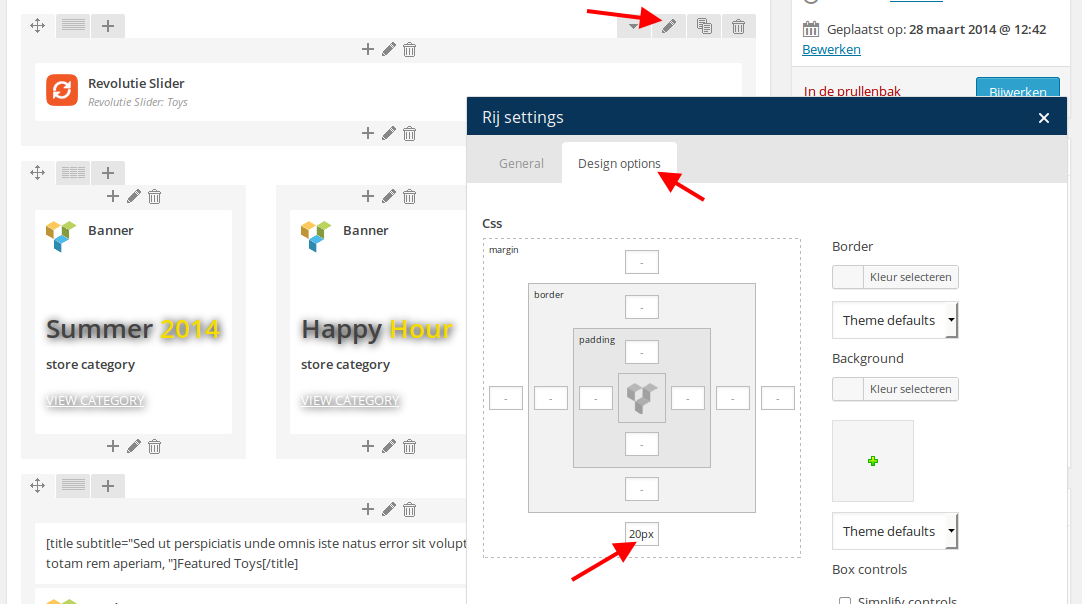
I’ve added margin value to the bottom of the row for Revolution slider:
If you want to edit footer blocks you need recreate them as described in our documentation:
https://www.8theme.com/demo/docs/legenda/index.html#!/footer
Thank you.
Regards,
Eva Kemp.
Hello,
I’ve added this shortcode [title subtitle=””] to your titles in Text elements.
Please check the blocks on Home page now.
Thank you.
Regards,
Eva Kemp.
Hello,
What version did you use previously? Was it less than 2.2 version?
If so you need delete wpbakery folder from wp-content/themes/legenda and install Visual Composer plugin as it has been separated.
Thank you.
Regards,
Eva Kemp.
Hello,
You can create such page with help of Visual Composer editor and its elements.
Please refer to their documentation:
http://kb.wpbakery.com/index.php?title=Visual_Composer
http://www.wpexplorer.com/visual-composer-guide/
Regards,
Eva Kemp.
Hello @sheefoo,
I’ve updated the file form-login.php.
Please check the site.
Thank you.
Regards,
Eva Kemp.
Hello,
Concerning the search button you need update the theme to the latest version as some bugs are fixed there.
Unfortunately there is no such option in the theme and Visual Composer plugin to make a link be opened in a new tab. Sorry.
Regards,
Eva Kemp.
Hello,
You need edit the file wp-content/themes/legenda/woocommerce/content-single-product.php.
We recommend you to make changes in a child theme.
Regards,
Eva Kemp.
Hello,
The problem is related to changes made in category header editor. You have to resave your categories.
Sorry for inconveniences.
Regards,
Eva Kemp.
Hello,
Please try to disable ajax add to cart in Theme Options > Single Product Page > Ajax Add to Cart > Off to fix the problem with gravity form.
Please read our documentation how to enable registration on a page:
https://www.8theme.com/demo/docs/legenda/index.html#!/registration_page
If you wish to edit Wishlist page you need edit the files of this plugin.
Regards,
Eva Kemp.
Hello,
We’re unable to open your wp-admin panel now, there is an error: “The connection has timed out”.
Are there any problems on a server at your hosting provider?
Regards,
Eva Kemp.
Hello,
Sorry, but unfortunately there is no such possibility.
Regards,
Eva Kemp.
Hello,
You need edit the file /wp-content/themes/legenda/framework/theme-functions.php, find the code: $blogPage = __('Blog', ETHEME_DOMAIN); (line 2525) and change the “Blog” title.
Regards,
Eva Kemp.
Hello,
You provided us with an empty FTP account.
There are no files of the site.
Please give us access to be able to view the files.
Thank you.
Regards,
Eva Kemp.
Hello,
As I see all your products are giving 404 error. What modifications have you made?
Regards,
Eva Kemp.
Hello,
Please provide us with wp-admin panel credentials in Private Content.
Thank you.
Regards,
Eva Kemp.
Hello,
Sorry for a long delay.
You need edit the file wp-content/themes/royal/framework/css/admin.css and delete the code .wp-core-ui .modal{ top:4% !important;} .
We’ll fix it in our next update.
Thank you.
Regards,
Eva Kemp.
Hello,
It’s also working. Please view a screenshot:
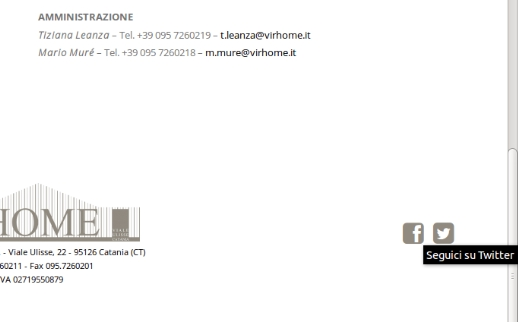
Try to check it in some other browser.
Thank you.
Regards,
Eva Kemp.
Hello,
There is a bug in the theme and it will be fixed in the next update.
Please take our apologies for inconveniences.
Regards,
Eva Kemp.
Hello,
1. Unfortunately there is no such possibility in the theme and a lot of customization is required in the files. This is not a free service.
2. Do you wish a tab to stay fixed when scrolling a page?
Thank you.
Regards,
Eva Kemp.
Hello,
Sorry for a long delay.
We have created a ticket on the support forum of the plugin. May we provide the plugin authors with your FTP and wp-admin panel credentials if they ask?
Thank you.
Regards,
Eva Kemp.
Hello,
Sorry for a delay.
Please check those errors more attentively and you’ll see that they aren’t related to our theme files. You can read about it at this link:
http://stackoverflow.com/questions/24490323/google-chrome-cast-sender-error-if-chrome-cast-extension-is-not-installed-or-usi
Also only 4 scripts are loading from our theme, the others are plugins scripts. You have to contact plugin authors concerning the minimization.
Thank you.
Regards,
Eva Kemp.
Hello,
We’ll try to implement it in the future updates.
Meanwhile you can add image in the place of breadcrumbs this way:
Edit the row in Visual Composer editor and write “section-breadcrumbs” for Extra Class field:
http://imgur.com/Yl6zv6k
Then you should disable “Show Page Heading” on the right side of the page editor to have that image shown instead of default breadcrumbs
http://imgur.com/EO4UKZl
Thank you.
Regards,
Eva Kemp.
Hello,
I’ve checked the social icon links on the Contact page and they are working properly.
Please describe what issue you are experiencing.
Thank you.
Regards,
Eva Kemp.









