
Hello,
In this case we recommend you to reinstall WordPress and the theme. Please note Woocommerce plugin must be installed before the theme.
Thank you.
Regards,
Eva Kemp.

Hello,
In this case we recommend you to reinstall WordPress and the theme. Please note Woocommerce plugin must be installed before the theme.
Thank you.
Regards,
Eva Kemp.
Hello,
You haven’t renamed default.custom.css file.
How to create custom.css you can watch in this tutorial.
You can find Woocommerce shortcodes in their documentation: http://docs.woothemes.com/document/woocommerce-shortcodes/
Regards,
Eva Kemp.
Hello,
Please upload your screenshot to some image storage, for example http://imgur.com/ and write its link in this topic.
Thank you.
Regards,
Eva Kemp.
Hello,
How to create a submenu with an image is described in our documentation:
https://www.8theme.com/demo/docs/legenda/index.html#!/primary_menu
To add size guide and set “New” icon for a product you need edit the product and upload your size guide image in Additional block:

Regards,
Eva Kemp.
Hello,
I’ve added the code shown on the screenshot below to the CSS block in Visual Composer editor:
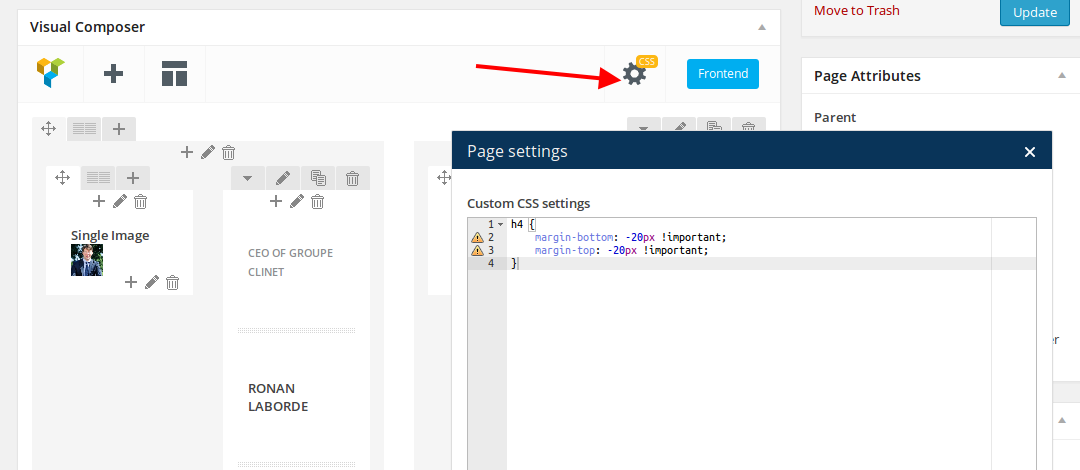
Please check the page now.
Thank you.
Regards,
Eva Kemp.
Hello,
The element where the link is added is related to Visual Composer plugin.
Their files have to be edited.
If you have necessary skills you may modify the files or you can ask at VC forum.
Thank you.
Regards,
Eva Kemp.
Hello,
The same issue with categories persists with default WordPress theme too.
You need contact WordPress support or visit their forum concerning this problem.
Thank you.
Regards,
Eva Kemp.
Hello,
As I see the tabs are shown fine on a mobile device:
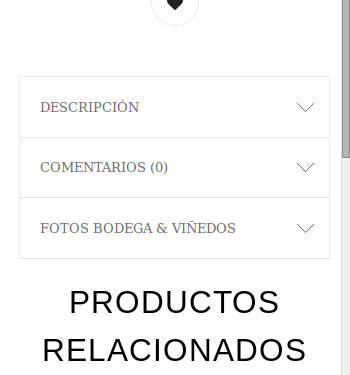
Are checking resizing a browser window?
Please provide us with FTP credentials to check the translation issue.
Thank you.
Regards,
Eva Kemp.
Hello,
Sorry but we don’t provide with 3rd-party plugins as we don’t test all plugins for compatibility with the theme.
You can test some plugins yourself.
Sorry for inconveniences.
Regards,
Eva Kemp.
Hello,
Sorry, but we still can’t connect to FTP.
What are the FTP host and port number?
Are you able to connect to your FTP account from your side?
Thank you.
Regards,
Eva Kemp.
Hello,
The word “Menu” is under the menu icon on a mobile device:
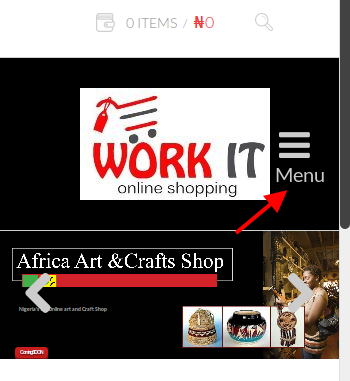
Also the checkout page is working fine. I was able to checkout successfully. Where do you see that error?
Thank you.
Regards,
Eva Kemp.
Hello,
You’re using very old theme version and the latest version of Woocommerce plugin.
Please update the theme to 2.4.1 version.
Now Visual Composer is no longer built-in, but is implemented in the theme as a separate plugin, which is suggested to be installed immediately after the theme installation. The plugin archive is included in the theme archive and to start working with it you just need to click “Install plugin” button.
Updating the theme to version 2.4.1 may cause some mess on the pages with sections and parallax effect! This is due to changes made in the code and separated visual composer. Therefore, after the upgrade be ready that you will need to recreate those pages! Please take our apologies for the inconveniences and we’ll be grateful if you treat it with understanding .
Always create a backup of all your files and databases before upgrading, and read instructions carefully on how to update your template properly.
https://www.8theme.com/demo/docs/legenda/index.html#!/upgrade
Also delete “wpbakery” folder from wp-content/themes/legenda before update to version 2.4.1!
Thank you.
Regards,
Eva Kemp.
Hello,
If you check the default file default.po in legenda/languages folder you’ll see that text and words are present in there.
So you haven’t translated all words as described in our documentation: https://www.8theme.com/demo/docs/legenda/index.html#!/how_to_translate
Regards,
Eva Kemp.
Hello @CJMillar82,
Are you using Legenda or Royal theme now?
If it’s Legenda, have you read the documentationhow to import demo pages: https://www.8theme.com/demo/docs/legenda/index.html#!/demo_data_installation > How to import Home Page ?
Thank you.
Regards,
Eva Kemp.
Hello,
You’re welcome.
Regards,
Eva Kemp.
Hello,
We don’t recommend to make such changes because product description can be overlapped on other bigger images if you move it closer to small images.
Sorry.
Regards,
Eva Kemp.
Hello,
The problem is caused by the function open_basedir.
You need contact your hosting provider to disable it.
Please read more information here:
http://www.templatemonster.com/help/open_basedir-restriction-in-effect-filex-is-not-within-the-allowed-paths-y.html
Thank you.
Regards,
Eva Kemp.
Hello,
We’ve removed the space at the bottom of the page.
You have a large padding value at the bottom:
http://gyazo.com/7d6f62c8585552d5bec16e5bf34e1633
There is not enough width for the video to add such padding value. You need remove it or your video should be higher.
Thank you.
Regards,
Eva Kemp.
Hello,
Sorry for a delay.
If you check your site using Chrome browser console you’ll the script error:
http://gyazo.com/46bd1aa742c9fdcf43abb33a3e9836bc
This is related to google map.
If you fix the map error the tooltips will work correctly.
Thank you.
Regards,
Eva Kemp.
Hello,
This may be related to Visual Composer element. You can ask for the solution at their forum.
Thank you.
Regards,
Eva Kemp.
Hello,
The map was added on the demo using Google Map element from Visual Composer editor.
Please use it instead of the one you’ve chosen:
http://imgur.com/6HW5xGk
I’ve commented this code in wp-content/themes/royal/js/etheme.js file (lines 1612-1616)
if($this.find('.current-cat.parent-level0, .current-cat, .current-cat-parent').length > 0) {
           $this.find('.current-cat.parent-level0, .current-cat-parent').find('.open-this').html(minusIcon).parent().addClass('opened').find('ul.children').show();
       } else {
          $this.find('>li').first().find('.open-this').html(minusIcon).parent().addClass('opened').find('ul.children').show();
       }
Thank you.
Regards,
Eva Kemp.
Hello,
Sorry, but unfortunately we don’t have such features.
Regards,
Eva Kemp.
Hello,
Sorry for misunderstanding.
Those messages are related to Visual Composer plugin. And their files need to be modified if you want to remove the notifications. You can ask about this at their support forum.
Thank you.
Regards,
Eva Kemp.
Hello @BSM9981,
Please describe your problem and provide us with wp-admin panel credentials in Private Content.
Thank you.
Regards,
Eva Kemp.
Hello,
Sorry for a long delay.
The issue with clicks will be fixed in our next update. It’ll be produced very soon.
Please check our site http://themeforest.net/item/royal-multipurpose-wordpress-theme/8611976 for a new theme version.
Thank you.
Regards,
Eva Kemp.
Hello,
If you want to create a button for downloading a pdf document you need use Call to Action element instead of Modal Box.
I’ve edited the code in custom.css and the border is visible again.
Sorry, but your second question is unclear.
What do you mean by “when I add the modal box other pages it does not show as the one above.”?
Thank you.
Regards,
Eva Kemp.
Hello,
Sorry but in this case you have to contact Woocommerce support as this is their configuration and PayPal home page is also visible in default WordPress theme.
Thank you for understanding.
Regards,
Eva Kemp.
Hello,
The problem might be caused by low values for post_max_size and upload_max_filesize functions. Also memory limit value needs to be increased.
Thank you.
Regards,
Eva Kemp.
Hello,
Sorry but this is related to Visual Composer element.
You can ask for this issue at their support forum.
Thank you.
Regards,
Eva Kemp.
Hello @Nebulas,
Please specify what problem you’re experiencing currently.
Also provide us with wp-admin panel credentials in Private Content.
Thank you.
Regards,
Eva Kemp.









