
Hello @BSM9981,
Please provide us with FTP credentials to investigate this issue.
Thank you.
Regards,
Eva Kemp.

Hello @BSM9981,
Please provide us with FTP credentials to investigate this issue.
Thank you.
Regards,
Eva Kemp.
Hello,
I’ve edited the code for youtube video and related videos are no longer shown.
As those are 2 different buttons they won’t be displayed the same. I’ve tried to change the style of Call to Action button but it still has problems. You can check it.
I’ve added the following code into CSS block:
.vc_call_to_action.vc_cta_btn_pos_left .vc_cta_btn {
    background-color: #E05945 !important;
    width: 220px !important;
    height: 30px !important;
}
.vc_btn-lg {
    padding: 4px 30px;
    font-size: 15px;
    border-radius: 3px;
}
Thank you.
Regards,
Eva Kemp.
Hello,
After you make changes for images sizes in Woocommerce Settings you need use this plugin http://wordpress.org/plugins/regenerate-thumbnails/ as recommended by Woocommerce team.
Please provide us with FTP credentials to investigate the issue with the products display.
Thank you.
Regards,
Eva Kemp.
Hello,
Your map isn’t full width, because you’re using boxed layout. If you change it to wide layout it will be shown the same as on our demo.
I’ve fixed the issue with the captcha image.
Please check.
Regards,
Eva Kemp.
Hello,
Could you please show us a link where you want to remove that option from?
Thank you.
Regards,
Eva Kemp.
Hello @zwoelfer,
You’re welcome.
Regards,
Eva Kemp.
Hello,
Please check at your host if allow_url_fopen and file_get_contents() functions are enabled on a server. Also ask your host to increase post_max_size and upload_max_filesize values.
After that try to import the demo template again.
Thank you.
Regards,
Eva Kemp.
Hello,
That’s great you were able to find the solution.
Enjoy your work.
Regards,
Eva Kemp.
Hello,
You’re welcome.
Regards,
Eva Kemp.
Hello,
In this case you need create a ticket at http://support.8theme.com/ and our specialists will look into this issue more deeply.
Thank you.
Regards,
Eva Kemp.
Hello,
You provided us with wp-admin panel credentials, but we need access to your FTP account. Please ask your host for the login details for FTP.
Thank you.
Regards,
Eva Kemp.
Hello @Rubien,
Please try to use Woocommerce shortcode [product_category category="category_name"].
Regards,
Eva Kemp.
Hello @zwoelfer,
I’ve imported the home page. Please check the site now but you have to readd your logo image.
The page is called “Front Page” in wp-admin panel > Pages.
Thank you.
Regards,
Eva Kemp.
Hello,
You’re welcome.
Regards,
Eva Kemp.
Hello,
The problem is you have price shown only for some products. We tried to align the buttons but because of the price. Please set it for all products to be able to customize the alignment.
Thank you.
Regards,
Eva Kemp.
Hello,
I’ve enabled Reviews tab in the product editor:
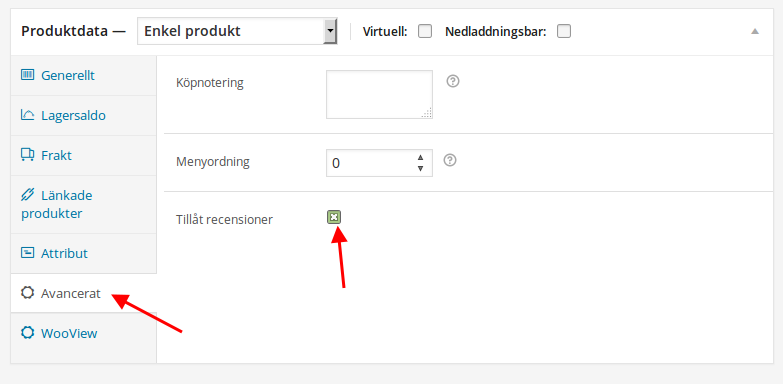
Please check the product page now:
http://justright.se/clients/imab/produkt/la-castelina-chianti-classico/
Regards,
Eva Kemp.
Hello,
Sorry, but this is WordPress configuration and if you copy the site to another url you need change the site link is the database. Or you can follow this instruction:
http://www.wpbeginner.com/wp-tutorials/how-to-properly-move-wordpress-to-a-new-domain-without-losing-seo/
Regards,
Eva Kemp.
Hello,
Please read our documentation: https://www.8theme.com/demo/docs/legenda/index.html#!/how_to_translate
Pay attention to this text:
Next edit wp-config.php located in the root folder of WordPress and use the $locale with prefix with your language name which should be similar to the translation file name. For example: $locale=’de_DE’;
Thank you.
Regards,
Eva Kemp.
Hello,
You have default.custom.css, but need to rename it to custom.css.
Please do this via FTP in the directory wp-content/themes/legenda.
Regards,
Eva Kemp.
Hello @dzzls,
Seems there are some restrictions on your server. Please contact your host and check if file_get_contents() function is enabled. If it’s disabled it may cause issues with import.
Thank you.
Regards,
Eva Kemp.
Hello,
We’ve taken your suggestion into our account and will try to include some lightbox plugin into the theme.
Please take our apologies.
Thank you.
Regards,
Eva Kemp.
Hello,
1. The text from pop up window is present in the file wp-content/themes/legenda/languages/default.po. Have you translated all words from there?
https://www.8theme.com/demo/docs/legenda/index.html#!/how_to_translate
2. Please provide us with FTP credentials to check the issue with the button translation.
Thank you.
Regards,
Eva Kemp.
Hello,
I’ve edited the code in CSS block on the page http://79.170.44.106/chateauclinet.com/meet-the-team/ and now it’s shown fine.
Please check.
Regards,
Eva Kemp.
Hello,
You should install WooCommerce plugin before theme installation as written in our documentation:
https://www.8theme.com/demo/docs/legenda/index.html#!/woocommerce
Please try to reinstall the theme after the Woocommerce installation.
Thank you.
Regards,
Eva Kemp.
Hello,
Concerning the password reset message you can edit it in the file wp-content/plugins/woocommerce/templates/emails/customer-reset-password.php.
Also error messages can be translated in the directory wp-content/plugins/woocommerce/i18n/languages.
Regards,
Eva Kemp.
Hello @NickW,
Please read our documentation carefully how to translate the theme:
https://www.8theme.com/demo/docs/legenda/index.html#!/how_to_translate and Woocommerce documentation:
http://docs.woothemes.com/document/woocommerce-localization/
Thank you.
Regards,
Eva Kemp.
Hello @zwoelfer,
Please provide us with wp-admin panel credentials.
Thank you.
Regards,
Eva Kemp.
Hello,
To have PDF file opened in a new tab you can use “Call to Action Button 2” element where this option is present instead of “Call to Action Button” element.
Also I’ve added this code to custom.css file to hide search icon:
.header-type-3 .top-bar .search{
   visibility: hidden;
}
Thank you.
Regards,
Eva Kemp.
Hello,
Sorry, but we still can’t connect to FTP with the provided credentials getting error:
Error: Authentication failed.
Error: Critical error
Error: Could not connect to server
Please check if you provided us with the correct login details. Are you able to log in yourself?
Thank you.
Regards,
Eva Kemp.
Hello,
Could you please describe with more details what you’re trying to achieve?
Thank you.
Regards,
Eva Kemp.









