
Hello,
We haven’t made any changes in wp-admin panel.
Now we can access it. Have you changed login details?
Regards,
Eva Kemp.

Hello,
We haven’t made any changes in wp-admin panel.
Now we can access it. Have you changed login details?
Regards,
Eva Kemp.
Hello,
Please use this code as well:
.recentCarousel .slide-item .caption p {
    font: 13px/24px Raleway !important;
}
Regards,
Eva Kemp.
Hello,
As I see now hover color for menu items is grey, but you have some items with red color. Do you want to change them as well?

Thank you.
Regards,
Eva Kemp.
Hello,
May we reinstall the theme?
Please confirm you have already had a back up of the files and database.
Thank you.
Regards,
Eva Kemp.
Hello,
What theme version are you using?
New plugins versions are included in the theme package and you can update them via FTP just reuploading the folders. The plugins are located in the theme archive in blanco/code/plugins directory.
Please try to update the slider plugin. If you have difficulties with it we can update it for you. Provide us with wp-admin panel and FTP credentials.
Thank you.
Regards,
Eva Kemp.
Hello,
I’ve tested your site with our theme enabled and it loads quite fast:
http://imgur.com/TnZHpXh
You can try to disable all 3rd-party plugins and check the site again.
Thank you.
Regards,
Eva Kemp.
Hello,
As I see top bar has red background color:
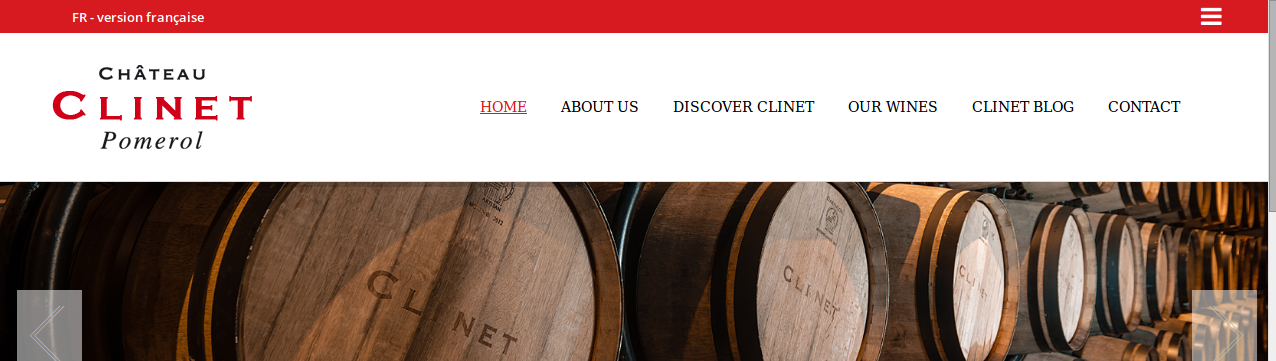
Concerning the “Some Figures and Facts” section please provide us with wp-admin panel credentials in Private Content.
Could you please show a screenshot how it was displayed?
Thank you.
Regards,
Eva Kemp.
Hello,
We’re sorry for a long delay.
Some variants of templates were not included in theme import, due to using essential grid visual composer element, which should be imported separately.
I’ll explain you how to create such pages and you’ll be able to create them in no time. Or if you don’t want to do this just provide your admin panel access and we’ll create it for you.
How to create Street Photo variants:
1. Go to Theme Options > Header > select 14 (or 13) type of header
2. Import Essential Grid as described in our documentation https://www.8theme.com/demo/docs/royal/index.html#!/essential_grid
3. Go to Pages > Add new. Use visual Composer and add Essential Grid element. Select the needed grid. All Page Layout settings (Sidebar, footer, heading) should be disabled. Save page and set it as Front page in Settings > Reading.
Thank you.
Regards,
Eva Kemp.
Hello,
Have you made any changes in the original theme files?
Please provide us with FTP credentials as well.
Thank you.
Regards,
Eva Kemp.
Hello,
Are you using WPML plugin?
You can translate the “empty cart” text with this plugin.
Regards,
Eva Kemp.
Hello,
I’ve disabled “Ajax “Add To Cart”” in Theme Options > Single Product Page and products are added to cart successfully.
This issue should be fixed in the next update.
Sorry for inconveniences.
Thank you.
Regards,
Eva Kemp.
Hello,
To make a site multilingual you need use WPML plugin http://wpml.org/ .
Sorry, but it’s not included in the theme package. You have to buy it yourself.
Regards,
Eva Kemp.
Hello,
I’ve updated the theme. Please check Checkout page now.
Regards,
Eva Kemp.
Hello,
I’ve edited Permalinks settings. Please check your products links now. Clear browser cache before.
As I see you haven’t translated all words in the file wp-content/themes/legenda/languages/es_Es.po.
Please do this.
Thank you.
Regards,
Eva Kemp.
Hello,
You can update the theme without any worries. The fix is included in the new theme version.
Thank you.
Regards,
Eva Kemp.
Hello,
Please add this code in custom.css:
.meta-title { display: none !important; }
Thank you.
Regards,
Eva Kemp.
Hello,
Have you created custom.css file and enabled it in Theme Options?
How to create custom.css you can watch in this tutorial (it’s for Legenda theme but the process is the same).
If so, then edit the code and add “!important”:
.menu > li > a:hover {
color: inherit !important;
}
Thank you.
Regards,
Eva Kemp.
Hello,
We’re unable to connect to FTP with the credentials you provided. Please check them.
Also you can update the plugin yourself. The new version is located in the theme package that you downloaded in royal/framework/plugins directory. Upload new “Ultimate VC Addons” folder via FTP to the wp-content/plugins directory.
Thank you.
Regards,
Eva Kemp.
Hello,
Please add this code into custom.css file:
.tbs {
    display: none;
}
.header-type-6 .header .header-logo img {
    max-width: 700px !important;
    margin-left: 140px !important;
}
Thank you.
Regards,
Eva Kemp.
Hello,
Please add this code into custom.css file:
.content-article {
    font: 13px/24px Raleway !important;
}
Thank you.
Regards,
Eva Kemp.
Hello,
As I see you’ve uploaded a lot of folders with different theme versions.
Please upload only one “royal” folder:
https://www.8theme.com/demo/docs/royal/#!/installation_upgrade
Thank you.
Regards,
Eva Kemp.
Hello,
You need create variable products. Please read Woocommerce documentation:
http://docs.woothemes.com/document/product-variations/
In the settings for variable products you’ll be able to manage their availability.
Thank you.
Regards,
Eva Kemp.
Hello,
Have you tested if the issue persists with default WordPress theme?
Please check it.
Thank you.
Regards,
Eva Kemp.
Hello,
In wp-admin panel go to XMarket – Theme Settings > Single Product Page section and untick “Enable Cloud Zoom for products”. Don’t forget to save changes.
Thank you.
Regards,
Eva Kemp.
Hello,
Are you using any plugin for events?
In this case you should refer to that plugin documentation.
Thank you.
Regards,
Eva Kemp.
Hello,
Sorry, my fault.
Please check your subdomain now and clear your browser cache before.
Thank you.
Regards,
Eva Kemp.
Hello,
I’ve reuploaded theme files for the parent theme.
Please check your site now.
Regards,
Eva Kemp.
Hello,
You’ve uploaded the theme into subfolder, but the theme should be located in wp-content/themes/idstore, not in wp-content/themes/idstore_v3.6/idstore.
Please try to reinstall the theme https://www.8theme.com/demo/docs/idstore/index.html#!/installation
and create a back up of files and database before.
Thank you.
Regards,
Eva Kemp.
Hello,
You’re welcome.
Regards,
Eva Kemp.
Hello,
You can find the latest versions of plugins in the new theme package http://themeforest.net/item/royal-multipurpose-wordpress-theme/8611976 , extract the archive and the plugins are located in royal/framework/plugins directory.
Thank you.
Regards,
Eva Kemp.









