
Hello,
Please provide us with FTP credentials as well.
Thank you.
Regards,
Eva Kemp.

Hello,
Please provide us with FTP credentials as well.
Thank you.
Regards,
Eva Kemp.
Hello,
Could you please show us a screenshot of the issue to have clear understanding?
Thank you.
Regards,
Eva Kemp.
Hello,
In this case you may try to use some plugin as our theme doesn’t have such feature. Sorry.
Regards,
Eva Kemp.
Hello,
I’ve edited the code.
Please check the menu now.
Regards,
Eva Kemp.
Hello @timbor,
I’ve checked your site and it loads quite fast:
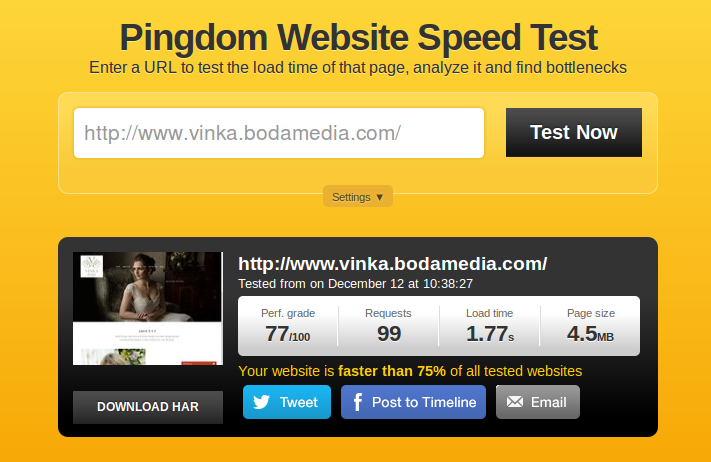
Also I tested it with default WordPress theme and load time was 4.24s, even more than with our theme.
The issue may be caused by some plugins that makes site load slower.
Thank you.
Regards,
Eva Kemp.
Hello,
If you want to create one page navigation please follow the instruction in our documentation:
https://www.8theme.com/demo/docs/royal/#!/3_one_page
Thank you.
Regards,
Eva Kemp.
Hello,
All plugins are external extensions which are included into theme because for each product we purchase “Extended license” and that’s why we are able to include it into them. These plugins work fine without activation and you can always get actual version if you want directly from us. Just ask and we’ll send a current version to you. We update plugins with theme updates from time to time so plugins will be also updated with each next theme update. The option with registering of the plugins has been already added to plugin and this only allows you to get automatic updates and support for this plugin directly from an author if you need. You don’t need to register these products because it is not required but if you want to get those features, then you need to purchase the plugins directly from the author. This is how it works for all themes on Themeforest and not only in our case.
Thank you.
Regards,
Eva Kemp.
Hello,
Please provide us with FTP and wp-admin panel credentials in Private Content.
Have you made any changes in the original theme files?
Regards,
Eva Kemp.
Hello,
Please provide us with wp-admin panel credentials in Private Content.
Thank you.
Regards,
Eva Kemp.
Hello,
Unfortunately reinstalling the theme didn’t help, because your database is already filled.
You have to restore the site from your back up.
In this case we recommend you to remove all files and clear your database, install clean WordPress and contact us. We’ll proceed with the theme installation.
Sorry for inconveniences.
Regards,
Eva Kemp.
Hello,
Please update the theme to the latest 1.5.2 version.
Thank you.
Regards,
Eva Kemp.
Hello,
Please read our documentation how to create a slider:
https://www.8theme.com/demo/docs/royal/#!/slideshow and http://revolution.themepunch.com/documentation/
Regards,
Eva Kemp.
Hello,
You can refer to our knowledge base:
https://www.8theme.com/knowledge-base/clearing-facebooks-share-cache/
Thank you.
Regards,
Eva Kemp.
Please add also this code:
@media (max-width: 480px) {.menu > li.current-menu-item > a, .menu >li a:hover {
    color: white !important;
}}
Regards,
Eva Kemp.
Hello,
You’re using old theme version. Please update it to 3.6 version: http://themeforest.net/item/idstore-responsive-multipurpose-ecommerce-theme/4792186
https://www.8theme.com/demo/docs/idstore/index.html#!/upgrade
Thank you.
Regards,
Eva Kemp.
Hello,
Your original image is small.
The original dimensions should be approximately 2 160px × 2 349px. So please reupload your image.
Thank you.
Regards,
Eva Kemp.
Hello,
You need add this code in custom.css:
.site-description {
    font-size: 25px;
    color: red;
}
Replace the values with your own ones.
Thank you.
Regards,
Eva Kemp.
Hello,
You’re welcome.
Regards,
Eva Kemp.
Hello,
Please provide us with wp-admin panel and FTP credentials in Private Content.
Thank you.
Regards,
Eva Kemp.
Hello,
You’re welcome.
Regards,
Eva Kemp.
Hello,
I didn’t make any changes.
Perhaps there was a problem with your Internet connection.
Regards,
Eva Kemp.
Hello,
Have you made css changes in style.css or custom.css?
If they are in the original style.css, then move your modifications to custom.css file.
Thank you.
Regards,
Eva Kemp.
Hello,
I’ve added this code into custom.css:
.header2 .et-mega-search {
    left: 145%;
}
Is search form located where you wanted?
If no please show a screenshot how you wish to display those elements?
Thank you.
Regards,
Eva Kemp.
Hello,
Please provide us with wp-admin panel credentials in Private Content.
Thank you.
Regards,
Eva Kemp.
Hello,
You’re welcome.
I’ve just changed setting in Theme Options, that’s all.
Sorry if something went wrong.
Regards,
Eva Kemp.
Hello,
You’re welcome.
Regards,
Eva Kemp.
Please use this code to fix the issue with mobile menu:
.et-mobile-menu li a, .et-mobile-menu li a:hover {
   color: black !important;
}
Thank you.
Regards,
Eva Kemp.
Hello,
I’ve activated Royal parent theme and disabled all 3rd-party plugins. After that theme works fine and changes are saved in Theme Options. Now you need deactivate plugins one by one and find out what is causing the issue. Also check the modifications you made in the child theme.
Thank you.
Regards,
Eva Kemp.
Hello,
In this case please add the following code into custom.css:
.menu > li.current-menu-item > a  {
    color: black !important;
}
Thank you.
Regards,
Eva Kemp.
Hello,
Please provide us with FTP credentials in Private Content.
Thank you.
Regards,
Eva Kemp.









