
Hello,
You can use this plugin https://wordpress.org/plugins/really-simple-captcha/
If there are any difficulties please provide us with wp-admin panel and FTP credentials in Private Content.
Thank you.
Regards,
Eva Kemp.

Hello,
You can use this plugin https://wordpress.org/plugins/really-simple-captcha/
If there are any difficulties please provide us with wp-admin panel and FTP credentials in Private Content.
Thank you.
Regards,
Eva Kemp.
Hello,
Please provide us with the access to all site files, from root directory of the site.
Thank you.
Regards,
Eva Kemp.
Hello,
You can refer to this article as an example:
http://www.designparc.com/wordpress-child-theme-wp-e-commerce-move-product-title-to-description-column/
Regards,
Eva Kemp.
Hello,
Happy New Year!
You should add price for your variations in products editor.
Please check it.
Thank you.
Regards,
Eva Kemp.
Hello,
What is your site url?
Thank you.
Regards,
Eva Kemp.
Hello,
We’re glad you managed to fix the issue.
If there are any questions let us know.
Regards,
Eva Kemp.
Hello,
Please add this code in custom.css file:
th.product-quantity, th.product-quantity .qty-block {
display: none;
}
th.product-subtotal {
position: absolute;
padding-left: 50px;
}@media only screen and (max-width: 479px) { th.product-quantity, th.product-quantity .qty-block {
display: none;
}
th.product-subtotal {
position: absolute;
padding-left: 50px;
}
}Thank you.
Regards,
Eva Kemp.
Hello,
I’ve created Portfolio project for “Diseño A”. Please check it.
Thank you.
Regards,
Eva Kemp.
Hello,
Sorry, but I don’t see any problems with images on the link you provided.
Could you please show a screenshot of the issue?
Thank you.
Regards,
Eva Kemp.
Hello,
You’re welcome.
Regards,
Eva Kemp.
Hello,
Please provide us with wp-admin panel and FTP credentials in Private Content.
Thank you.
Regards,
Eva Kemp.
Hello,
Please add this code in custom.css file:
.top-bar .submenu-dropdown ul li a:hover {
color: #46166b !important;
}
Thank you.
Regards,
Eva Kemp.
Hello,
1. To add images as a submenu item you need add it as a last item:
https://www.8theme.com/demo/docs/legenda/index.html#!/primary_menu > Menu images
2. To divide submenu into columns view our documentation: https://www.8theme.com/demo/docs/legenda/index.html#!/primary_menu > Colums in menu
3. Please read the documentation: https://www.8theme.com/demo/docs/legenda/index.html#!/primary_menu > Menu types
4. Please add this code into custom.css file:
.main-nav .menu > li .nav-sublist-dropdown {
    background-color: rgba(255, 255, 255, 0.95);
}
5. To change logo size add this code in custom.css file:
.header7 .logo img {
    max-width: 500px;
}
Thank you.
Regards,
Eva Kemp.
Hello,
As I see you didn’t add CSS code in custom.css, and you didn’t create this file.
Also we recommend you to update theme to the latest version 2.5 and Woocommerce plugin as well.
Don’t forget to create back up of the files and database before update!
Thank you.
Regards,
Eva Kemp.
Hello,
I’ve updated the second slide in Revolution Slider.
Please check it now.
Thank you.
Regards,
Eva Kemp.
Hello,
You can select Posts Grid element in Visual Composer editor and choose “product” as post type. There you’ll be able to select “Order”.
Thank you.
Regards,
Eva Kemp.
Hello @brandonrowell,
You need use this Google Map element in VC editor:
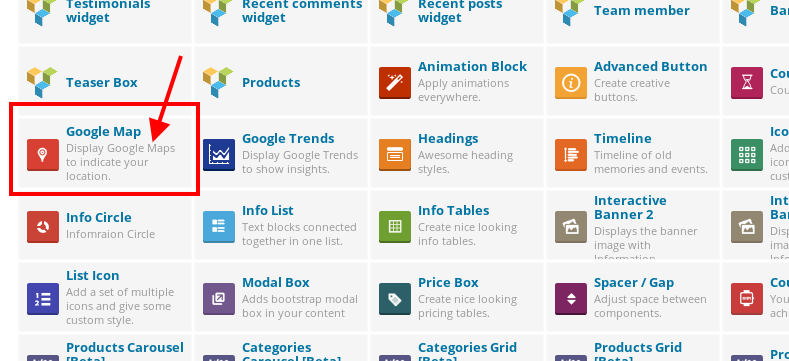
Please try it.
Thank you.
Regards,
Eva Kemp.
Hello,
Have you installed the theme? To activate it go to wp-admin panel > Appearance > Themes and activate Royal theme.
After that in dashboard you’ll be asked to install required plugins.
Please check it.
Thank you.
Regards,
Eva Kemp.
Hello,
When a visitor subscribes for newsletter he should tick “Don’t show this popup again” in pop up window. Unfortunately there is no other possibility. Sorry.
Regards,
Eva Kemp.
Hello,
You can select Categories Grid Beta element in Visual Composer editor and select categories there which you want to display.
Regards,
Eva Kemp.
Hello,
You can add this code into custom.css file and then remove it when you don’t need it:
.page-heading-slider .wpb_revslider_element {
   display: none;
}
Thank you.
Regards,
Eva Kemp.
Hello,
Please add this code in custom.css file:
div#map_54a7f7b8345af {
width: 1100px;
min-width: 1100px;
left: 0px;
}
How to create custom.css you can watch in this tutorial (it’s for Legenda theme but the process is the same).
Thank you.
Regards,
Eva Kemp.
Hello,
As I see your logo high resolution on mobile devices.
Do you still have problems?
Could you please show us a screenshot?
Thank you.
Regards,
Eva Kemp.
Hello,
Please provide us with a link to your site.
As I understood you want to display top bar on all mobile devices, don’t you?
Regards,
Eva Kemp.
Hello @brandonrowell,
To create photos on Contacts page you need use Team Member element in Visual Composer editor.
Please try.
Thank you.
Regards,
Eva Kemp.
Hello,
We’re glad you’ve found the solution.
This topic will be closed.
Regards,
Eva Kemp.
Hello,
Please try to add this code in custom.css file:
.containerInner img {
padding-right: 60px;
padding-left: 30px;
}
To create custom.css you need rename default.custom.css to custom.css via FTP in wp-content/themes/blanco directory and then enable it in Blanco – Theme Settings > Enable Custom CSS file.
Thank you.
Regards,
Eva Kemp.
Hello,
That is an icon which you should edit with some image editor. It’s located in wp-content/themes/royal/images/sprite/icons.png.
Thank you.
Regards,
Eva Kemp.
Hello,
You need add this code in custom.css file:
.product_meta {
   display: none;
}
Regards,
Eva Kemp.
Hello,
You’re welcome.
Regards,
Eva Kemp.









