Problem related to your server configuration: file_get_contents() is disabled in the server configuration. Contact with your hosting provider to solve your issue.
Regards,
Olga Barlow
8theme
Support staff
September 3, 2014 at 07:57
Hello,
Please, recreate your pages according to new rules.
Regards,
Olga Barlow
8theme
Support staff
August 27, 2014 at 08:22
Hello,
If you want to add product categories as subitems into menu read here how to do it.
If you want to display categories and subcategories directly on shop page go to WooCommerce > Settings > Products > Shop Page Display > Show Subcategories & Default Category Display > Show Subcategories
Regards,
Olga Barlow
8theme
Support staff
July 17, 2014 at 13:12
Hello, @HighPassion,
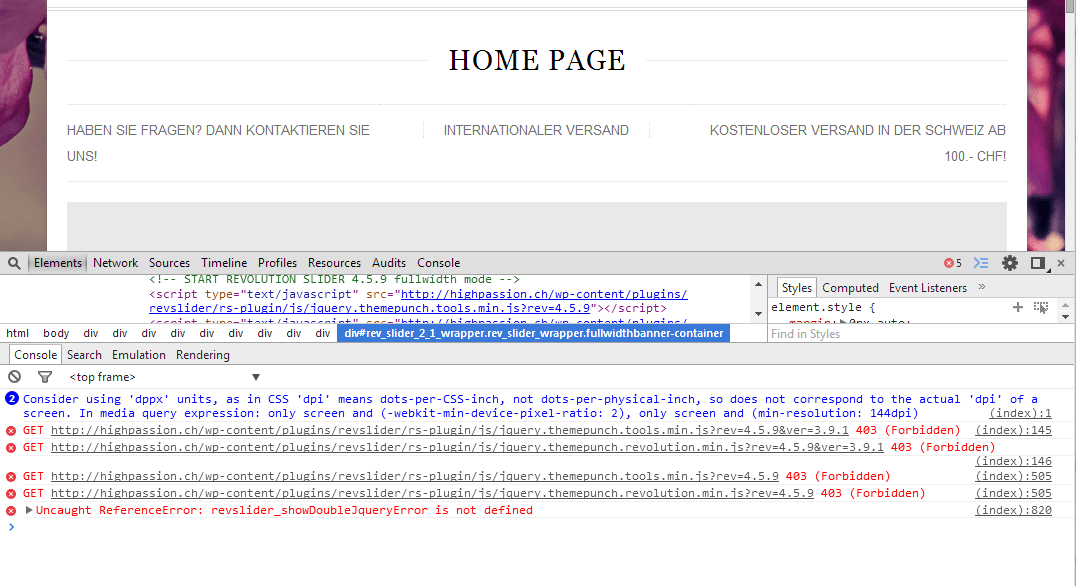
There are few errors with scripts in console ( Failed to load resource: the server responded with a status of 403 (Forbidden) see screenshot)
Very likely they caused your issue with slider. Please, check if these files exist and permissions for them.
Regards,
Olga Barlow
8theme
Support staff
July 16, 2014 at 08:04
Hello, @blakejnolan,
1) Following code adds some space between cart page information and products slider: .woocommerce-cart .slider-container{margin-top: 30px;}
We have fixed it on your site, check, please.
This slider is cross sells products slider, “Our Offers” is upsells, so these are two different types of linked products and if you delete one of them the other will be displayed.
2) You have added “8theme – Brands” widget into Single Product Page widget area, that’s why you see list of existing brands in sidebar. Delete it if you don’t like and leave just empty text widget if you want to have sidebar on single product page.
Regards,
Olga Barlow
8theme
Support staff
July 10, 2014 at 07:06
Hello, @mikeoc,
If you want to change Post title on single blog post page you should edit legenda/single.php, line 75. Create child theme, copy this file into you child theme and do necessary changes.
If you want to change Post title to H1 on Blog page then you should edit content.php, content-grid.php or content-timeline.php, it depends on what Blog layout you are using.
Regards,
Olga Barlow
8theme
Support staff
June 26, 2014 at 10:16
Hello,
You can also go to Theme Options > Contact Form > Choose contact page layout > Custom Layout and add your image as page content.
Please, check if you haven`t enabled the sidebar for that page? If you are using element section you need not enabled sidebar.
8theme
Support staff
April 4, 2014 at 06:29
Hello,
As I can see you are using version 1.5 of XMarket theme, which is not compatible with WooCommerce 2.1.x. Please, update your theme to version 1.7.
Before update, please, delete woocommerce folder from wp-content/themes/xmarket/ to delete all the out of date files.
Also don’t forget to backup all your files!
To update theme:
– Download the zipped package from ThemeForest and extract to your desktop.
– In the extracted package you will find archive xmarket_theme_v1.7.zip, which is the WordPress theme.
– Extract xmarket_theme_v1.7.zip file and upload the extracted folder to /wp-content/themes/ folder on your server with overwriting.