Forum Replies Created

Viewing 30 posts - 31 through 60 (of 63 total)
  • Avatar: tamarica
    tamarica
    Participant
    October 11, 2015 at 20:08

    hello,
    i dont see my reply to you from morning so maybe i forgot to submit it, and if not , sorry for sending again.

    i checked the newsletter and its fine now:)
    also about the default WPML switcher it’s also fine located at the left top of the pages as i want, but is it possible to locate it also at the Home front page next to the logo? (not on the menu otherwise it will appear at all pages and i dont want that)/

    one more thing.. the facebook icon of the SHARE links on the product page isnt working properly. it just share the product title but not the image. how can i fix that?

    thank you and have a good week:)
    tamarica.
    Avatar: tamarica
    tamarica
    Participant
    October 9, 2015 at 12:00

    hi,

    about the newsletter:

    at the setting of MailChimp WP I set the WooCommerce checkbox position to: “after the billing detail” and also checked the checkbox that says: “Woocommerce checkout”.
    at the checkout page the checkbox appear but when i marked it, it doesn’t send the details of the customer to my newsletter account that connected to MailChimp.

    regarding to the Lang:

    what does it mean “write url of the translated page for this language”? many pages are opened depending on my choice.

    please can you explain me this issue with more details?

    thank you for your help. best regards,
    tamarica.

    Avatar: tamarica
    tamarica
    Participant
    October 9, 2015 at 02:05

    hello again,

    the full code at the private area.

    one more thing ,please, about the checkout page. i set a checkbox for newsletter and i assign to MailChimp.
    i create a form for the newsletter with a link on the top right menu and it works fine, but the checkbox that connected to woocommerce doesn’t.
    i would like to have these 2 options.
    am i doing something wrong? do i need to configure something more?

    Best regards,
    tamarica.

    Please, contact administrator
    for this information.
    Avatar: tamarica
    tamarica
    Participant
    October 9, 2015 at 01:22

    hi,

    i removed this file, but still i dont understand what i should put at the link of the second lang.
    for now its looks like this:

     <div class="languages">
     <ul class="links">
      <li class='active'>EN</li>
      <li>|</li>								
      <li><a href="#">עברית</a></li>								
    </ul>
    </div>

    Best regards;
    tamarica.

    Avatar: tamarica
    tamarica
    Participant
    October 6, 2015 at 12:43

    thank you very much for your help Jack Richardson.
    i added few more things in css and im very happy with the result.

    have a good day.
    tamarica

    Avatar: tamarica
    tamarica
    Participant
    October 6, 2015 at 08:48

    Hello Jack Richardson,

    sorry but i didnt really meant this kind of setting.
    is it possible that the products page will remain as before with 5 products and the subcategory and categories pages will show 3 images same as the categories page set like now?

    Best regards,
    tamarica.

    Avatar: tamarica
    tamarica
    Participant
    October 5, 2015 at 21:47

    thank you!!!

    by the way it goes together with this one:

    .fixNav-enabled.admin-bar .header-wrapper{
    background-color: rgba(255,255,255, -1);
    }

    have a good day and thank you again for your support:)

    Avatar: tamarica
    tamarica
    Participant
    October 5, 2015 at 20:25

    thank you very much. the slider works great now:)
    about the menu it is possible with css to make the white background behind the menu disappear?
    i tried to do it with opacity but the menu disappeared as well as the icon of the shopping basket, logo and all.

    thank you.
    tamarica.

    Avatar: tamarica
    tamarica
    Participant
    October 5, 2015 at 19:42

    hello again, i changed my mind about the menu at the left side.
    but the slider still dont know how to solve it.

    thanx and have a good day:)
    tamarica.

    Avatar: tamarica
    tamarica
    Participant
    October 5, 2015 at 09:24

    hi, just to be more clear..
    i would like to have the ability to change the menu to the left side of the home page and if i wont like it so i can change back to how it was.. want to play with all variations to see what i like the most. is it possiblle or need to change something in the code so i cant change it back by myself if i want?

    and about the master slider the reason i wanted to use it at the front page because it looks less complex to dill with than the revolution. dont mind to stay with revolution just want to make it automatically move from one slide to the next with fade effect and slowly.
    couldnt found where to set it.

    thanx!!

    Please, contact administrator
    for this information.
    Avatar: tamarica
    tamarica
    Participant
    October 5, 2015 at 08:06

    hello , one more question about the slider. im trying to integrate the Master slider but i cant see it at the front page. just the revolution slider.
    why is that? i understood that i can put it manually everywhere i want, but i would like to have it at the front page not as a small slider. i want it to cover the all page as revolution does.

    thank you:)

    Avatar: tamarica
    tamarica
    Participant
    October 4, 2015 at 21:29

    hello Eva,
    i didn’t see until now that you replied to me. sorry but i fixed it and forgot to let u support know about it.

    have another question,if i may please..
    can i make my home page with menu on the left of the page and the other pages to remain as they are now?
    i tried to do that from the admin ->theme options->general->header type->variant 9
    and it changed all the pages.
    by the way what is the difference between variant 9 and 6 ?

    Best Regards,
    tamarica

    Avatar: tamarica
    tamarica
    Participant
    September 23, 2015 at 08:32

    hi, sorry one more question forgot to ask about translation the search engine..
    i translated the popup search but the page that i redirected to when result not found is back to english. where can i change this page?

    thank u again!!

    tamarica.

    Avatar: tamarica
    tamarica
    Participant
    September 23, 2015 at 08:28

    hello,
    its still doesnt work for me:(

    i located 2 lan switchers. one with the flags at the header main menu which is work fine (but i dont want it for the future, its just for now as a sample for switching between languages) but the other one which located on the top left side (like in your demo), doesnt work.
    the href of the hebrew language isnt correct and i dont know what to put over there.

    also the other menu on the top right side ,when i change to hebrew , doesnt display right. there is no separation between the words. i can change it with css but dont know in which file to do it so it wont brake the english pages as well.

    thank u with best regards,
    tamarica.

    Please, contact administrator
    for this information.
    Avatar: tamarica
    tamarica
    Participant
    September 21, 2015 at 10:58

    hi, sorry for sending again mail to you..
    just wanted to say that i dont need help with the issue of the category and product pages. i used the editor and chose [8theme]product category instead of the woo product categories and it looks fine now:)

    but still need help ,please, with the other things that i mentioned before.

    Regards,
    tamarica.

    Avatar: tamarica
    tamarica
    Participant
    September 21, 2015 at 08:55

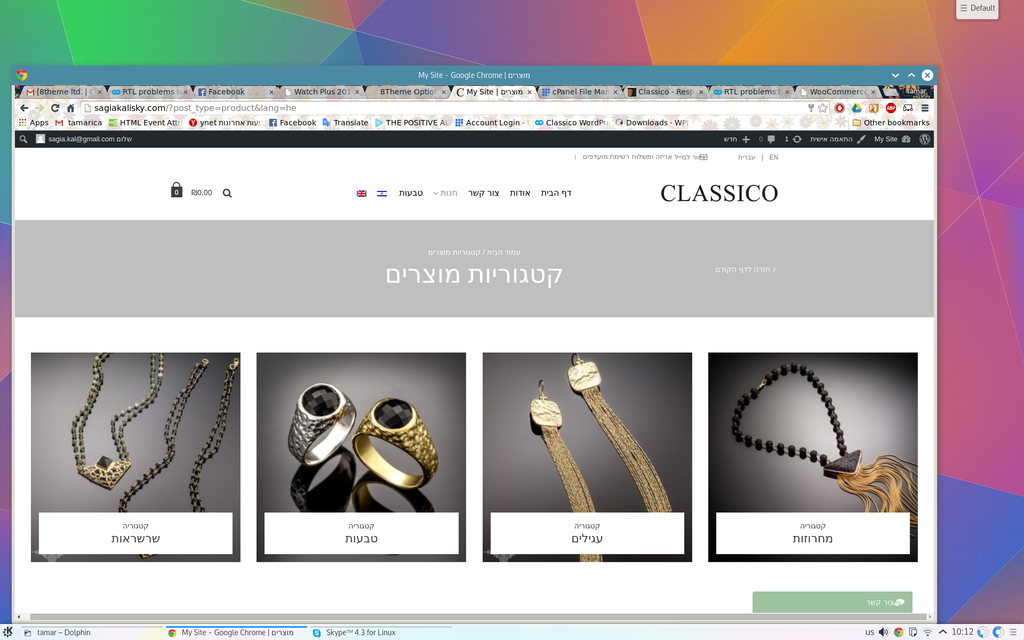
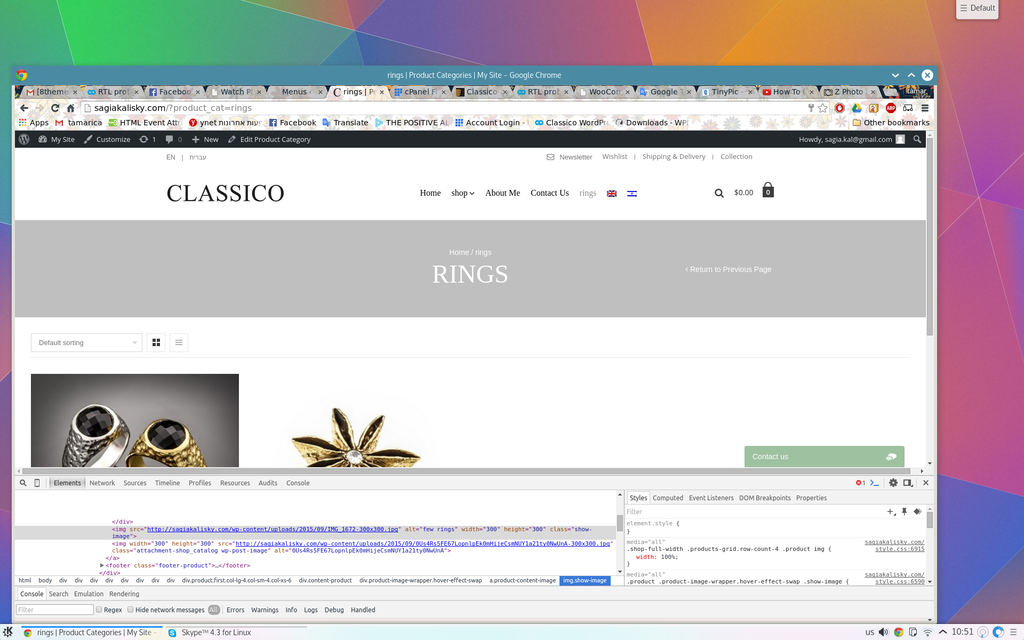
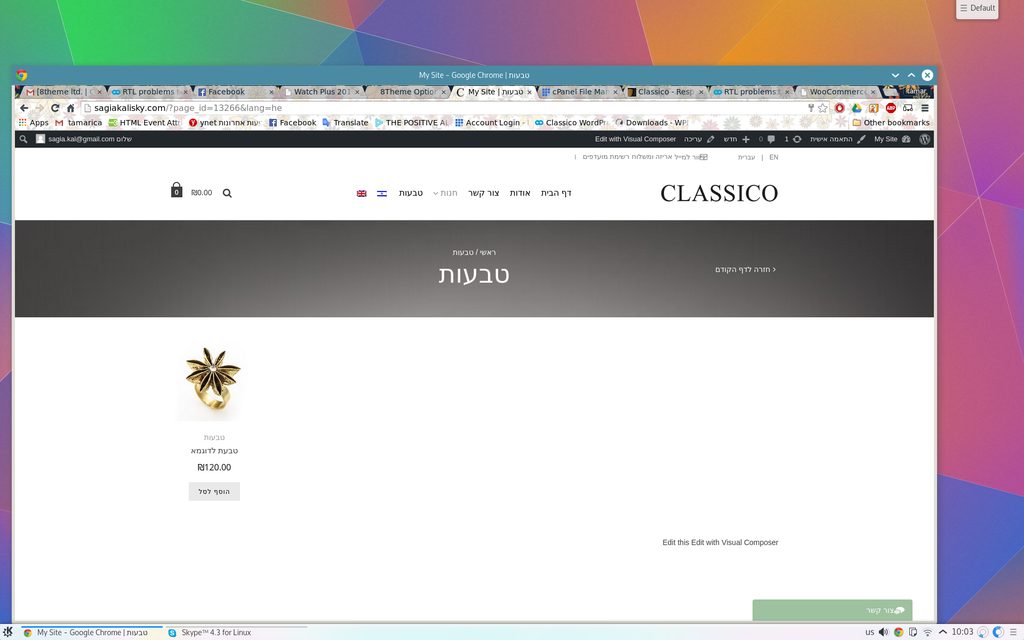
    the screenshots:

    1. top right menu

    2.categories page

    3. page of the rings cateory

    by the way, in HE page im missing one of the products (i guess because it configured to grouped)

    thanx again:)

    Avatar: tamarica
    tamarica
    Participant
    September 21, 2015 at 08:28

    hi,

    1. the top bar link in lan HE doesnt look good. there are no spaces between the words like in EN (“|”) it looks like one long sentence and the icon of newsletter to close.looks not good the top menu

    2.about switching the # to the url of the page in Hebrew i dont really get it because each page that i go is different url from the other so how should i know the general page of Hebrew? im missing something, right?

    3.when clicking from the menu on rings it works , but when clicking just the shop from the menu (without specify the category) than you redirect to “categories of products” and than when you click on rings than you redirect to different page. for example:
    categories page
    page of products(ring)

    something is wrong with the configuration of category page and products page.
    from the menu it goes to a page that i configure as category page with 6 columns
    but when i chose to go from the other way (from categories of product) than clicking on rings is taking me to a Custom Links (because i didnt know other way to do it).
    i wanted it to look like at your demo with 3 center columns at the category page and from there ,according to the category that you click on, you redirect to the specific products page with 6 columns

    hope i explained myself more clearly.

    Best regards;
    tamarica.

    Avatar: tamarica
    tamarica
    Participant
    September 20, 2015 at 23:33

    hello dear support,

    regarding to my last email to u, there were some things that i succeeded to solve and there are some new things that i would like to get your help, please…

    1.still stuck with the display of the top bar menu when i change the language to HE (RTL).doesnt look good.

    2.regarding to the languages area like in your demo … dont know what is the href that i need to put instead of the # at the /headers/parts/top-bar.php for the HE lan.

    3.succeeded with the translation of both plugins that i needed help before:)

    4. im trying to have like your demo .. 3 columns at the CATEGORY page and from there redirect to PRODUCT page specific to each category that display 5-6 product in a raw as the example:

    but without success. for example: when i press from the menu at the rings ,i redirect to the page of all the rings but if i press at the big photo of the category rings at the categories of product , than i redirect to a different place that i dont want.(sample of my site at the private content)

    hope that i express my self well. my english is not so good:(

    thanx,
    tamarica.

    Please, contact administrator
    for this information.
    Avatar: tamarica
    tamarica
    Participant
    September 19, 2015 at 07:43

    oops! i sent it wrong way.
    now the HE also dosnt work completely well.
    how should i know the exact href for the other lang?

    Avatar: tamarica
    tamarica
    Participant
    September 19, 2015 at 07:30

    hi, thank u for your replay:)
    i tried this:

    <ul class="links">
    <li class="active">EN</li>
    <li>|</li>								
    <li><a href="http://sagiakalisky.com/?page_id=13144&lang=he"> (HE)עברית</a></li>								
    </ul>

    the default is English and when i click the other lang it switch but than cant go back to English again. it doesnt show that the English is active(it doesnt show as a link)when im on the other language.

    Avatar: tamarica
    tamarica
    Participant
    September 14, 2015 at 16:51

    hello again,
    well i did some research and it looks like this is the only plugin that support the ecommerce plugin so i purchased it.
    i want it to look like your sample that on the left top it display the languages and currency icons .
    how can i do that?

    Regards,
    tamarica.

    Avatar: tamarica
    tamarica
    Participant
    September 14, 2015 at 09:59

    there is no other plugin which is free to use
    and support woocommerce multilingual as well?

    thanx,
    tamarica.

    Avatar: tamarica
    tamarica
    Participant
    September 8, 2015 at 10:05

    great!!

    than u very much!
    tamarica.

    Avatar: tamarica
    tamarica
    Participant
    September 7, 2015 at 21:38

    thank u for your replay.
    as i said before about the editing the newsletter: i find the place where to edit, but just simple one with text and image but how to insert the input signup with email and submit this to the admin email? this is i dont know.

    thanx and regard,
    tamarica.

    Avatar: tamarica
    tamarica
    Participant
    September 6, 2015 at 15:03

    and again regarding to my last question..
    im also fine with the cart and checkout.. finally find it after long of research!

    now i have just 2 question.. editing news letter still dont know how.
    and second: at my product page i can checked the “Mark product as New” only. where can i find the “sale” and “out of stock” ?

    thank u:)
    tamarica.

    Avatar: tamarica
    tamarica
    Participant
    September 5, 2015 at 21:43

    hi, regarding to my last contact with u.. im happy to say that i succeeded to solve question number 3 🙂

    unfortunately the others are still remain unsolved.

    the cart and checkout that are not listed at the “select a page” list.

    about how to edit the newslatter ,i think i find the place (8theme options -> e-commerce -> Promo Popup). is that right? because if yes, still dont get how to add the input email and the button for sign up.

    about the converting to coin.. its enough to download the Translation with WPML and it will solve language and coin accordingly?

    regards,
    tamarica

    Avatar: tamarica
    tamarica
    Participant
    September 4, 2015 at 19:59

    woww thanx!!

    helped me alot:))

    have a good day
    tamarica.

    Avatar: tamarica
    tamarica
    Participant
    September 4, 2015 at 14:02

    yes. it works great!
    thanx again:)

    Avatar: tamarica
    tamarica
    Participant
    September 4, 2015 at 11:35

    sorry forgot:/

    Please, contact administrator
    for this information.
    Avatar: tamarica
    tamarica
    Participant
    September 3, 2015 at 21:53

    hello,
    thank u very much for your help.
    the credentials are at the private section..
    Regards,
    tamarica.

    Please, contact administrator
    for this information.
  • 1 2 3
    Viewing 60 results - 31 through 60 (of 63 total)
Viewing 30 posts - 31 through 60 (of 63 total)
We're using our own and third-party cookies to improve your experience and our website. Keep on browsing to accept our cookie policy.