The issue has nothing to do with my website, it happens on all websites using Royal theme. To clarify what I mean, I have added some details in private content as I dont want my url or screenshots of my page to be public. Thank you.

The issue has nothing to do with my website, it happens on all websites using Royal theme. To clarify what I mean, I have added some details in private content as I dont want my url or screenshots of my page to be public. Thank you.
It happens on every page with royal theme and hover/swap images enabled. Please find my page in private content. Thank you.
Perfect, thank you very much!
I would prefer to solve this without installing more plugins. Anyway, the change you made in product-image.php has lead to another problem: Now, the add-to-cart-popup doesnt show the product image anymore.
Here is the original ROYAL code:
<?php echo apply_filters( 'woocommerce_single_product_image_html', sprintf( '<a href="%s" itemprop="image" class="woocommerce-main-image product-image" data-o_href="%s" data-o_srcset="%s" data-o_src="%s" title="%s">%s</a>', $image_link, $image_link, $image_srcset, $image_src[0], $image_title, $image ), $post->ID ); ?>
And here is what you changed in order to remove the error message:
<?php echo apply_filters( 'woocommerce_single_product_image_html', sprintf( '<a href="%s" itemprop="image" class="woocommerce-additional-image product-image" data-o_href="%s" data-o_srcset="%s" data-o_src="%s" title="%s">%s</a>', $image_link, $image_link, $image_srcset, $image_src[0], $image_title, $image ), $post->ID ); ?>
-> class=”woocommerce-additional-image product-image” instead of class=”woocommerce-main-image product-image”. But as said, the product image is not shown in the emodal anymore.
Any idea how to fix this?
Thatso strange..
No I am using no caching plugin. For testing purposes, I disabled all plugins except Woocommerce and the problem was still there. I really dont understand why this happens and why I am the only one with this problem. Can it be server- or php-version related?
I’ll try to explain it more clearly:
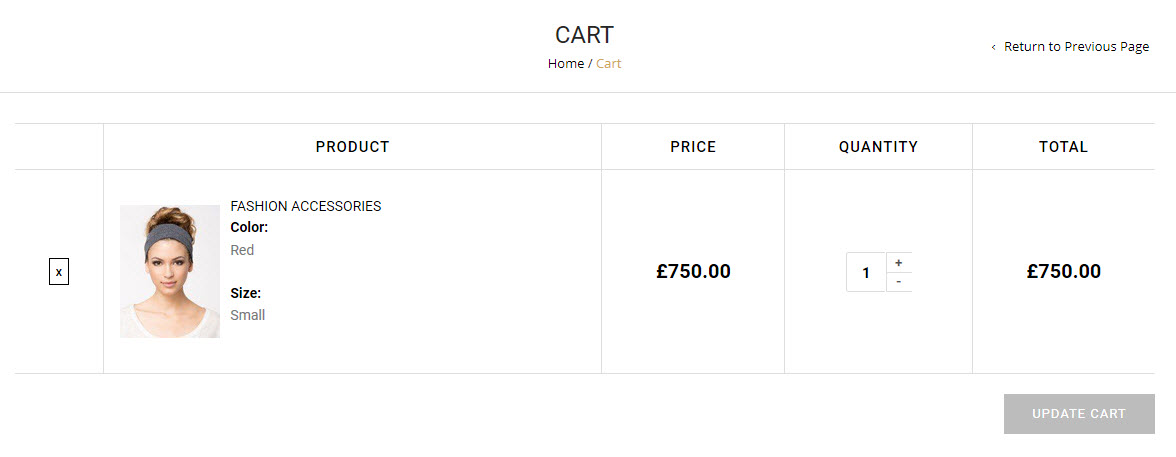
In your demoshop, your running older versions of Royal theme and woocommerce. The cart with a variable product looks like in this screenshot:
http://fs5.directupload.net/images/170505/yo7mcfm4.jpg
It shows the product name and the variation attributes (Color and Size).
In Woocommerce 3.0, this has been changed. Now, they use $_product->get_name() instead of $_product->get_title() (version 2.9.X) and the variation attributes are combined with the product name like “FASHION ACCESSORIES – Red, Small”. But in Royal theme, the variation attributes are not shown at all because it uses the deprecated $_product->get_title() – this shows only the product title and the variation attributes have disappeared.
My goal is to show the variation attributes again, but in the old style like on the screenshot above – not combined with the product name because I want to change their position and their look.
Do you know what I mean?
Maybe I missunderstood the function. I thought that this function outputs the product variation (p.e. “Size: Medium”). I am searching for a solution to achieve this. Since Woocommerce version 3.0.X, the variation isnt shown seperately anymore, it’s always combined with the product name like so: “Shirt – Medium”. Royal did not implement this behavior at all so there is no variation shown because Royal uses “$_product->get_title()” while woocommerce uses “$_product->get_name()”. But anyway I would like to re-seperate the variation from the product name, give it a seperate class and style it different…
Ok great the error message has gone, thank you. You’ve edited only royal/woocommerce/single-product/product-image.php – right?
Will the next update fix this?
Please find them in private content. I’ve disabled childtheme and switched to an untouched copy of Royal Theme 3.0.2 to make sure that no custom files affect the theme behavior. The problem with the slow loading images exists only in Firefox. But the error message appears also in Chrome.
Please dont post any screenshots or links to my page in public content.
Thank you.
I found a fix for that, so this issue is resolved.
And if I disable zoom in 8theme options, the error is gone.
Firefox console also shows this error if zoom (window or lens) are activated:
TypeError: d.dp is undefined
zoom.js (Line 24, Column 262)
And I noticed that the single product page loads slower than before and it seams that the zoom is blocking the page from loading. Sometimes the product images are not loaded properly and they are displayed in full size one after the other before they get included in the product gallery slider.
Thats weird.
I uploaded a whole new copy of Royal theme v. 3.0.2, made no changes at all.
Disabled all plugins except woocommerce v 3.0.4.
So there is no customization at all.
But the bug is still there (tested with firefox and chrome).
Do you have any idea what to check? PHP version is 5.6 (apache module).
Thanks, but there have to be different classes or so. Otherwise I dont understand why the code mentioned above works with Storefront, but not with Royal..?!
I know and I didnt copy the whole content, only added the parts that I wanted to modify and custom code for my plugins (that was a lot though).
I disabled all plugins except woocommerce and switched to Royal parent theme to be sure that no template files from my childtheme affect it, but that made no difference..
Ok but why isnt it your zoom effect?
The source is wp-content/themes/royal/js/zoom.js
No, its still there.
1. Clear the cache
2. Add a product to the cart > the popup appears immediately, but the loading buttons dont
3. Add another product to the cart > the popup AND the loading buttons appear immediately (thats how it should be)
Can you please recheck it?
Many thanks.
Woocommerce version is 3.0.4 and all plugins are up to date
Now there is this error in chrome console, but I dont see any unusual behavior with the zoom:
zoom.js:24 Uncaught TypeError: Cannot read property 'tn' of undefined
    at e (zoom.js:24)
    at e.load (zoom.js:26)
at HTMLImageElement.g.onload (zoom.js:24)Yeah, updating woocommerce from version 3.0.3 to 3.0.4. fixed the problem with the popup plugin. Thank you!
Updated the theme to version 3.0.2 and cleared the cache but the bug is still there 🙁
Thats no additional customization, I am only asking which classes Royal theme uses for the update cart button/cart quantity instead of the original woocommerce classes.
I did so and cleared the cache but the error is still there and the popup plugin still only works for simple products 🙁
Hmm ok thank you. So, one more issue to hope that the update will be released soon and will really fix the bugs.
Can you please give me an ETA for the new theme version?
Ok, thank you very much for your help!
Hm thats weird. I’ve just disabled the Cookie notice plugin a few minutes ago because I wanted to have as less plugins active as possible when you check. Then I’ve cleared the cache but the problem with slider revolution was still there. Then I’ve reactivated the plugin and all seems to work fine. Or did you make any changes?
I am using latest versions of all plugins.
Please find wp-admin credentials for my test page in private account. thank you.
PLEASE DO NOT POST ANY SCREENSHOTS OR LINKS OF MY PAGE, THANK YOU
I just reuploaded the file you sent me (thank you) but the bug is still there. Then I compared the file you sent me with the file that was included in the theme and noticed that the two files match, so there is no difference at all. Did you sent me the wrong file?
The bug only exists with variable products, for simple products everything works fine.
Did you make a rollback of the theme? I had version 3.1 installed, now just downloaded a fresh copy from codecanyon and installed it and noticed that its version 3.0.1…