

I tried re-installing the theme and it did not help. The only changes I made to Essential grid was the names of the categories, so I am not sure if that has something to do with it. Error logs provided below. Please advise, thanks

I tried re-installing the theme and it did not help. The only changes I made to Essential grid was the names of the categories, so I am not sure if that has something to do with it. Error logs provided below. Please advise, thanks
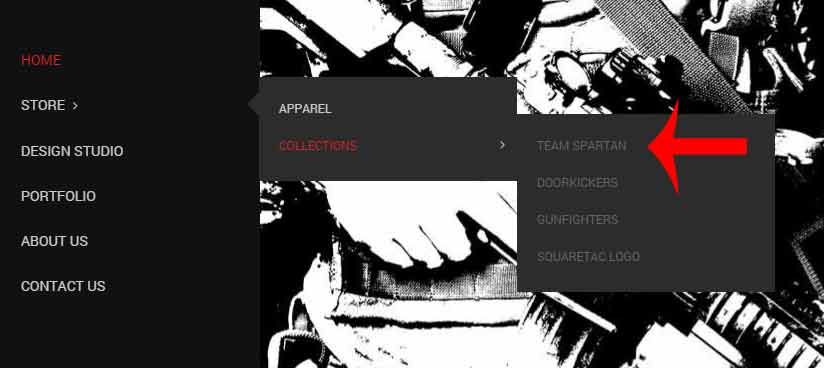
Robert, thanks so much for getting this figured out. I’m not sure how the code got changed, as I do not remember messing with it. However, it seems that everything is working well now. However, I still do not see the lighter color font for the third row drop down menu. Please refer to this picture:
Thanks for your time
Thanks for the response. I recently changed my web host from GoDaddy to WP Engine and started my website build all over and it seems that the issue has resolved itself. Thank you for your time on the issue.
I’m not seeing any difference, please advise.
That worked. Do you know of any inline code for the netMODIFY.com link that I can use to change the hover color to white?
The one in the picture looks good it’s the next drop down on ‘Collections’ that still needs to have the lighter font color. Also, the color of the font has not changed on the mobile version. Thanks
Looking good, but the third row of the drop down menu still has the old font color. Please advise, thank you for your time.
New log in credentials below. I submitted a ticket in reference to this post, but still no response. Please advise, thanks
This code did not work. Please advise
New log in credentials below
This code did not work. Please advise
New log in credentials below
Eva, are you able to log in?
Sorry for that. I am currently re-routing DNS records, but you should now be able to log in with the credentials previously given. Thanks.
It looks beautiful, thanks. One more thing on this (almost finished with the website). How do I move the “next” page text to the bottom of the page? It placed to high on the right side of the last product displayed. And is there anyway to increase the text size of the numbers for the cart? Thanks you for your time, this will get my shop to the perfect settings.
I used this code to move the edit icon on the products previously, which worked wonderfully, but I do not know how to do it for the next page text:
.spreadplugin-article .edit-wrapper-integrated, .spreadplugin-items .edit-wrapper {
float:none !important;
margin-top:230px !important;
}
Thanks for the response. This did not seem to fix the issue. Please advise
Eva,
Your awesome. Thanks for helping me get this resolved. Your company is amazing and your customer support is second to none.
Is there a way to replace the cart image with my own? I added an image to my WP Media Library (link provided below) and was wanting to replace the small cart icon with mine. Can you help me? Thanks
Sorry, I meant I am using Header 13. Thanks
Eva, thanks for your concern. I have decided to take my hosting else where. Hopefully my experience with WP Engine will be a good one. I just installed your theme for my new rebuild of my website and I still need to get that left slider button to appear. Please advise, new login credentials below. Thanks
Thanks for the reply. Sorry, but my website has crashed because Godaddys WordPress hosting back up service failed when I tried to go back a day. Godaddy is trying to fix the issue, but not sure if they can yet. I’ll keep you posted.I may be rebuilding my website with wpengine as my hosting provider.
Thanks for the reply. I haven’t made any changes to any files. It seems that this is the way the slider came with the demo data after installation. Is there anyway to fix it?
I understand (I am alao using a one page template). When editing your page via visual composer, only do it through the backend editor and see if that makes a difference. Let me know how that works out for you.
If I use the frontend editor, my page name changes to something random, my revaluation slider disappears, and I get a side bar. I have to go back in and change everything back, but this doesn’t happen with the backend editor.
I just checked on the website and it’s up and running for me. Please follow the link below.
This happens to me as well. I have found that if changes to the home page are made using the frontend editor weird things happen (as you described), but if you make the changes using the backend editor nothing bad happens. Try using only the backend editor for the home page until 8theme gets the bug fixed.
Thanks for the reply, but I don’t understand the question. Can you please repeat with more details? The only change to the website has been the css code you provided.
It’s been two days with no response. I really need to get this header looking right. I changed the menu items font size, but now there is no color on link hover, and the size of the drop-down menu items are still original size, I need these to be bigger as well. And I need to get the recent blog comments to appear in the recent comments section of the footer. Log in credentials included in above posts. Please advise, thanks
Here is the log in credentials
Sorry, modified my post above. Please review new comment, and advise. Thanks
Thanks for the reply. Code works; however, now there is no hover color like before, and how do I increase the size and color of the drop down menu items? Also, I do not need a blog page in the menu, I simple need the blog post to show up in the recent comments widget on the footer. Please advise
Also, there is no blog page, so the comments are not showing up in recent comments in footer. Please advise
Link provided below. Thanks









