

Hello,
Please add this code in custom.css file:
.header-top-variant5, .header-top-variant5 .container {
background: #007dc3;
}
How to create custom.css you can watch in this tutorial.
Regards,
Brian Johnson.

Hello,
Please add this code in custom.css file:
.header-top-variant5, .header-top-variant5 .container {
background: #007dc3;
}How to create custom.css you can watch in this tutorial.
Regards,
Brian Johnson.
Hello, @plandoin
We will send translation files in your e-mail.
Please, provide us access to your wp admin panel in private content.
Hello, @kikalomy
Variable products should be in demo data. Also use video tutorial which we sent in the last message.
You can change color of text and button and create divider using css if you have basic knowledge in css. How to create custom.css file you can see in our video tutorial. (Video is for Legenda theme, but process is similar).
Additional customization is a paid support in our company.
WooCommerce 2.1.7 and Xmarket 1.7 installed on our demo and you can check that everything is working.
Maybe WooCommerce in your site updated incorrect? Or you use additional plugins?
It seems that you use cache plugin. Try to deactivate this plugin before updating.
Hello, @eCompliance1
Please, provide us access to your wp admin panel in private content.
Hello,
we check your site, everything is working good.
Hello, @Hector Orlando
Yes, Xmarket compatible with WooCommerce 2.1.7. You can check it on themeforest.net
But we recommend you make backup of your files before updating.
Hello, @zelenotosr
We fixed this issue with translation, please check your site now.
We changed code in file wp-content/themes/xmarket/woocommerce/archive-product.php in line 86 from
<?php _e( 'No products found which match your selection.','woocommerce'); ?>
to
<?php _e( 'No products found which match your selection.',ETHEME_DOMAIN); ?>
After that we updated translation files.
Hello, @kikalomy
Please, describe more detail what color do you want to change. Send us screenshot.
You can put slider on product category page as in our demo: https://www.8theme.com/demo/idstore/?product_cat=women
It isn’t possible to use full width slider in product category page.
If you want to add variations to your product, please follow next instructions: http://docs.woothemes.com/document/product-variations/
Hello, @kkachi514
Unfortunately, WordPress doesn’t have such feature.
Hello, @art_non2525
It isn’t possible to create different shop pages. You should create different categories for your products and add in the top menu links to these categories. You can read here how to manage product categories: http://docs.woothemes.com/document/managing-product-taxonomies/
Also, if you are new in WooCommerce, we recommend you read full documentation of this plugin: http://docs.woothemes.com/documentation/plugins/woocommerce/getting-started/
Hello,
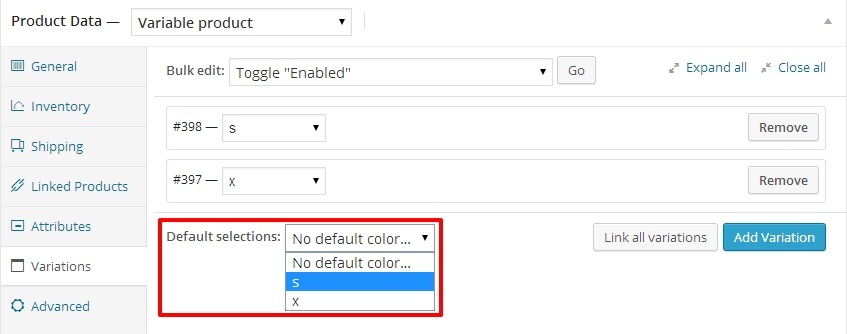
It is standard feature of WooCommerce plugin. If customer haven’t chosen any options, “Add to cart” button hidden. If you want to show this button by default, you can choose options in product by default. and these options will show in page immediately after loading.
Hello, @agencia-andante
You should remove this part of code: && get_option('woocommerce_enable_sku') == 'yes' in file wp-content/themes/blanco/woocommerce/single-product/price.php
this part of code is in 17 lines.
Or you can wait to our update. We will fix this issue in next version.
Hello, @agencia-andante
You should upload Size guide in theme options. Navigate to WP Admin Panel -> Blanco -> Single Product page -> Size Guide img. After that, navigate to product -> edit -> Custom Settings -> Enable Size Guide on this product.
SKU you should add in Admin panel -> Products -> Edit product -> General -> SKU.
If it will not help, provide us link to your site and access to admin panel in Private Content.
Hello, @Isabelle
Please, provide us access to your admin panel and FTP in Private content. It seems scripts don’t load in your site.
Hello, @surmodernite
You should remove part of script. Navigate to this folder via FTP: wp-content/themes/blanco/js and find file script.js. You should remove next code from this file(it is approximately 276 line):
            if(jQuery('.categories-group.opened').length > 0) {
                //jQuery('.categories-group.has-subnav').addClass('opened');
            }else{
                // If doesnt exitst opened point
                jQuery('.categories-group.has-subnav:first').addClass('opened').find('ul').show();
}Hello, @Delete126
Put next code to custom.css file:
.page-wrapper{
 -webkit-transform: none;
    -moz-transform: none;
     -ms-transform: none;
      -o-transform: none;
         transform: none;
}
How to use custom.css file read here
Hello,
Please, provide us access to your WP admin panel in Private Content, we’ll check it.
Hello,
Follow this instruction how to set variation for products: product variations
Thanks for feedback.
Prices template related with WooCommerce plugin.
You can find template of prices in this way: wp-content\plugins\woocommerce\templates\single-product\price.php
Please, create page “My Account” with folowing shortcode [userlog].
Parent page for this “My Account” page should be “Product page”.









