

Hello,
Please, provide us your admin access to the live website so we could check it.
Thank you

Hello,
Please, provide us your admin access to the live website so we could check it.
Thank you
Hello,
We just checked your website and see that response time is less than 1 second and it is not so slow. It is normal for WordPress website and it is not a problem. See a screenshot https://gyazo.com/600e3c17e44b7adf3446dc42bbe57318
Regards
Hello,
We just checked your website and see that average response time is small and your website is not slow https://gyazo.com/17922944c473b509e73d9fc8bb4cca6e
As for backend it seems that your server blocks external requests and can’t load some resources like CDN select2 JS. Please, contact your hosting providers for help.
Regards
Hello,
1. We see that you have added this code snippet that makes your logo scrunched on smaller devices
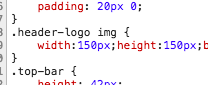
2. You are able to manage texts visibility for different devices sizes in Revolution Slider. Here is a video tutorial that should help you https://www.youtube.com/watch?v=iyuxFo-WBiU
Regards
Hello,
1. You can change your fonts in Theme Options / Typography / Navigation
2,3,4. These questions can be done only with additional code customization because there are not such options in our theme.
Regards
Hello,
You can do this by adding this code snippet to the Custom CSS
.footer-bottom .col-sm-6 {
width:100%!important;
text-align:center;
}
.footer-bottom .container > .row {
display:block;
}
.footer-bottom .et-follow-buttons {
text-align:center!important;
}
Regards
Unfortunately, there is no way to disable custom post types by placing some code to the child theme functions.php. You need to remove the line we sent you.
As for custom styles, add empty function to the functions.php file in your child theme to remove all generated styles
function etheme_assets() {}
Regards
Make it this way
<?php if( is_singular('product') ): ?>
   <h2 class="product-subtitle">
   <?php echo do_shortcode(' [wc-ps tag="p"]'); ?>
   </h2>
<?php endif; ?>Hello,
Thank you for purchasing our theme.
You can import similar contact page in Theme Options -> Import/Export -> Dummy content -> Additional pages and import “Contacts organic” page.
Regards
Hi there,
Thank you for your question.
In order to activate this hover effect, you need to upload additional images to your products galleries. Then a first image from the gallery will be used for the hover effect.
Regards
Hello,
Thank you for contacting us.
You can disable them by removing the following line in the file /wp-content/plugins/et-core-plugin/inc/post-types.php
register_taxonomy( 'brand', array( 'product' ), $args );
Regards
Hello,
Thank you for the question.
Here is a code snippet that you can place into the custom CSS area to fix this issue
article.blog-post .zoom, article.post-grid .zoom {
    opacity: 1;
    visibility: visible;
}
Regards
Hi,
You need to wrap your code that displays this subtitle in a PHP IF_ELSE statement like this:
<?php if( is_singular('product') ) {
echo $subtitle; // function that shows the subtitle
} ?>
Regards
Hello,
Our product page structure is a bit different from standard WooCommerce that this plugin is developed for. So you probably need to add a code for the subtitle manually to the file xstore/woocommerce/global/breadcrumb.php
Regards
Hello,
Thank you for the question.
Single product page may be edited in the file single-product-content-fixed.php and there you can place your button after stars or after product name.
Regards
You are welcome 🙂
Simply edit your page with Visual Composer and remove a row containing this slider completely. Write us if you are not able to do this.
Hello,
Could you please provide a screenshot of what image do you want to remove?
Regards
Hello,
Thank you for contacting us.
You can easily create such layout on your web-site with Visual Composer editor. Here is a link where you can find a lot of useful video tutorials that will help you in using this plugin https://vc.wpbakery.com/video-tutorials/
But the best option for you will be to import this page via Theme Options -> Import / Export. It will create the exact layout with all the necessary elements, slider, texts etc.
Regards
Thank you. To fix this problem you need to edit this page in admin panel and change margin bottom value to 20px for the first row with Revolution slider element using Visual Composer editor.
Regards
Hello,
Thank you for investigating our code reporting this issue.
Yes, we see that there is a typo in the key to one our theme options. But it is harmless bug and it is not necessary to fix it since when we will change this key all users after update may loose some configuration that stored in their databases.
Regards
Hello,
Thank you for contacting us.
You can add a link to your banner via Link option for this element of Visual Composer. See a screenshot https://gyazo.com/639aeba9cffa234b6f01132236a6cd75
Regards
Hello,
Please provide your admin access so we could see what is wrong with your video for the product.
Regards
Hello,
You can remove it by removing or commenting this line of code in the file wp-content/plugins/et-core-plugin/inc/post-types.php
add_action('init', array($this, 'register_post_types'), 1);
Regards
Hello,
We are glad that you have found the solution. Feel free to contact us if you have any additional questions.
Regards
Hi,
We just checked pinterest link on your web-site and it works well for us. See this gif
Are you able to provide us your web-site link so we could see this problem live?
Regards
Try to to your custom CSS also the following code snippet
.vc_row.et-parallax-right {
    background-attachment: inherit!important;
}
Regards
Hello,
Thank you for contacting us.
As PayPal integration is more relevant to WooCommerce plugin so you can find useful information in their documentation https://docs.woocommerce.com/document/paypal-standard/#section-6
Regards
Hi,
Try to add the following code snippet to this page Custom CSS field in Visual Composer
.vc_row { background-position: center right!important; }









