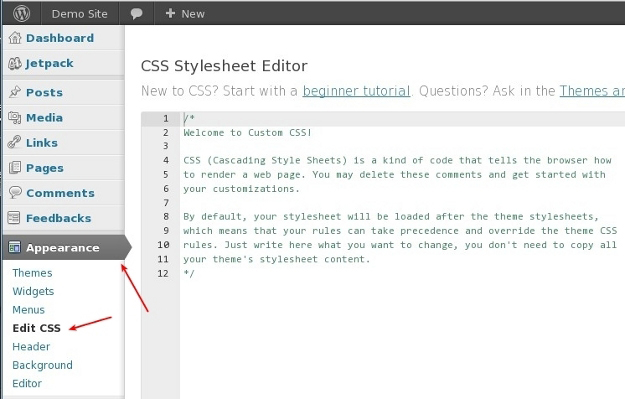
 To edit the file style.css your theme, you must have access to the site via FTP, or support change theme files directly from the administration panel WordPress. If you change the file from the admin panel is supported by your hosting provider, you will find this option in the Appearance → Editor.
 Open the style.css file of your child theme in your favorite text editor and enter the following code:
/ ** * Theme Name: My Child Theme
* Template: twentytwelve* /
import url ("../ twentytwelve / style.css");
body {background: red; }
Theme Name directive, we specify the name of our child theme, and on the next line directive Template refers to the parent topic, we want to use. In our case, this is a topic Twenty Twelve, which is located in the directory twentytwelve.
After the title theme include teamimport styles threads Twenty Twelve, and all that follows - our own CSS code. In our case, we change the background color to red.
Save the changes in style.css file of your child theme and upload the entire directory my-child-theme to the server through FTP. You will see that your new child WordPress theme is available when it is the under Appearance → Themes.
Open the style.css file of your child theme in your favorite text editor and enter the following code:
/ ** * Theme Name: My Child Theme
* Template: twentytwelve* /
import url ("../ twentytwelve / style.css");
body {background: red; }
Theme Name directive, we specify the name of our child theme, and on the next line directive Template refers to the parent topic, we want to use. In our case, this is a topic Twenty Twelve, which is located in the directory twentytwelve.
After the title theme include teamimport styles threads Twenty Twelve, and all that follows - our own CSS code. In our case, we change the background color to red.
Save the changes in style.css file of your child theme and upload the entire directory my-child-theme to the server through FTP. You will see that your new child WordPress theme is available when it is the under Appearance → Themes.