Change the size guide image on the product page

This topic has 5 replies, 2 voices, and was last updated 3 minutes ago ago by Jack Richardson

  • Avatar: ARYA
    ARYA
    Participant
    March 12, 2026 at 16:24

    Hi.
    How can I change the size guide image on the product page for all products?
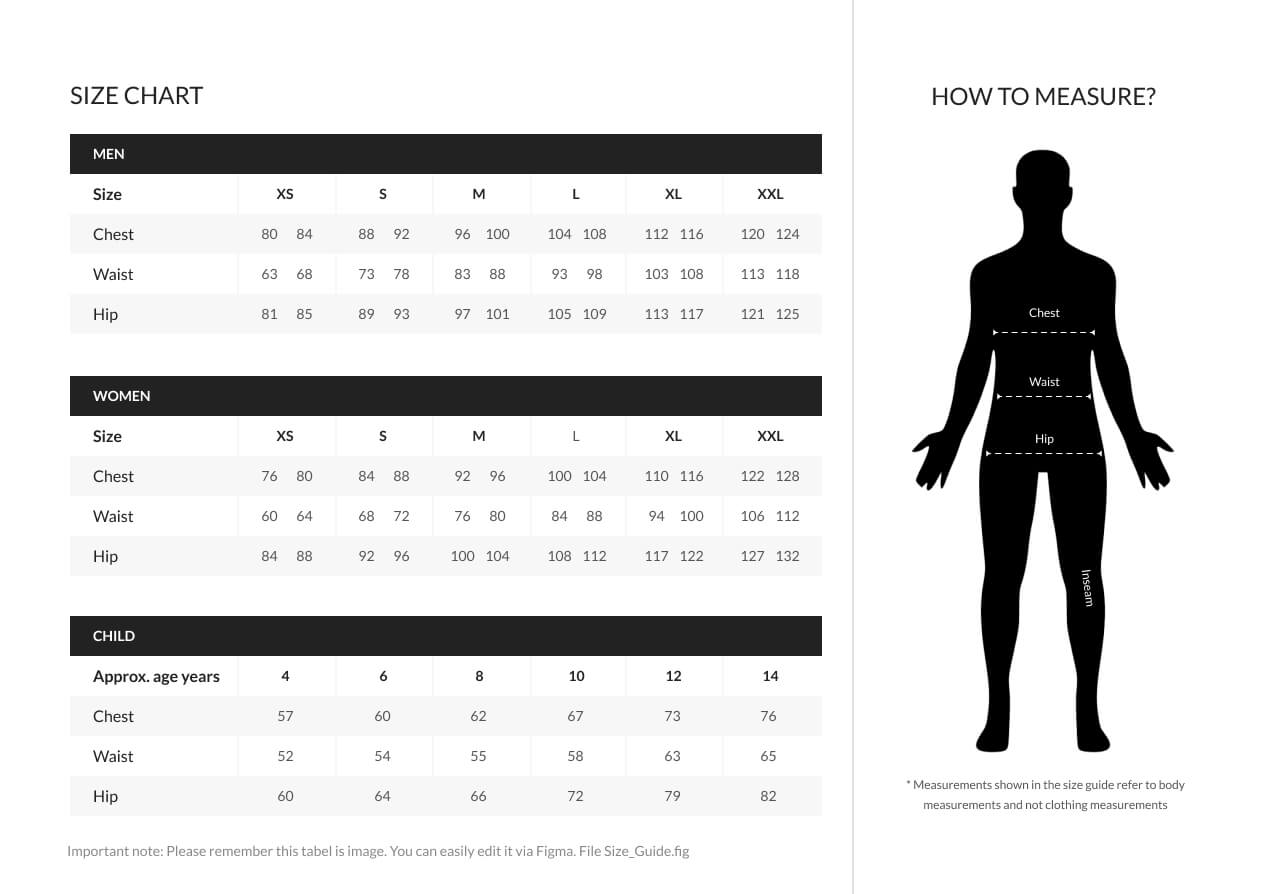
    I changed it from the theme options, but it doesn’t seem to work (the photo is taken from the Xstore site (see attached image).
    Due to the different types of items in the shop, I’d like to add a global image and then edit the size guide item by item.
    Would it also be possible to work with groups of similar items (categories)?

    Files is visible for topic creator and
    support staff only.
    4 Answers
    Avatar: Jack Richardson
    Jack Richardson
    Support staff
    March 13, 2026 at 07:00

    Hello @ARYA,

    Could you please provide temporary wp-admin access? We need to check your settings.

    To grant WP-Admin access, please proceed to create a new user account with an administrator role through your WordPress Dashboard. Once the account is established, you may securely transmit the username and password to us via the Private Content section designated for this purpose.

    Kind regards, Jack Richardson
    The 8theme’s team

    Avatar: ARYA
    ARYA
    Participant
    March 13, 2026 at 17:56

    Hi Jack,
    before providing admin access, could you please confirm if the category-based size guide and multilingual support are native features of the theme? I would like to understand the theme’s capabilities first.

    I am currently using the XStore theme and I need some clarifications regarding the Size Guide feature before proceeding with my site configuration.

    1. Category-based Size Guides
    My shop sells both clothing and shoes, which obviously require different size charts. Is there a way to manage the Size Guide image by product category? Currently, I can only see a global default option or a manual override for each individual product. Is there a more efficient way to assign different charts to different categories?

    2. Multilingual Support
    My website is available in Italian and English. Since the Size Guide is an image containing text, it needs to be different for each language. How can I provide a translated version of the Size Guide image for my English-speaking users (using WPML)?

    3. Technical Issue: Size Guide Image linking to External Demo Site
    I have also noticed a technical anomaly. When I change the default Size Guide image in the Theme Options, the change is not reflected on the product pages. The product page continues to show the demo image, and I noticed that the image URL points to your server:
    https://xstore.8theme.com/elementor/demos/minimal-fashion02/wp-content/uploads/sites/69/2021/10/Size_chart.jpeg
    It seems the theme is pulling the asset from an external source instead of my local media library.

    I would appreciate your guidance on the first two points first, as they are crucial for my project’s workflow. Please let me know if these features are supported natively.

    Thanks in advance

    Avatar: ARYA
    ARYA
    Participant
    March 13, 2026 at 18:12

    This msg only to specify that We are currently using the XStore theme on our website. Specifically, I have imported the “Minimal Fashion 02” Prebuilt WooCommerce Website.

    Avatar: Jack Richardson
    Jack Richardson
    Support staff
    March 14, 2026 at 14:10

    Hello @ARYA,

    The Size Guide image can be uploaded in two ways:
    1) Globally for all products through the Theme Options.
    2) Individually for a specific product via Dashboard > Products > Edit Product > [8theme] Product Options – https://prnt.sc/x3qa2r

    There is no direct option to upload it for a category; however, you may use the following workaround:
    Go to Single Product Builder > Templates > Create a new template and assign it to a specific category using Conditions, then edit the Size Guide widget as needed.

    For your reference, please see the image here: https://prnt.sc/C0qPGPFJ9QCx

    You can find more information about the Single Product Builder at:
    https://www.8theme.com/documentation/xstore/xstore-builders/xstore-single-product-builder-with-elementor/

    You can also refer to the documentation on creating multilingual content with Elementor here:
    https://elementor.com/resources/e/multilingual-website/

    Regarding the issue with the incorrect image display, we need to review your settings or website. However, as your site is currently protected by login credentials, we are unable to proceed without access.

    Best regards,
    Jack Richardson
    The 8Theme’s Team

  • Viewing 5 results - 1 through 5 (of 5 total)

You must be logged in to reply to this topic.Log in/Sign up

We're using our own and third-party cookies to improve your experience and our website. Keep on browsing to accept our cookie policy.