
Forum Replies Created

Viewing 30 posts - 61 through 90 (of 170 total)
  • Avatar: designerobot
    designerobot
    Participant
    July 6, 2018 at 07:11

    Hello, thank you for your reply

    I tried to add the code as suggested in the link to defer parsing of javascript and my whole website got really slow (yes, apparently yet more).
    Also, the slideshow on the homepage (powered by Revolution Slider) disappeared and the images in the product detail page disappeared as well. Any idea why this would be happening?


    Avatar: designerobot
    designerobot
    Participant
    July 2, 2018 at 13:28

    Hello,

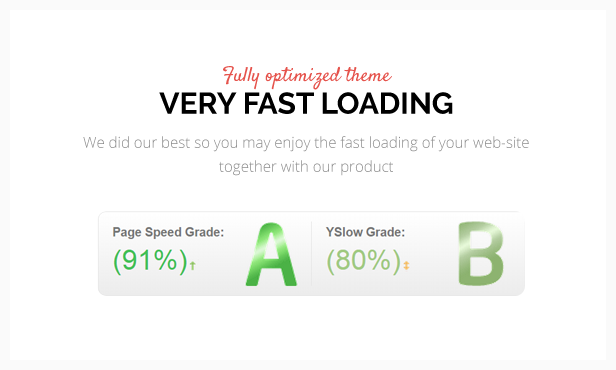
    I saw your WooPress 8theme theme is advertised as fully optimized and very fast loading (https://8theme.com/images/themeforest/woopress/06.png). I followed all your previous hints but I’m still having quite a few problems with page speed and yslow grade (C 72% and E 57%).

    GTMetrix suggests I fix:

    1. defer javascript parsing

    I tried a plugin to do this but it removed the product detail page image…
    what else can I do?

    2. leverage browser caching

    3. inline small css

    What can I do to fix these problems?

    Avatar: designerobot
    designerobot
    Participant
    June 20, 2018 at 11:32

    Thanks.
    Where do I find the “footer-ap-2” static block to edit it?

    Avatar: designerobot
    designerobot
    Participant
    June 19, 2018 at 15:06

    Thanks for the helpful links.
    Regarding the wp-admin access please use these (see below in pvt content)

    Please, contact administrator
    for this information.
    Avatar: designerobot
    designerobot
    Participant
    May 28, 2018 at 10:37

    If possible, I would like to insert plugins.js directly in /child/js/ and portfolio.php directly in child/framework/.
    But now these two files don’t work at all if they are copied in the child directory instead of the main directory. Could you solve this in a next update maybe?

    Avatar: designerobot
    designerobot
    Participant
    April 12, 2018 at 17:51

    Thank you very much! Now it works perfectly.

    Best regards

    Avatar: designerobot
    designerobot
    Participant
    April 12, 2018 at 11:49

    Hello, thank you for your reply.

    I created a mirror of the website on another domain of mine. Please use this to do your test. In pvt content belove there is all info to enter.

    This installation has the 4.2.1 theme version and you can see the flickering problem.

    At this point please don’t touch the main website, I’ll continue to work on it in the meanwhile (only adding content in the various language).

    Please, contact administrator
    for this information.
    Avatar: designerobot
    designerobot
    Participant
    January 18, 2018 at 17:31

    You are very kindly Rose.

    If possible I would have another question. I’ve some lines (used to divide blocks) that are made always in the same way.

    But sometimes (for example in homepage where there is written “I nostri settori”) something is wrong… the title is not on the right (as it should be) but in the center, with the red line also on the right, instead to be only on the left.

    Please see the screenshot in pvt to better understand the problem.

    Please, contact administrator
    for this information.
    Avatar: designerobot
    designerobot
    Participant
    January 18, 2018 at 16:27

    Thanks.

    Unfortunately, 1/5 (namely 20%) doesn’t exist. I’ll continue to use 1/4 at this point.

    Regards,

    Avatar: designerobot
    designerobot
    Participant
    January 18, 2018 at 16:08

    Thank you very much!

    The last question, in the home page I’ve the sidebar that now is 25% at full view of the width. Could I set it to 20% like it is now in smaller view?

    Avatar: designerobot
    designerobot
    Participant
    January 18, 2018 at 12:19

    Hello, almost every page have these type of columns.
    I need a script that works on the entire website.
    As described above (2>2, 3>3, 4>4 or 2, 6>3 or 2).
    I think it’s enouh clear if you see the website. You already have the access data.

    Avatar: designerobot
    designerobot
    Participant
    January 16, 2018 at 13:27

    Hello,

    I’ve just discovered that in the Widget section there is a widget called “8theme – Search Form” that permits to search in all things (posts, pages, portofolios, products, etc.) at the same time.

    I’ve only one question, why if I search with none text I’ve all pages as result? It seems a bug.

    Moreover the last two results are “Footer” and “Footer-jewellery”, even if these two pages are not present in any place. How can I remove these two pages from the results?

    Please, contact administrator
    for this information.
    Avatar: designerobot
    designerobot
    Participant
    January 15, 2018 at 18:37

    Perfect, thank you very much!!!
    Regards

    Avatar: designerobot
    designerobot
    Participant
    January 15, 2018 at 16:52

    I would like to remove all this block with the page heading (see the link in pvt content), like when I select “Disable” in “Page heading” in the options of the page

    Please, contact administrator
    for this information.
    Avatar: designerobot
    designerobot
    Participant
    January 15, 2018 at 16:40

    Thanks for the reply.
    Now sidebar is finally not present, but the page heading is still present.

    Avatar: designerobot
    designerobot
    Participant
    January 12, 2018 at 16:59

    By the way, point 2 doesn’t work (I insert the code in the child, as you can see in pvt)

    Please, contact administrator
    for this information.
    Avatar: designerobot
    designerobot
    Participant
    January 12, 2018 at 16:53

    Thanks for the answers.
    Regarding the point 1, maybe in the next update of the theme, you could consider inserting this function. I think that other people too could find very helpful to search in “posts” and at the same time in “pages” too. Please consider it.
    Regards

    Avatar: designerobot
    designerobot
    Participant
    January 12, 2018 at 16:42

    Thank you very much, now it is perfect!

    Avatar: designerobot
    designerobot
    Participant
    January 12, 2018 at 13:12

    Hello Rose, thank you very much.
    With this code, the problem is solved in the desktop version. In the mobile version, it continues to not work, do you know why?

    Avatar: designerobot
    designerobot
    Participant
    January 11, 2018 at 19:09

    As said the problem is that if the mouse go on the link of the language, the word doesn’t become white. Yesterday (before the last upgrade of WPML) it worked.
    If you see the main menu, if the pointer of the mouse goes on a link, it becomes white. In the language menu above it doesn’t happen anymore. This both on the desktop menu and on the mobile menu.
    With the upgrade, some class in CSS is changed as you said before…

    Avatar: designerobot
    designerobot
    Participant
    January 11, 2018 at 14:22

    Thank you very much, in this way I solved the previous problems.
    But I noted that now on the rollover, the color of the language menu doesn’t change color (both in desktop and in mobile) like happens in the main menu.

    Avatar: designerobot
    designerobot
    Participant
    December 28, 2017 at 10:41

    Hello Rose,
    It’s perfect, thank very much!
    Regards

    Avatar: designerobot
    designerobot
    Participant
    December 28, 2017 at 10:39

    Perfect, now everything works. Thank you so much!!!
    Just out of curiosity, what was the problem?

    Avatar: designerobot
    designerobot
    Participant
    December 28, 2017 at 09:30

    Hello, thanks for your reply.
    I did all things you said.
    Please try again with the FTP, I modified the starting director setting it to the root.

    Avatar: designerobot
    designerobot
    Participant
    October 13, 2017 at 15:38

    Ok, now I understand. Thanks for the explanation, before it was not clear that is had a new name. Maybe you should change the name “Visual Composer” to the new one also on the download page to avoid misunderstandings in other users too.

    Avatar: designerobot
    designerobot
    Participant
    October 13, 2017 at 15:05

    Hello Rose,
    thanks for your reply.
    At https://www.8theme.com/download-plugins/ there are “Visual Composer v 5.4” and “Ultimate Addons for Visual Composer v 3.16.18”, but my WP control panel says to upgrade also “WPBakery Page Builder”. This from the last upgrade of Visual Composer, before the 4.2 I never see the plugin WPBakery Page Builder.
    For this reason I asked if I can remove it or if you will provide it at https://www.8theme.com/download-plugins/

    Avatar: designerobot
    designerobot
    Participant
    October 4, 2017 at 11:30

    I know, but the problem is that from this VC control panel you can select at maximum 6 element per row, I was hoping I could put more with CSS. I will do some test

    Avatar: designerobot
    designerobot
    Participant
    October 3, 2017 at 16:48

    Here are two pics to better understanding (see below in pvt)

    Please, contact administrator
    for this information.
    Avatar: designerobot
    designerobot
    Participant
    October 3, 2017 at 14:20

    Scuse me, there was a misunderstanding… I meant miniatures of the Gallery Zoom section of the page.
    I would like that they are the half of the size of the other minuatures.

    Avatar: designerobot
    designerobot
    Participant
    October 3, 2017 at 11:13

    Now, it’s perfect. Many thanks.

    A last question… but could be possible to make still smaller ONLY the icons of the Gallery Zoom section, in EVERY size of the window (that is both desktop and mobile version)?

  • 1 2 3 4 5 6
    Viewing 90 results - 61 through 90 (of 170 total)
Viewing 30 posts - 61 through 90 (of 170 total)
We're using our own and third-party cookies to improve your experience and our website. Keep on browsing to accept our cookie policy.