

Hello,
Add this code snippet to the custom CSS for mobile devices
.content-product .products-page-cats {
	display:none;
}
Regards

Hello,
Add this code snippet to the custom CSS for mobile devices
.content-product .products-page-cats {
display:none;
}Regards
Hello,
“Watch video” button is located on the product image https://gyazo.com/f4bc1282bf0626f87d94c5a106dc2060 and can’t be placed after the description.
Regards
Hello,
You can hide it by adding this code snippet to the custom CSS in Theme Options
.products-page-cats {
	display:none;
}
Regards
Hello,
Firstly, be sure that you have two different translations files: one for WooCommerce strings located in wp-content/languages/ and for our theme strings in wp-content/languages/themes/
Regards
The order for all JS scripts are the same and there is no any problems with it. Try to disable all additional plugin also.
OK, but how it works with a default theme?
Hello,
Try to use this css snippet to hide this link. Add it for mobile devices only in the Custom CSS area.
.mobile-menu-wrapper .popup_link {
    display: none!important;
}
Regards
Hello,
You can find all available options for the breadcrumbs in Theme Options -> General -> Breadcrumbs.
Kind Regards
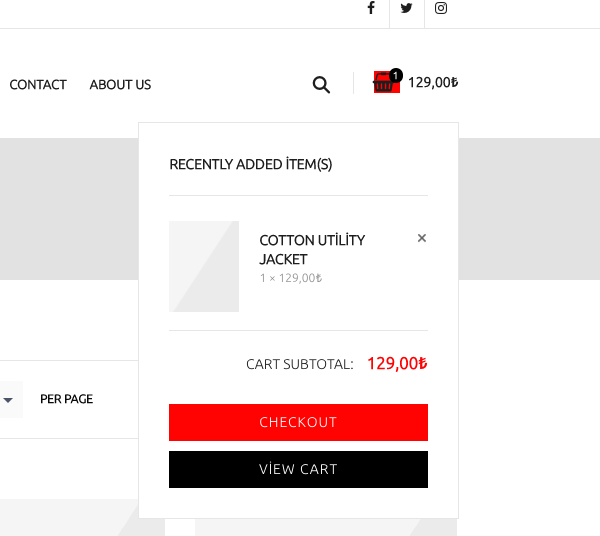
Sorry, we have found your products. It seems that cart widget works correctly. Here is a code snippet to remove red background from it
.header-simple.header-color-dark .cart-bag {
	background:none;
}
Regards
Hello,
How can we add something to cart to see the issue on your website?
Regards
Hello,
You need to enable registration in WooCommerce -> Settings -> Account.
Regards
Hello,
1. Sorry, but there is no such function in our theme.
2. Try to add this code to the custom CSS for mobile devices
.header-logo img {
    max-width: 70px !important;
}
Regards
Hello,
We are glad that you have found a solution. Contact us if you have any additional questions.
Regards
Hello,
We are glad that you have found a solution. Contact us if you have any additional questions.
Regards
Hello,
Sorry, but this button is not compatible with WooCommerce and doesn’t update cart widget at all. You can check how it works with standard WooCommerce Storefront theme.
Regards
Hello,
We didn’t test any plugins for comments captcha but if you will have any issues using some of them just contact us and we will try to help you with any incompatibilities.
Regards
Hello,
You can find public methods of the JS library used for this popup in its documentation http://dimsemenov.com/plugins/magnific-popup/documentation.html
Sorry, but we don’t have a solution for you and it may need additional code customization to achieve this.
Regards
Hello,
Unfortunately, there is no such feature in our theme and it may require additional code customization to achieve this.
Regards
Hello,
Thank you for posting this useful information here @Walid.
Please, contact us about the result when you will update PHP to the latest version. @redwhite34
Regards
We don’t see any JS errors. Could you please switch to default theme to check how it should work?
Hello,
Could you please send a screenshot of the multi upload field for better understanding?
Thank you
Hi,
We will take into account your request.
Regards
Hi,
Could you please provide us a screenshot of the problem?
Yes, it appears for simple products only. We will consider adding this text for variable products too in our future updates.
Regards
Thank you.
Try to add this snippet to the Custom CSS to increase menu font size
.header-simple .menu-wrapper .menu > li > a {
	font-size:20px;
}
Regards
Hi,
Use this simple CSS code
.top-bar.topbar-color-dark,
.top-links > div{
	border:none;
}
Regards
And this for social buttons
.top-bar.topbar-color-dark .topbar-widget.etheme_widget_socials .et-follow-buttons a {
	border-left:none;
}
Regards
Hi,
Add this code to the Custom CSS
.header-simple .shopping-container {
	border-left:none;
}Great 🙂 You are welcome
You are welcome!









