
Width of Map too wide - by klxtl - on WordPress WooCommerce support

This topic has 4 replies, 2 voices, and was last updated 10 years, 11 months ago ago by Eva Kemp

  • Avatar: klxtl
    klxtl
    Participant
    January 3, 2015 at 05:44

    Hello, on the contact page, how can I make the width of the map to shrink so that its centered and does not extend across the whole page. I try changing the percent on the contact page, but it does not work. Please help.

    Please, contact administrator
    for this information.
    3 Answers
    Avatar: Eva
    Eva Kemp
    Participant
    January 3, 2015 at 15:14

    Hello,

    Please add this code in custom.css file:

    div#map_54a7f7b8345af {
    width: 1100px;
    min-width: 1100px;
    left: 0px;
    }

    How to create custom.css you can watch in this tutorial (it’s for Legenda theme but the process is the same).

    Thank you.
    Regards,
    Eva Kemp.

    Avatar: klxtl
    klxtl
    Participant
    January 4, 2015 at 10:55

    I added such code onto custom.css and it did not work. I also made sure that my custom.css is enabled in the theme options. The map’s width is still across the whole page.

    Avatar: Eva
    Eva Kemp
    Participant
    January 5, 2015 at 09:30

    Hello,

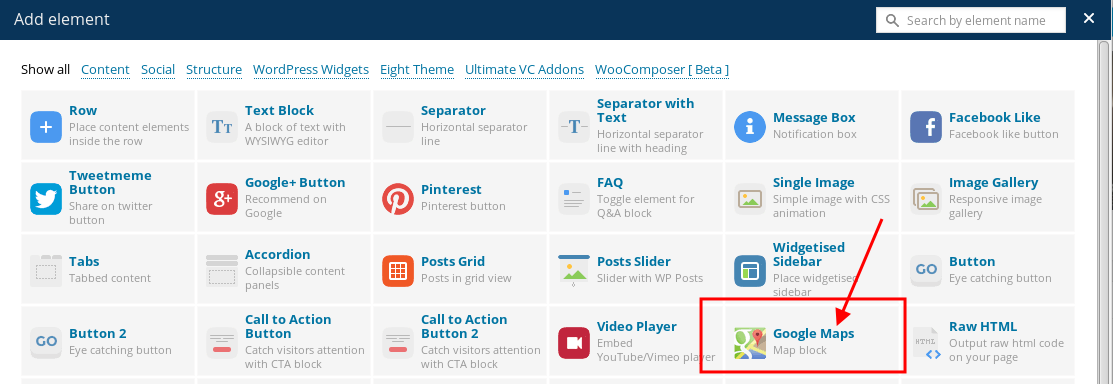
    In this case you can try to use other VC element for Google map:

    It won’t be shown for full width.

    Thank you.
    Regards,
    Eva Kemp.

  • Viewing 4 results - 1 through 4 (of 4 total)

The issue related to '‘Width of Map too wide’' has been successfully resolved, and the topic is now closed for further responses

We're using our own and third-party cookies to improve your experience and our website. Keep on browsing to accept our cookie policy.









