
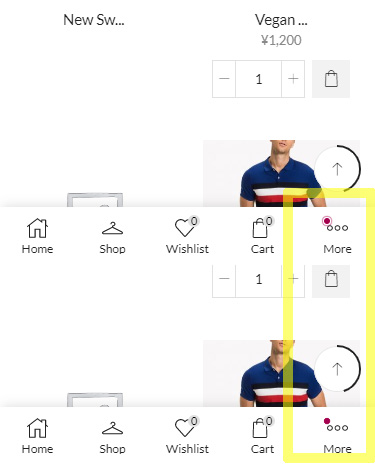
Red blinking alert on mobile sticky menu suddenly appears. I guess adding more quantity than stock to the cart is doing something with this error. How can I turn off this error?
This topic has 5 replies, 2 voices, and was last updated 4 years, 10 months ago ago by east_ikebukuro
Red blinking alert on mobile sticky menu suddenly appears. I guess adding more quantity than stock to the cart is doing something with this error. How can I turn off this error?
Hello,
Thanks for using our theme.
Theme Options > Mobile pannel > More element > disable Animation dot https://prnt.sc/yp6t96
Regards
Thanks.
I could turn off the alert.
I want to ask a few more things because I may need to use this someday.
What kind of alert is this? What makes appear this alert?
The mentioned animation dot is just an option that you enable or disable depends on your needs.
Regards
Thanks.
I got it.
The issue related to '‘Want to erase red alert on sticky menu’' has been successfully resolved, and the topic is now closed for further responses










