Visual Composer / Demo Layout - by DIPHA

This topic has 10 replies, 4 voices, and was last updated 10 years, 8 months ago ago by Brian Johnson

  • Avatar: DIPHA
    DIPHA
    Participant
    March 10, 2015 at 21:00

    Hi,

    I can’t edit a provided demo page layout using the Visual Composer. In the future editors will be responsible for this task so I am not looking for a quick fix but for guidance how modify the layout using VC (changing pictures, adjusting size, …)

    The page currently looks like this in the backend http://i.imgur.com/yAfgBYY.png

    What do I need to adjust to enable editing the picture(s) that can be seen at the front end using the Visual Composer? Some parts are greyed out / disfunctional when looked at with VC. I’m not sure if your provided mark-up is compatible with VC or if I adjusted some setting the wrong way. http://i.imgur.com/dIw9i8b.png

    Cheers,

    Melanie

    Please, contact administrator
    for this information.
    9 Answers
    Avatar: Robert Hall
    Robert Hall
    Participant
    March 11, 2015 at 16:15

    Hello,

    You’re using old theme and plugins versions. Please update.
    You can download the latest plugins versions at this link https://www.8theme.com/download-plugins/ ,
    enter your purchase code of the theme to get the plugins.
    Here is video tutorial how to update theme:
    https://www.youtube.com/watch?v=KdWESIIPU1k

    Regards,
    Robert Hall.

    Avatar: DIPHA
    DIPHA
    Participant
    March 18, 2015 at 10:49

    Hello Robert,

    I updated the theme. It’s still not possible to edit the mentioned elements in a WYSIWYG way.

    What now?

    Cheers

    Melanie

    Please, contact administrator
    for this information.
    Avatar: Eva
    Eva Kemp
    Participant
    March 18, 2015 at 15:57

    Hello,

    Please update the theme to 2.6.3 version as well as Revolution Slider plugin to the latest version https://www.8theme.com/download-plugins/ .

    Thank you.
    Regards,
    Eva Kemp.

    Avatar: DIPHA
    DIPHA
    Participant
    March 18, 2015 at 16:54

    Hello Eva,

    ok. I updated the site once again.

    Cheers

    Melanie

    Avatar: Eva
    Eva Kemp
    Participant
    March 18, 2015 at 22:00

    Hello,

    Is your issue resolved?

    Regards,
    Eva Kemp.

    Avatar: DIPHA
    DIPHA
    Participant
    March 19, 2015 at 09:29

    No!

    Cheers

    Melanie

    Avatar: Eva
    Eva Kemp
    Participant
    March 19, 2015 at 11:49

    Hello,

    I’ve recreated the page and it’s working fine now.
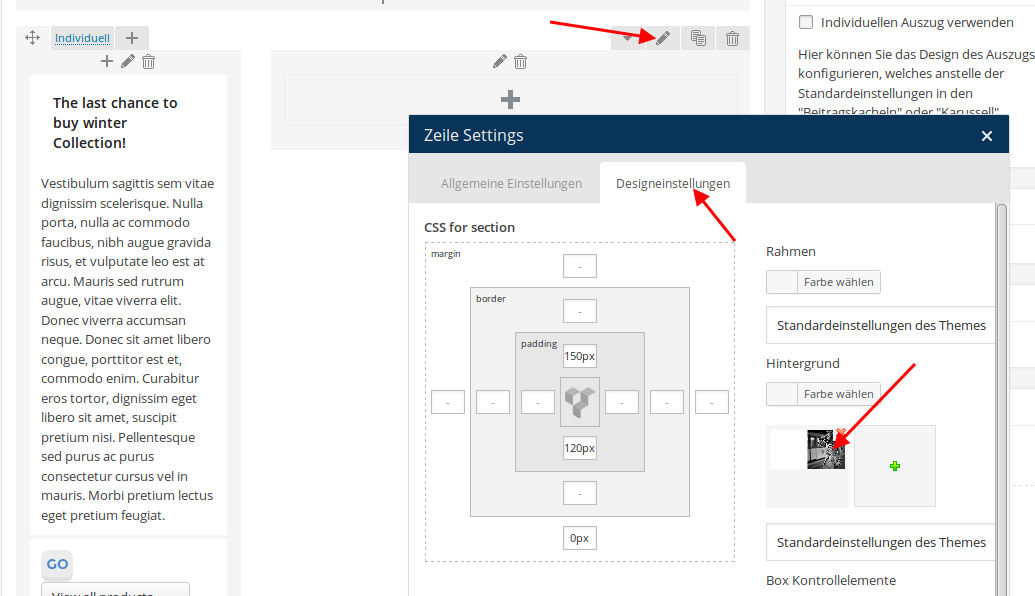
    To change background image you need edit the row:
    https://s3.amazonaws.com/fvd-data/notes/168674/1426762088-yWKFuR/screen.png

    Please check.

    Thank you.
    Regards,
    Eva Kemp.

    Avatar: DIPHA
    DIPHA
    Participant
    March 25, 2015 at 12:02

    Hello,

    thank you. It looks like it is working now!

    Cheers

    Melanie

    Avatar: Brian Johnson
    Brian Johnson
    Member
    March 25, 2015 at 12:05

    You are welcome.
    We would very much appreciate if you leave a comment and rating for our theme on themeforest

    With best regards
    Brian Johnson

  • Viewing 10 results - 1 through 10 (of 10 total)

The issue related to '‘Visual Composer / Demo Layout’' has been successfully resolved, and the topic is now closed for further responses

We're using our own and third-party cookies to improve your experience and our website. Keep on browsing to accept our cookie policy.