Video - by Libardo - on WordPress WooCommerce support

This topic has 13 replies, 2 voices, and was last updated 10 years, 9 months ago ago by Eva Kemp

  • Avatar: Libardo
    Libardo
    Participant
    March 5, 2015 at 03:38

    Good Day Support,

    Could you please assist me to make the video full width so it can cover in the black area that is still showing? I would like for the video to show just like the sample as on your page. IS this possible?

    Also can we make a small black border at the top and bottom? Please see in private.

    Please, contact administrator
    for this information.
    12 Answers
    Avatar: Libardo
    Libardo
    Participant
    March 5, 2015 at 03:48

    I also noticed that the video does not start right away before I scroll down and get to the video. Is it possible to start the video a bit earlier?

    Avatar: Eva
    Eva Kemp
    Participant
    March 5, 2015 at 17:27

    Hello,

    Are you editing the page now? We are unable to open it in the editor.
    Also the video is started quickly once I scrolled to it.

    Regards,
    Eva Kemp.

    Avatar: Libardo
    Libardo
    Participant
    March 5, 2015 at 19:15

    Hi Eva,

    No I’m not editing at the moment. Yo may try again.

    Avatar: Libardo
    Libardo
    Participant
    March 5, 2015 at 21:51

    Hi Eva,

    Where you able to look into this case#?
    Thanks..

    Avatar: Libardo
    Libardo
    Participant
    March 6, 2015 at 19:57

    Hi Eva,

    Just wanted to check if you could assist with this case#?
    Thanks..

    Avatar: Libardo
    Libardo
    Participant
    March 9, 2015 at 00:37

    Good Day Support,

    Coukd you lkease provide me a status on this case#?

    Thanks..

    P.S I just need some help with the width of the video to look good in the field. Right now when the video plays it shows a big black bar on top. Can it show full width?

    Avatar: Libardo
    Libardo
    Participant
    March 9, 2015 at 15:40

    Good Day Support,

    Any HELP?

    Avatar: Eva
    Eva Kemp
    Participant
    March 10, 2015 at 14:03

    Hello,

    We’re sorry for a delay.
    I’ve changed padding bottom value in the row settings where you added the video.
    Please clear browser cache and check the page.

    Thank you.
    Regards,
    Eva Kemp.

    Avatar: Libardo
    Libardo
    Participant
    March 16, 2015 at 20:40

    Thanks Eva. However is there a way to make the space where the video is a bit bigger?

    Please check the padding, space which I’ve setup at the moment. I believe the black bar is showing at the moment. Is there a way to auto width the video? Or a bypass which can maximize the video into the respective space which it is allocated?

    Avatar: Eva
    Eva Kemp
    Participant
    March 17, 2015 at 16:12

    Hello,

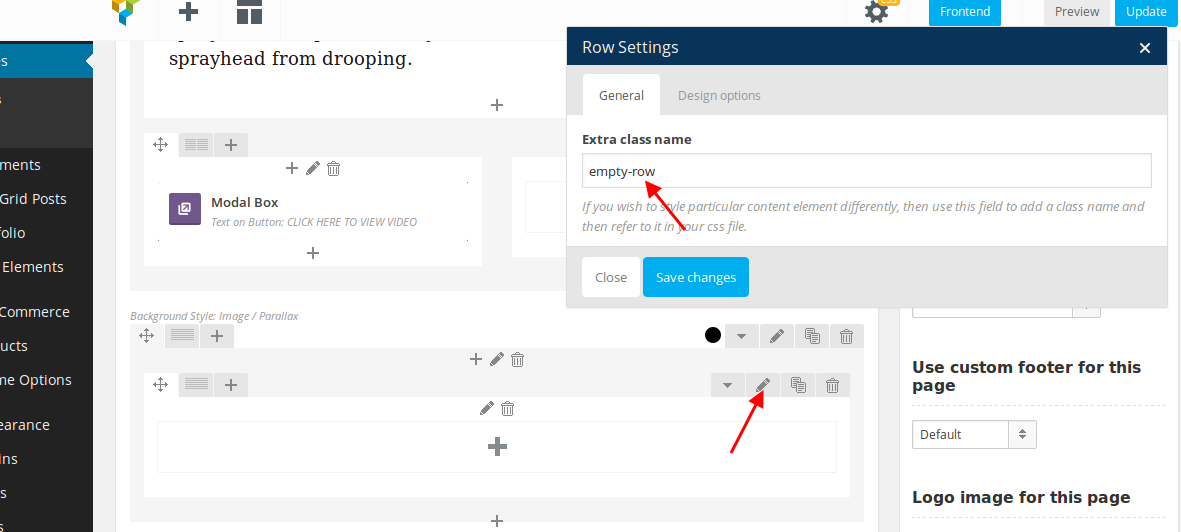
    I’ve created extra class for an empty row where video background is added:
    https://s3.amazonaws.com/fvd-data/notes/168674/1426604955-35gpQR/screen.png
    and added this code in CSS block of Visual Composer editor in “KOHLER” page:
    .empty-row {height: 500px;}

    Please check the video now.

    Thank you.
    Regards,
    Eva Kemp.

    Avatar: Libardo
    Libardo
    Participant
    March 18, 2015 at 21:14

    Thanks Eva. Your the Best!

    Avatar: Eva
    Eva Kemp
    Participant
    March 18, 2015 at 23:31

    Hello,

    You’re always welcome.

    Regards,
    Eva Kemp.

  • Viewing 13 results - 1 through 13 (of 13 total)

The issue related to '‘Video’' has been successfully resolved, and the topic is now closed for further responses

We're using our own and third-party cookies to improve your experience and our website. Keep on browsing to accept our cookie policy.