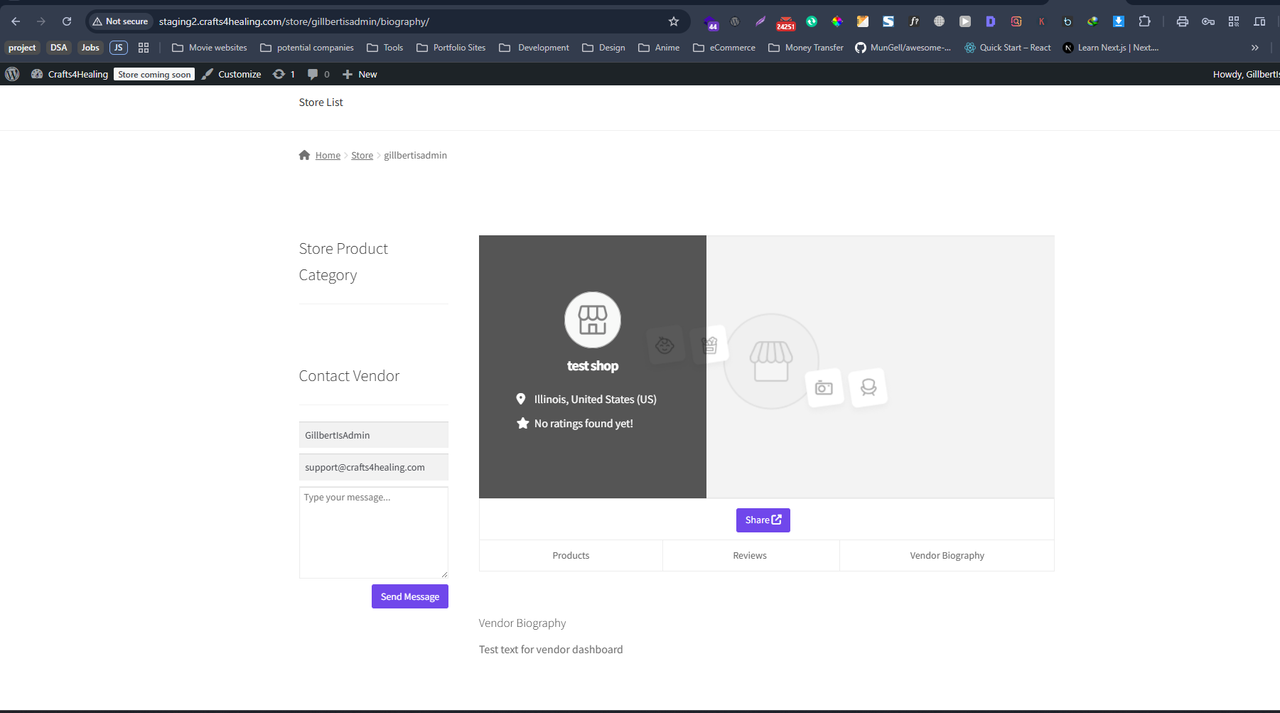
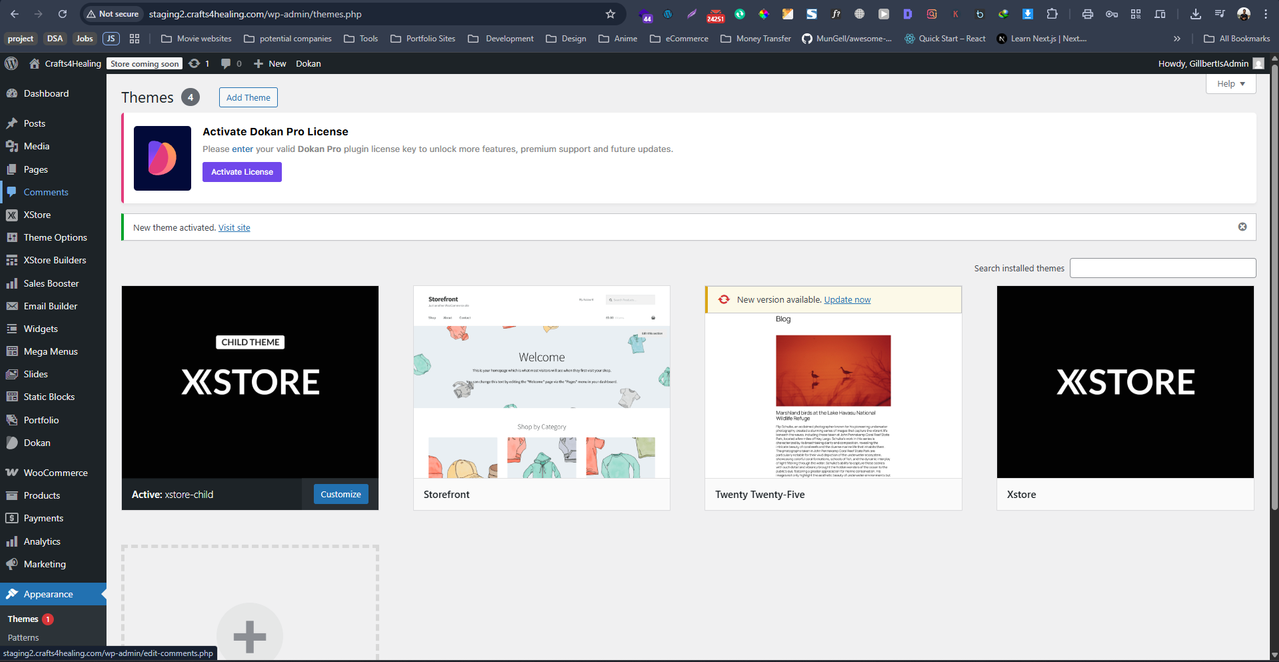
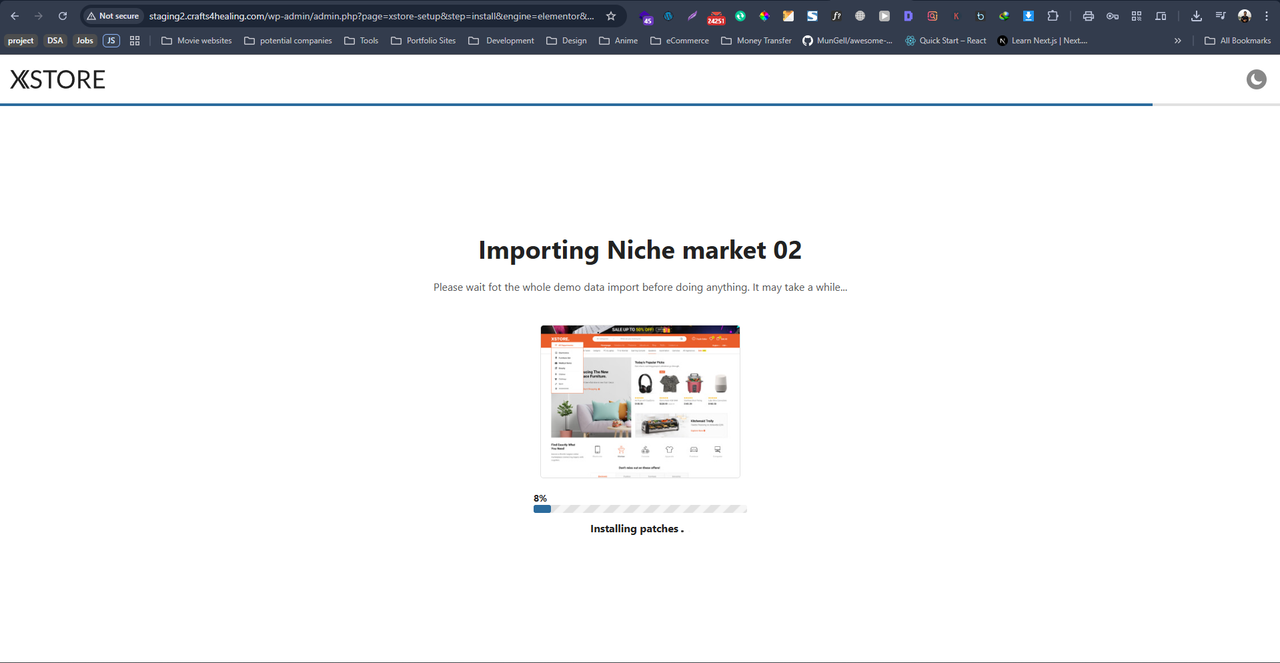
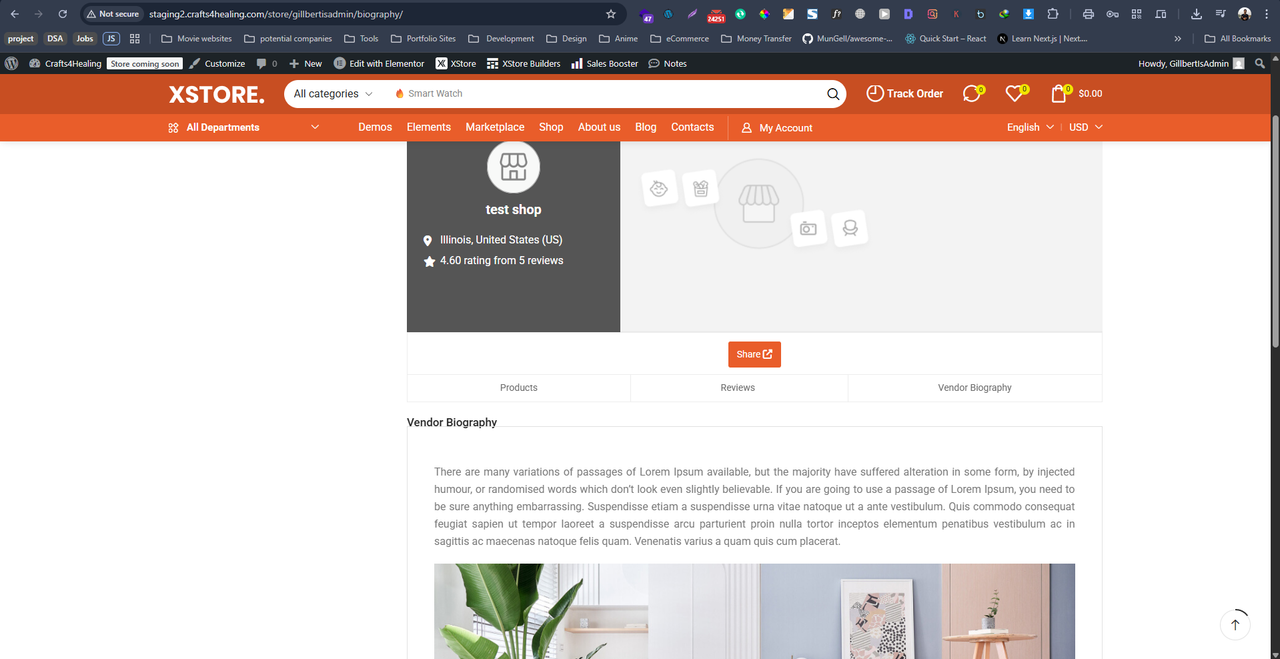
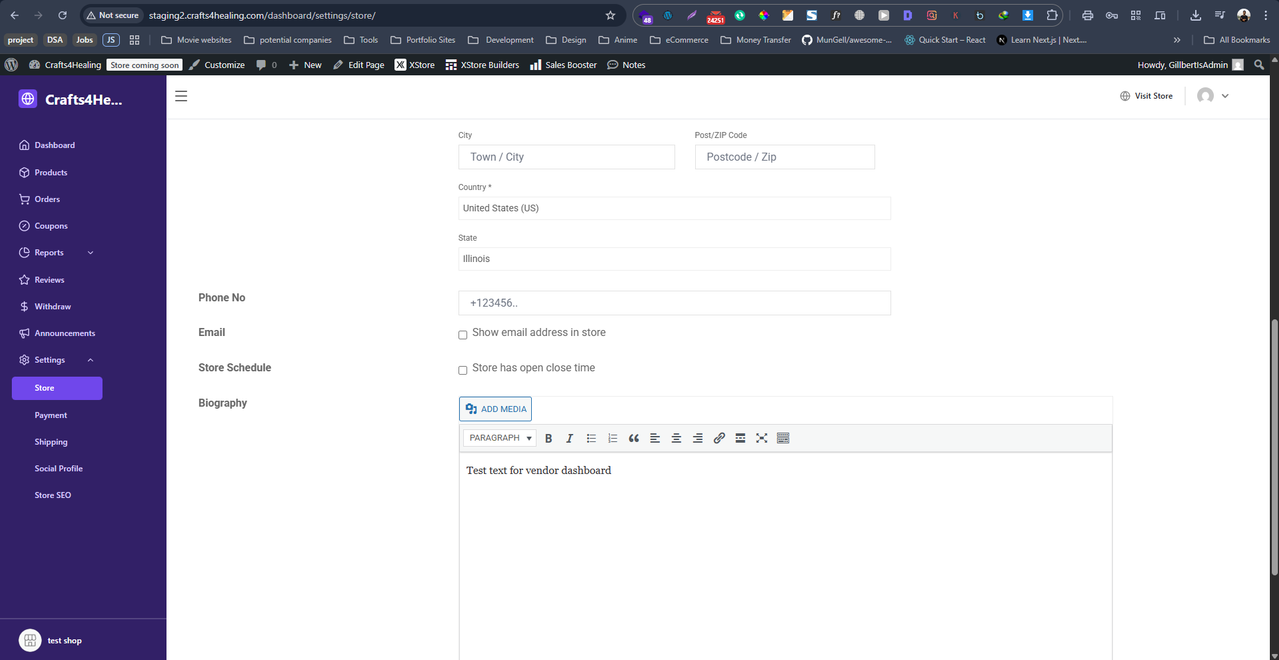
Vendor biography showing dummy text and image.

This topic has 12 replies, 2 voices, and was last updated 49 minutes ago ago by Jack Richardson

  • Avatar: Gillbert
    Gillbert
    Participant
    December 10, 2025 at 09:56

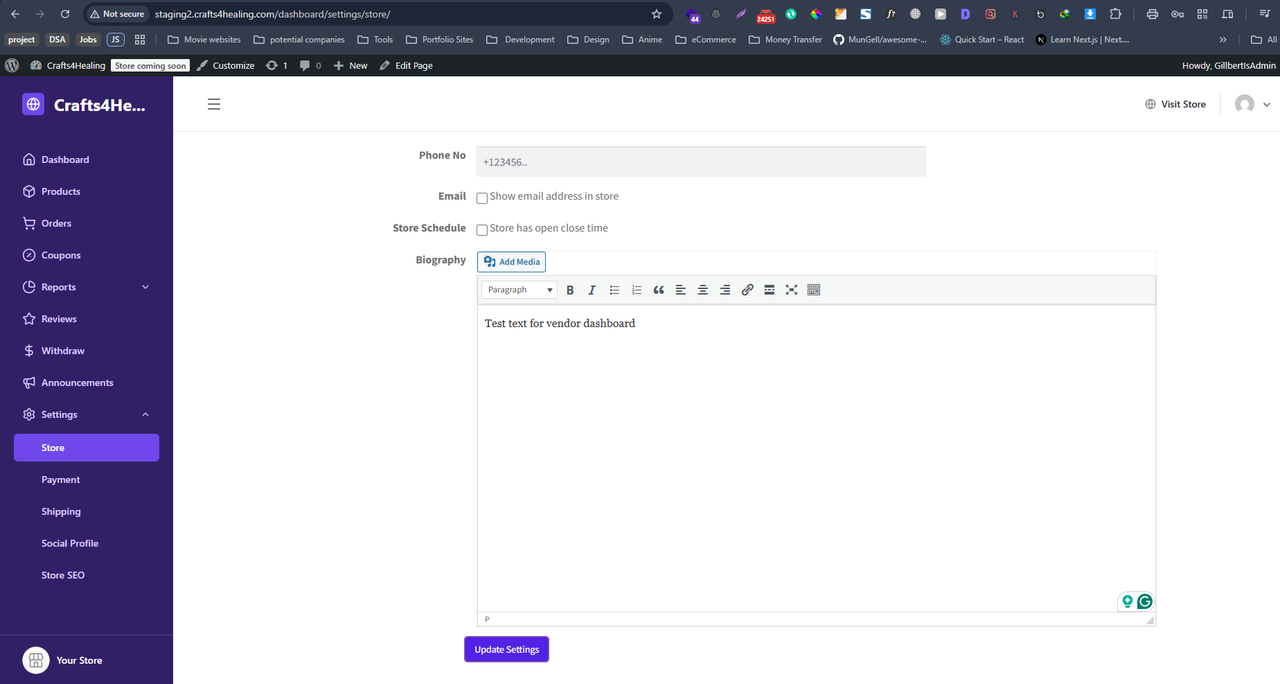
    Hi, I just installed the XStore theme on my website, and when I went through the settings when I saw this issue. From the vendor dashboard, if I add a biography as a vendor, it’s showing dummy text. If I remove the dummy text, then the biography section is hidden. To be sure that it’s not happening because of the dokan plugin, I checked it on another website using a different theme. Please see the screenshots below and help me fix this issue.


    Content is visible for topic creator and
    support staff only.
    Files is visible for topic creator and
    support staff only.
    11 Answers
    Avatar: Jack Richardson
    Jack Richardson
    Support staff
    December 10, 2025 at 14:32

    Dear @Gillbert,

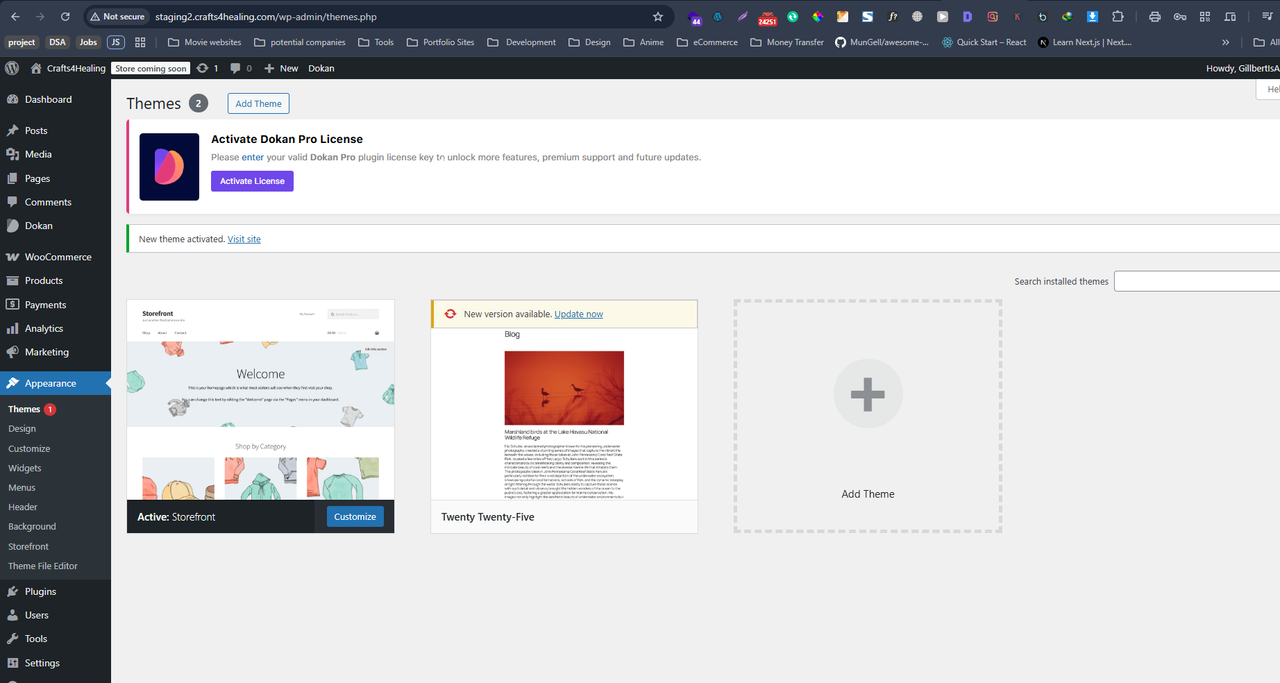
    We have checked the issue with the default Storefront theme (https://prnt.sc/cr4t6ezXGKeU) and with the XStore Core plugin (https://prnt.sc/wUlzqLxlc7Of) disabled, and the same issue persists (https://prnt.sc/f7AQ84oOMMDJ). Therefore, we kindly ask you to submit your request to the Dokan plugin support forum for further review, as the issue is also reproduced with the default theme and is not specific to our theme.

    Please note that we can only assist with bugs or issues related to our theme. Since this issue occurs with the default theme as well, it falls outside our support scope. Thank you for understading and respecting our support policy.

    Best regards,
    Jack Richardson
    The 8Theme’s Team

    Avatar: Gillbert
    Gillbert
    Participant
    December 11, 2025 at 06:06

    Hi, thank you for your response.

    As I have already shared with you, this is not happening because of the dokan plugin. I have three different websites, other than this one, and none of them are experiencing this problem.

    I understand that you installed a different theme on the site and checked, but the issue was still present, resulting in your verdict that the issue is related to Dokan. But could you try it in your sandbox and see? (First installing dokan with the default theme and then the XStore theme) Maybe this dummy text is overwriting any text that gets added by the vendor.

    Also, here is a screenshot from your theme demo vendor store page, which has the same text and image as my website, which also hints that the text and image are coming from the theme. (Also, Dokan doesn’t add any media items Eg: the image in question, upon fresh installation.)

    Files is visible for topic creator and
    support staff only.
    Avatar: Jack Richardson
    Jack Richardson
    Support staff
    December 11, 2025 at 08:50

    Dear @RapidClick,

    We sincerely appreciate your continued support and the trust you have placed in us by reaching out for assistance. We would like to take this opportunity to clarify several important points regarding the issues you have encountered on your website.

    After carefully reviewing the reported problems, we conducted a thorough test and confirmed that the issue persists even when using the default Storefront theme. This indicates that the problem is not related to our XStore theme. For your reference, we have provided screenshots showing that both the XStore theme and the XStore Core plugin (https://prnt.sc/cr4t6ezXGKeU, https://prnt.sc/wUlzqLxlc7Of) were deactivated during testing. Please note that only active themes and plugins can affect your website’s functionality; deactivated ones do not load their code.

    While we appreciate your attention to detail, our internal testing procedures sometimes produce results that differ from those reported by customers. Such discrepancies may arise from misunderstandings or variations in testing environments.

    Even though you have mentioned there are no similar issues on another website, we still performed tests using the default theme and essential plugins to isolate the problem from our theme or plugin.

    To address your concerns, we followed the testing steps. For your convenience, we have attached screenshots confirming each step:
    1. Activated the default WordPress theme “Storefront” (https://prnt.sc/cr4t6ezXGKeU).
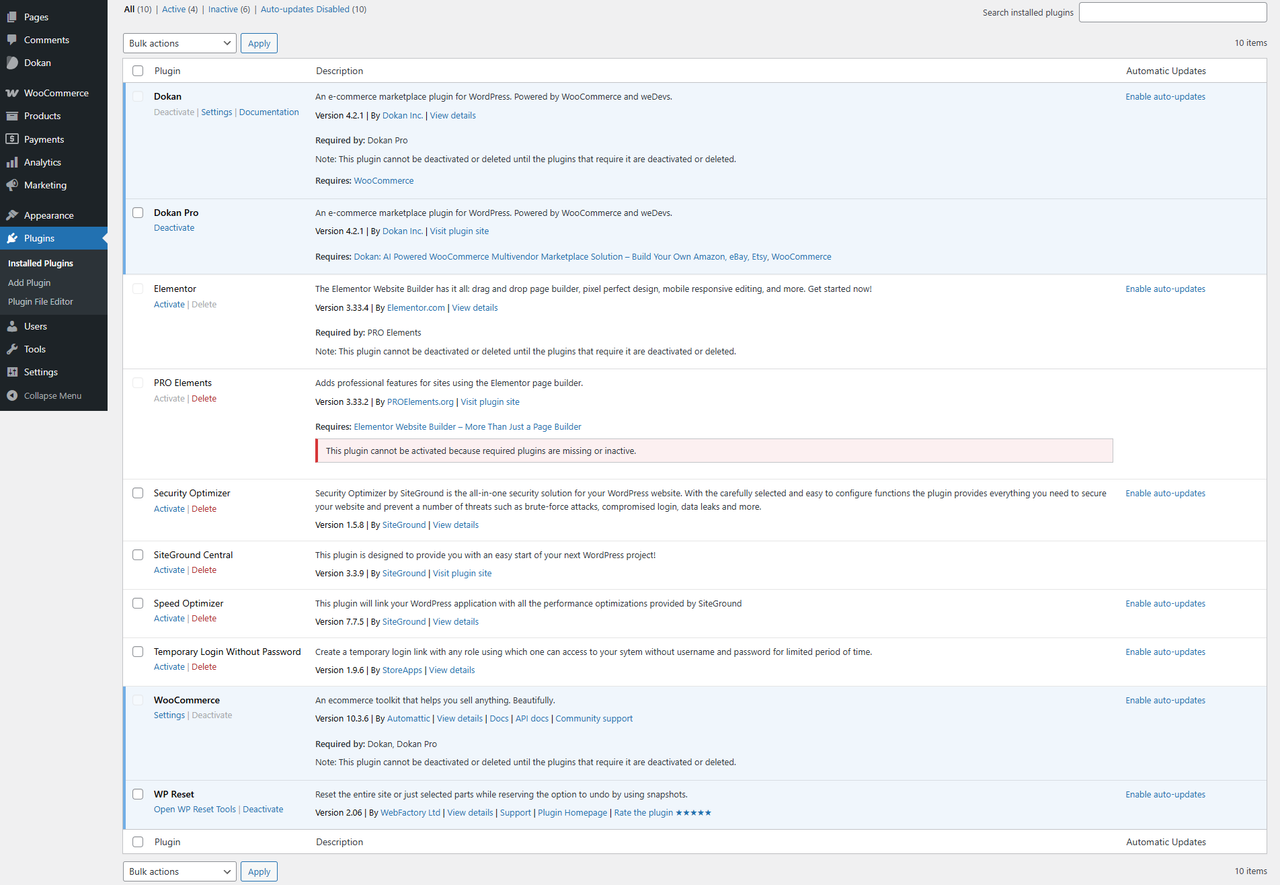
    2. Deactivated all plugins except those shown in the screenshot (https://prnt.sc/dCce-Wx933m-) — Dokan, Dokan PRO, Elementor, Temporary Login Without Password, and WooCommerce.
    3. Reviewed the vendor page and observed that the description issue persists even without our theme and plugins (https://prnt.sc/9MPhO4jdQruZ).

    Based on these findings, we must emphasize that our support scope is limited to matters directly related to our themes and plugins, as outlined in our support documentation (https://www.8theme.com/documentation/xstore/support/support/). Since the issue also occurs with the default theme and basic plugins, it falls outside the scope of our responsibility.

    We hope this explanation clarifies our position and the boundaries of our support services. We kindly ask for your understanding and adherence to our support guidelines.

    As you are using the Dokan Pro plugin, we recommend contacting their support team for further assistance in resolving this compatibility issue.

    Best regards,
    Jack Richardson
    The 8Theme Team

    Avatar: Gillbert
    Gillbert
    Participant
    December 11, 2025 at 09:57

    Since my previous requests were not addressed and the testing steps I suggested were not followed—specifically:

    1. Testing the issue in a fresh sandbox environment instead of repeatedly using my live website.
    2. Installing Dokan with a default theme first, then activating XStore to reproduce the issue.

    I have taken the initiative to perform the full diagnostic process myself. Below are the exact steps and findings demonstrating that the issue originates from your theme:

    1. I created a staging site and performed a full reset to ensure a clean environment. Screenshot: https://i.postimg.cc/B6cNNKmL/Screenshot-2025-12-11-141806.png

    2. I removed your theme and all associated bundled plugins, keeping only WooCommerce and Elementor active. Screenshot: https://i.postimg.cc/Jzr8QNK2/xstore-2.png

    3. I reactivated Dokan, restored my vendor status, and added text through the vendor dashboard. Screenshot: https://i.postimg.cc/MHSNpwFB/Screenshot-2025-12-11-141712.png

    4. On the front end, the text displayed correctly, confirming that Dokan works as expected without your theme. Screenshot: https://i.postimg.cc/0yB4JD48/Screenshot-2025-12-11-141650.png

    To confirm that the issue is caused by your theme:

    1. I reinstalled and activated XStore on the same staging site. Screenshot: https://i.postimg.cc/vm5vHnF0/Screenshot-2025-12-11-142043.png

    2. I imported the theme demo content. Screenshot: https://i.postimg.cc/1X30HYnQ/Screenshot-2025-12-11-142547.png

    3. After visiting the vendor store page, the previously working text no longer displayed correctly. Screenshot: https://i.postimg.cc/jS7HZf5z/Screenshot-2025-12-11-143109.png

    4. The vendor dashboard still shows the original text I entered, confirming that the issue occurs only on the front end when your theme is active. Screenshot: https://i.postimg.cc/Kc7BkbWv/Screenshot-2025-12-11-143021.png

    For clarity and transparency, I included page URLs in each screenshot to avoid any misunderstandings.

    Given the thorough, evidence-based testing above, and considering that I have demonstrated the issue twice through different approaches, it is now clear that the problem originates from your theme—not from Dokan, WooCommerce, or my configuration.

    If you still maintain that the issue is not related to your theme, despite this verified testing, then I respectfully request a full refund. I cannot continue relying on a support team that is unable to acknowledge or resolve a theme-related issue even when it is clearly documented and reproduced step-by-step.

    Avatar: Jack Richardson
    Jack Richardson
    Support staff
    December 11, 2025 at 13:13

    Hello @Gillbert,

    Thank you for providing the details. As you can see on your staging website, there are other plugins installed along with our demo content. To replicate the same list of active plugins, please deactivate any additional plugins on your current website so that it matches the plugin list used on your staging site.

    We believe there may be an incompatibility issue between Elementor and Dokan. Please note that Elementor is not our product, so we kindly ask you to ensure that the same set of plugins is active on both your current and staging websites.

    As mentioned in our previous reply, the issue is not directly related to our XStore theme or the XStore Core plugin. It appears to be caused by a conflict between the plugins required by our demo content and the Dokan plugin.

    Have you contacted the Dokan support team regarding this issue? If so, could you please share their feedback with us?

    Best regards,
    8Theme Team

    Avatar: Gillbert
    Gillbert
    Participant
    December 11, 2025 at 15:18

    At this point, I am not sure I understand the direction of your explanation.

    To clarify: I have not contacted Dokan yet because bringing multiple support teams into a single issue before identifying the root cause creates unnecessary confusion. Additionally, as demonstrated through a clean installation, Dokan alone does not produce the error. With that in mind, there is no valid basis for opening a ticket with them at this stage.

    Your earlier responses stated that the issue originated from Dokan. In your latest message, you are suggesting that it is a conflict between Dokan and Elementor—yet Elementor is one of your theme’s recommended plugins. Before assigning responsibility elsewhere, may I ask whether you have attempted to reproduce the issue in your own testing environment or sandbox? The section affected is part of Dokan Lite, so Dokan Pro is irrelevant to this case.

    I have already provided thorough, step-by-step, evidence-based testing demonstrating that the issue occurs only when the XStore theme is active. Despite this, you are concluding—without replicating my test—that the problem lies with Dokan or Elementor.

    To remove any uncertainty, I am providing you with one fully replicated staging environment and new access to my main website. You now have the opportunity to perform the exact tests you requested in your recent reply directly on the staging sites. This will allow you to confirm the issue independently rather than relying on assumptions.

    I appreciate your cooperation and look forward to a definitive resolution based on actual testing, not speculation.

    Content is visible for topic creator and
    support staff only.
    Avatar: Jack Richardson
    Jack Richardson
    Support staff
    December 11, 2025 at 18:59

    Hello @Gillbert,

    Thank you for providing us with the opportunity to test the issue on your staging website.

    Initially, we indicated that the issue originated from the Dokan plugin code. However, upon further investigation, we discovered that the problem results from an incompatibility between the Elementor and Dokan plugins. As these plugins are developed and maintained by their respective teams, we are unable to resolve the issue directly.

    Although Elementor is one of our recommended plugins, we kindly suggest that you contact the support teams of both Dokan (with over 40,000 downloads) and also Elementor (with over 10 million downloads: https://wordpress.org/plugins/elementor/), as their developers are best positioned to address this compatibility issue.

    We appreciate your understanding that even widely used plugins may sometimes conflict with each other. With due respect, we are unable to fix this issue from our side.

    A video of our testing process is attached below, demonstrating that the issue can be replicated even when using the default theme with the Elementor plugin installed and activated.

    Video URL: https://fex.net/s/b47cldy

    Best regards,
    Jack Richardson
    The 8Theme’s Team

    Avatar: Gillbert
    Gillbert
    Participant
    December 11, 2025 at 19:16

    I can’t access the video you shared.

    edit: I saw the video. I’ll contact Elementor.

    Avatar: Jack Richardson
    Jack Richardson
    Support staff
    December 12, 2025 at 07:14

    Hello @Gillbert,

    Thank you for your update. We’re glad to hear that you were able to view the video.

    If you have any additional questions or concerns, please do not hesitate to reach out to us. Our support team is always available to assist you.

    Kind regards, Jack Richardson
    The 8theme’s team

    Avatar: Gillbert
    Gillbert
    Participant
    December 15, 2025 at 07:23

    Hi there,

    I have now contacted both Elementor and Dokan regarding this issue. Elementor has not responded yet, and Dokan confirmed that they were unable to reproduce the error on their end.

    I purchased this theme almost a week ago, and there has been no meaningful progress on the website due to this unresolved issue. This project is a charity website, and the vendor biography section is a mandatory feature for us. We cannot proceed knowing that this functionality is unreliable or non-functional.

    Before attributing the issue to Elementor, I would like to highlight an important finding from my testing. Elementor and Dokan do not reproduce this issue on a fresh WordPress installation when using other themes. The problem only appears after the XStore theme is installed and the demo content is imported. Once this occurs, the issue persists even if the theme is later deactivated or deleted. This strongly indicates that something introduced by your theme or its demo setup is causing a lasting conflict with Elementor.

    Since Elementor does not reproduce this behavior with other themes, and because Elementor does not claim compatibility with XStore, rather, XStore claims compatibility with Elementor, I am unable to wait indefinitely for a third-party resolution.

    Given the time already lost and the critical nature of this feature for our project, I respectfully request a full refund so I can move forward without further delay and close this matter.

    Thank you for your understanding.

    Avatar: Jack Richardson
    Jack Richardson
    Support staff
    December 15, 2025 at 09:09

    Hello @Gillbert,

    We have successfully reproduced the issue on our end without activating the XStore theme. Please follow the steps below to replicate the issue on your side or to share them with the Elementor or Dokan developers:

    1. Activate a default theme such as Storefront: https://prnt.sc/OcUxYI_3vkNA
    2. Install and activate Dokan, Dokan PRO (as the vendor description option is included in this plugin), Elementor, and WooCommerce.
    3. Enable product editing with the Elementor editor: https://prnt.sc/fOl-PJ9OWckk
    4. Create a test vendor and configure a custom vendor biography: https://prnt.sc/At-ioZpfRGhY
    5. Create a test product with Elementor content: https://prnt.sc/1YZ1GSZoiM_C, https://prnt.sc/gQrpjsm5Sj7Q, and assign this product to the created vendor: https://prnt.sc/GSz7oNnjFDWE
    6. Open the vendor page: https://prnt.sc/QZDKKh1afeFK, then navigate to the Vendor Biography tab: https://prnt.sc/2QSSDgQJ8myG. The content displayed in this tab is taken from the latest product assigned to the vendor (in our case, there is only one product, so its description appears there).

    We hope these detailed instructions will help you reproduce the issue on your end without activating our theme, simply by following the procedure described above.

    Best regards,
    Jack Richardson
    The 8Theme’s Team

  • Viewing 12 results - 1 through 12 (of 12 total)

You must be logged in to reply to this topic.Log in/Sign up

We're using our own and third-party cookies to improve your experience and our website. Keep on browsing to accept our cookie policy.