Several questions regarding layouts - by stmkjp

This topic has 10 replies, 2 voices, and was last updated 10 years, 11 months ago ago by Eva Kemp

  • Avatar: stmkjp
    stmkjp
    Participant
    January 12, 2015 at 15:02

    1) Grouped product page layout (in mobile),
    – quantity set /single item name/ price section not aligned well on mobile.
    – quantity box seems like this on mobile:
    <
    [0]
    >
    – not aligned well: quantity box seems middle aligned but single item name and price seems top aligned (both pc and mobile)

    for fixing single item name (if it’s too long), I tried to implement ellipsis option in css, but it only applied to single row, is is possible to implement this with 2-3 rows?
    (It’s too short if set width in css to 100px and whole layout totally messed up if set it longer.)

    and how can I fix to display quantity box (with arrows) in a single row?

    2) I tried to put widgets ( mega search, etc.) on the “place in header top bar”, but it’s show only when I enable “language area” which I don’t want it to be enabled.
    Is it possible to put something in header?

    3) I put “featured products” with “slider” format (3 items in a row) and then “recent products” with “grid” format (set column option to 3) in the homepage,
    but those layout doesn’t match as I wanted. size seems different
    Is it possible to assign size (width,height) of those items or any workarounds?

    Best,
    JP

    Please, contact administrator
    for this information.
    9 Answers
    Avatar: Eva
    Eva Kemp
    Participant
    January 12, 2015 at 17:20

    Hello,

    1./3. Please provide us with wp-admin panel credentials in Private Content to check the issue.
    2. You can put something in header only when languages area is enabled and drag some widgets in “Place in header top bar” area in Appearance > Widgets.

    Thank you.
    Regards,
    Eva Kemp.

    Avatar: stmkjp
    stmkjp
    Participant
    January 12, 2015 at 17:34

    Hi,

    check the private content.

    btw, any reason you have for the header top bar restriction? I hope you unlock header top bar (without language area) in next update.

    Best,
    JP

    Please, contact administrator
    for this information.
    Avatar: Eva
    Eva Kemp
    Participant
    January 13, 2015 at 14:05

    Hello,

    I’ve added this code into style.css of your child theme:

    @media (max-width: 480px) {
    .single-product-page .product-info .quantity .minus, .single-product-page .product-info .quantity .plus {
    width: 15px;
    } 
    
    .woocommerce a.button.quick-checkout-product-after {
    margin-left: 100px;
    }
    .single-product-page .product-info .single_add_to_cart_button {
    margin-left: -50px;
    }
    }

    Please check a single product page on a mobile device.

    Could you please clarify the question with product name? Do you wish it to be displayed in one row and the whole name should be in one row?

    As I see “featured products” slider has similar products images in size.
    What size do you want them to be displayed?

    Thank you.
    Regards,
    Eva Kemp.

    Avatar: stmkjp
    stmkjp
    Participant
    January 13, 2015 at 15:08

    Hi Eva,

    thanks * 10,000! quantity box now looks fantastic in a mobile device!

    Regarding the product name,

    Let’s say the name is “product name which has reeeeeeeeally loooooooooong name”.
    If I put ellipsis option to the css with a width:100px, then it looks like
    <[0]> product name… $30,000

    instead I want it to look like,

    
           product name  
    <[0]>  which has       $30,000 
           reeeeeeee...
    

    if it’s possible.

    And…about the product box size, you might think that the size looks similar on mobile but please check the desktop site.
    size and alignment of featured products (first row) looks fine (it’s slider format) but recent products (which is grid format) box width is wider and product image is not center aligned. ( 2 items in a row and 1 item below them, I set 3 items in a row though)

    Hope this can clarify my issue…

    Best,
    JP

    Avatar: Eva
    Eva Kemp
    Participant
    January 13, 2015 at 15:51

    Hello,

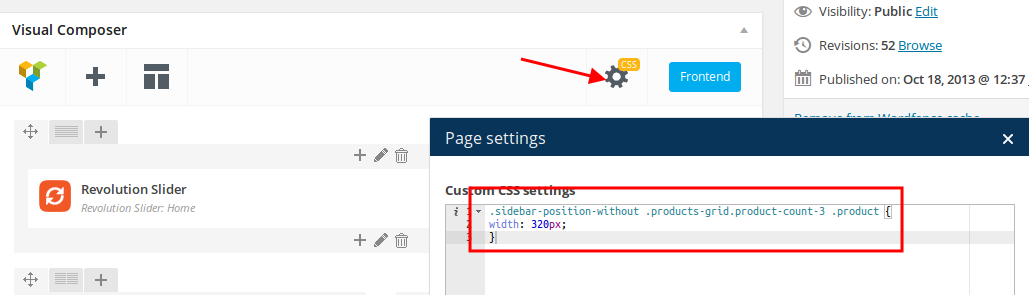
    I’ve added this code in CSS block in Visual Composer editor of your Home page:

    Please check products grid now.

    You can try to use this code to align the price in mobile:

    @media (max-width: 480px) { td.price .amount, ins .amont {
        vertical-align: sub;
    } }

    Thank you.
    Regards,
    Eva Kemp.

    Avatar: stmkjp
    stmkjp
    Participant
    January 13, 2015 at 16:20

    Hi Eva,

    Wow…this is great, and now I think I have a clue how to handle all the layout issues!

    You just saved my day! Really appreciated!!

    Best,
    JP

    Avatar: Eva
    Eva Kemp
    Participant
    January 13, 2015 at 16:35

    Hello,

    You’re always welcome.
    We’ll be thankful if you leave your comment on our site:
    http://themeforest.net/item/legenda-responsive-multipurpose-wordpress-theme/5888906

    Thank you.
    Regards,
    Eva Kemp.

    Avatar: stmkjp
    stmkjp
    Participant
    January 13, 2015 at 17:40

    Hi Eva,

    ok, I’ll do that right away.

    Best,
    JP

    Avatar: Eva
    Eva Kemp
    Participant
    January 13, 2015 at 19:18

    Hello,

    Thank you a lot.

    Have a nice day!

    Regards,
    Eva Kemp.

  • Viewing 10 results - 1 through 10 (of 10 total)

The issue related to '‘several questions regarding layouts’' has been successfully resolved, and the topic is now closed for further responses

We're using our own and third-party cookies to improve your experience and our website. Keep on browsing to accept our cookie policy.