Hi!
I need some help guys if possible, there are some things that are not displaying as i would like on the mobile version and some small issues. Please help me correct this
1.for desktop version, do you think it’s possible to move the “Go up” button a little bit more up (in the original position is interfering with the chat design, similar like the up button on this forum interfering with the chat)
2.the search bar is not working. Yes i know it shows some “dildo” but that’s it. Try search for “lenjerie sexy” or other categories from the menu, or for some SKU code or product title and it is not working. The SKU search is very important.
3.For the mobile version, how can I have the same space between objects like on the desktop version (the one you helped me earlier with this problem, with the custom-cat-banners and etc)? Because, if I keep my Ipad on horizontal, the spacing is correct, like on the laptop; but if I put the Ipad vertical, the spacing is like theme standard, with some 20px or so between every object. I would like to keep the spacing from the desktop version of home page, but if I put the custom-cat-banners in the object, it’s not working
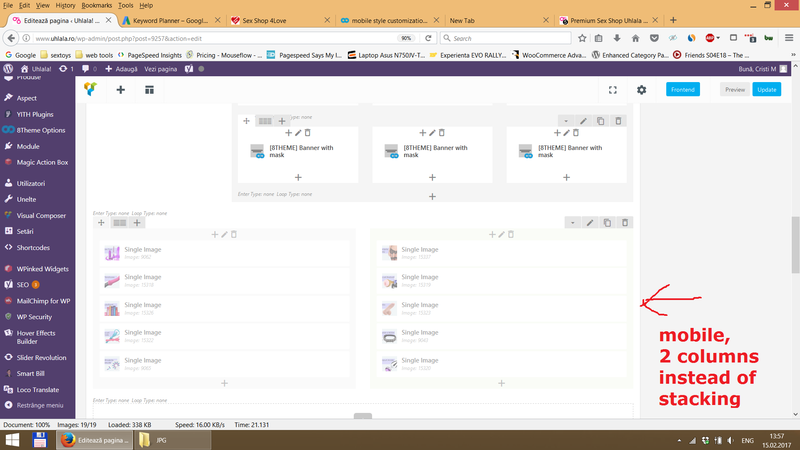
4.For the mobile version, I want to have two columns of single images, instead of one like the theme, who is stacking my image buttons. If you check http://www.uhlala.ro on mobile, you’ll see that I have images stacking…i have to be able to go for two columns, this is VERY important! …something like in the following picture:
http://i135.photobucket.com/albums/q125/kristake/Untitled%202_zpsgrgr0ui8.png<img
5.There seems to be an error on the sticky sidebar, if you are browsing to the catalog with 80 products, and go down and up, you’ll see that the sticky sidebar is not working properly, it jumps somehow…
6.If you could pretty please move the categories – in the single product page – where the tags were before (after the sku) it will be awesome.
7.On mobile, Can I make the fixed header to have less height? like 1/2 it is now… Also, i would like smaller height for the grey row under the header, the one with the scooter logo…
8.on desktop, somehow I messed the header, it’s repeating somehow and i don’t remember where to change it back. The same, somehow the grey row under the header (the one with the scooter logo) it added some space bellow the logos…
Thanks guys, I hope with these I can complete my site, i’m at 95% now