
Hi there
My subcategory is not dropping down when I point at the menu,why is that ?
my site: custom4u.club
This topic has 34 replies, 3 voices, and was last updated 11 years, 2 months ago ago by Eva Kemp

Hi there
My subcategory is not dropping down when I point at the menu,why is that ?
my site: custom4u.club

Hello,
Please provide us with wp-admin access in Private Content.
Regards,
Robert Hall.
Ok,

Hello,
As I see menu drop down is working fine.
Has your issue been resolved?
Regards,
Eva Kemp.
NO,it’s not working
Hello,
Could you please clarify with more details what exactly you want to do and show us screenshots?
Regards,
Robert Hall.
I mean that when your arrow goes to the menu,usually the subcategory under the menu will show drop down for selecting.now my menu is not acting like this
And another question :
The defaul register form has only second confirm for password,and I want to add a confirm form for email too,is it possible ?/
Hello,
Please look at the screenshot, the drop down menu is working
http://imgur.com/08u7bcu
What browser are you checking in? Try to use another one.
You can add confirmation field for email address modifing the file et-registration.php.
If you have necessary skills you may do this yourself.
Regards,
Eva Kemp.
Thanks
but I test the chrome and firefox, it’s still not working
BTW I can’t update WPBakery Visual Composer plugin:
It shows error: An error occurred while updating WPBakery Visual Composer: Update package not available.
Thanks in advance
Hello,
Please provide us with FTP credentials and we’ll update Visual Composer plugin for you.
Are your browsers updated to the latest versions?
Regards,
Eva Kemp.
Yes,my browser is the newest version
but when I roll down the page, the Menu will change to the right up side corner,right? and then the subcategories are showing down correctly..
And my promo popup is not showing
and when I create a popup,the guide said using shortcode [block id= ” “].what’s the ID ? is it the block title I created??
please check it
and the admin access is in the above REPLY #27381
Thanks in advance
Hello,
You can find static block id in the static block url:
http://i.imgur.com/5SfrNVt.png
I’ve updated Visual Composer plugin for you.
Sorry, but I don’t see any issues with the menu.
Please show us a screenshot to have clear understanding of your problem.
Thank you.
Regards,
Eva Kemp.
Thanks, it’s OK now
I got more questions:
1.how to set background color for the menu button like “My account” “cart” on 8theme.com

2.what’s the code for the green color on 8theme.com ?
3.I want to create a landing page just like the demo style : https://www.8theme.com/demo/legenda2/
how do I suppose to do,is there a demo file ? I want to learn the settings
Thanks in advance
Hello,
1. To change background color for My account link add this code into custom.css file:
.links li a {
    background-color: #0E98D8;
}
Change color value to yours.
2. Code for green color is #88BB0C .
3. You need import Corporate template. It’s located in the theme package in the folder “XML_Data” > “corporate”.
Regards.
Eva Kemp.
Thanks
1. how to change the other menu selections background color ?
2.only upload the home.xml ? then how to use it ? is it in the visual composer ?
Hello,
1. Please specify for what menu items you want to change background color.
2. Yes, you need import home.xml file and change your front page in Settings > Reading. The page is created with Visual Composer editor.
Thank you.
Regards,
Eva Kemp.
1.I can’t find the home.xml after I uploaded…
could u kindly create it in a draft page for me please ?
2.How to set the slider like the demo shows ?
could u set one as an example for me, set the one already with words”Stay good memories for good” on it on my site ??
The access is provided above already
Thanks in advance
Hello,
1. You’ve already had home page file imported. It’s called Front page. I’ve selected it as your Home page in wp-admin panel > Settings > Reading.
Please check your site now.
2. Concerning the slider, I can’t import it. What php version is used on your server? Please ask your host if ziparchive function is enabled.
Thank you.
Regards,
Eva Kemp.
I just updated to the php5 and ziparchive function is enabled.
Regards,
and please help upgrade the WPBakery Visual Composer plugin,
It can’t receive automatic updates
Thanks in advance
Sorry, one more quesiton :

how to disable one of the “add to wishlist” selection ?
I want to keep the heart picture one
Hello,
I’ve updated VC plugin and imported the slider, it’s called “Full Width”.
To remove the second “Wishlist” button go to Woocomerce > Settings > Wishlist and choose “Use shortcode” in “Position” option.
Don’t forget to save the changes.
Regards,
Eva Kemp.
Thanks very much !
and I’m gonna do some changes like these:
1. set the menu in the same horizon line with the logo picture like 8theme.com does

2. set a background picture for the slider,and also for the banner like :


Hello,
1. To have the menu beside the logo you need select the 3rd or 4th header type in Theme Options > Header.
2. To set background picture you can edit a row in Visual Composer editor:
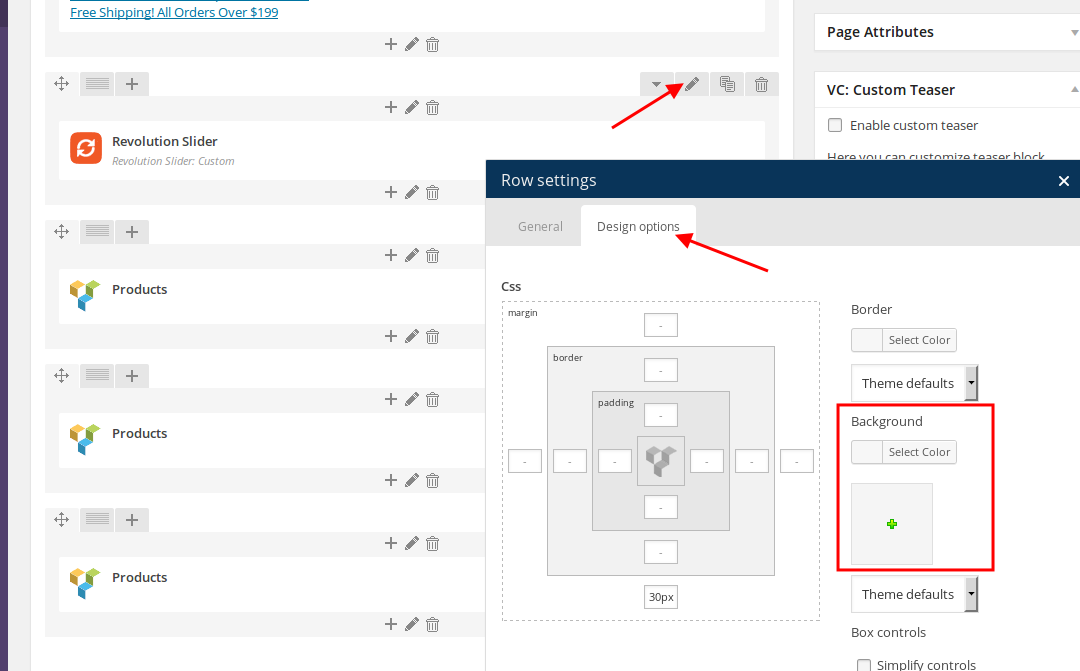
Thank you.
Regards,
Eva Kemp.
Thanks Eva !
and I set the 3th header and it shows up like this :

there’s a big blank space between the category and the subcategory.
Is that because of the logo picture size? if so,what’s the best size for the logo pic ?
Thanks in advance
Hello,
You can add this code into custom.css file:
.header-type-3 .main-nav {
    height: 100px;
}
Please try.
Thank you.
Regards,
Eva Kemp.
Thanks it’s better now
Hello,
You’re welcome.
Regards,
Eva Kemp.
The issue related to '‘Menu: subcategory drop down issue’' has been successfully resolved, and the topic is now closed for further responses










