Google analytics code - by whorv - on WordPress WooCommerce support

This topic has 6 replies, 4 voices, and was last updated 10 years, 5 months ago ago by Jack Richardson

  • Avatar: whorv
    whorv
    Participant
    July 10, 2015 at 07:53

    Hi,

    To The Concern,

    We want to know that we have added google analytics code in our website, but we can’t see the code on the homepage, but we can see the code on all other pages.

    Please suggest, Looking forward to hearing from you.

    Regards,
    Team Whorv

    Please, contact administrator
    for this information.
    5 Answers
    Avatar: Eva
    Eva Kemp
    Participant
    July 10, 2015 at 10:44

    Hello,

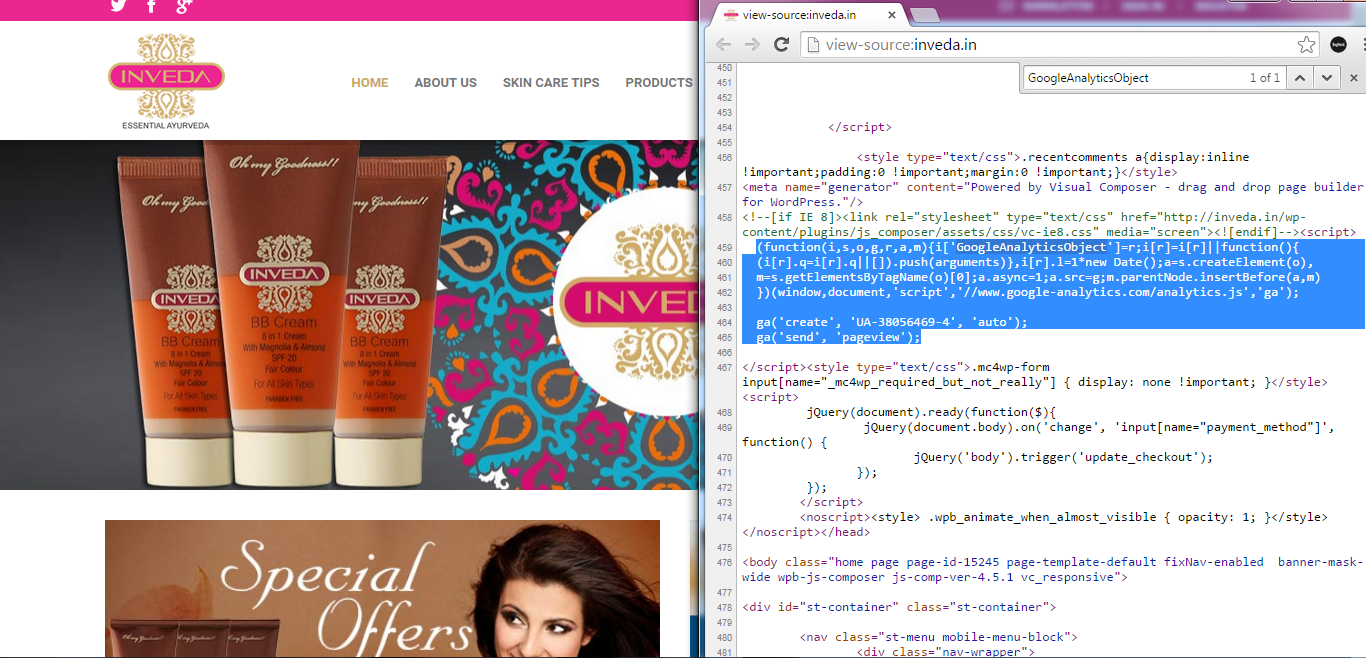
    I’ve viewed source code of your home page and Google Analytics code is shown there.
    Please clarify where you’re checking it.

    Regards,
    Eva Kemp.

    Avatar: whorv
    whorv
    Participant
    July 10, 2015 at 11:01

    Hi,

    Thanks for your reply, can you tell me where you can see the code because i am looking on homepage but i can’t see it.

    Regards,
    Team Whorv

    Avatar: stan
    Stan Russell
    Participant
    July 10, 2015 at 15:32

    Hello,
    click on right mouse button in Chrome, select ‘View source code’ and search(ctrl+F) for “GoogleAnalyticsObject”. You will be able to see following code:

    Regards,
    Stan Russell.

    Avatar: whorv
    whorv
    Participant
    July 11, 2015 at 07:06

    Hi,

    Thank you, We have got it. It was not showing us because of internet cookies.

    Regards,
    Team Whorv

    Avatar: Jack Richardson
    Jack Richardson
    Support staff
    July 11, 2015 at 08:35

    Hello,

    You’re welcome.

    Best regards,
    Jack Richardson.

  • Viewing 6 results - 1 through 6 (of 6 total)

The issue related to '‘Google analytics code’' has been successfully resolved, and the topic is now closed for further responses

We're using our own and third-party cookies to improve your experience and our website. Keep on browsing to accept our cookie policy.