Footer and Single Product Widgets - by lorenzo.mortato

This topic has 6 replies, 2 voices, and was last updated 10 years, 11 months ago ago by Eva Kemp

  • Avatar: lorenzo.mortato
    lorenzo.mortato
    Participant
    December 29, 2014 at 16:36

    Hi,
    I purchased Royal Minimal Template,
    in footer I don’t want to show widget like ABOUT / INFORMATIONS / FLIKR / RECENT POST
    How to change options?
    In your live preview of this template in Single Product Page there is a widget with PRODUCT BRAND with logo but in backend in widget there isn’t this.
    How to make this widget?

    Thanks a lot

    Lorenzo

    5 Answers
    Avatar: Eva
    Eva Kemp
    Participant
    December 29, 2014 at 18:08

    Hello,

    You need create your own footer as described in our documentation:
    https://www.8theme.com/demo/docs/royal/#!/9_footer

    To create brands go to Products > Brands in wp-admin panel, then drag 8theme – Brands filter widget into Single Product Page Sidebar in Appearance > Widgets.

    Thank you.
    Regards,
    Eva Kemp.

    Avatar: lorenzo.mortato
    lorenzo.mortato
    Participant
    December 30, 2014 at 15:03

    Hi,
    for footer I understand all and it’s OK!
    For Brands widget if drag 8theme – Brands filter widget into Single Product Page Sidebar, in page there a list of brands but in your demo there is only a brand logo of product. I want to do this.

    A wait a reply from you.

    Regards

    Lorenzo

    Avatar: Eva
    Eva Kemp
    Participant
    December 30, 2014 at 16:09

    Hello,

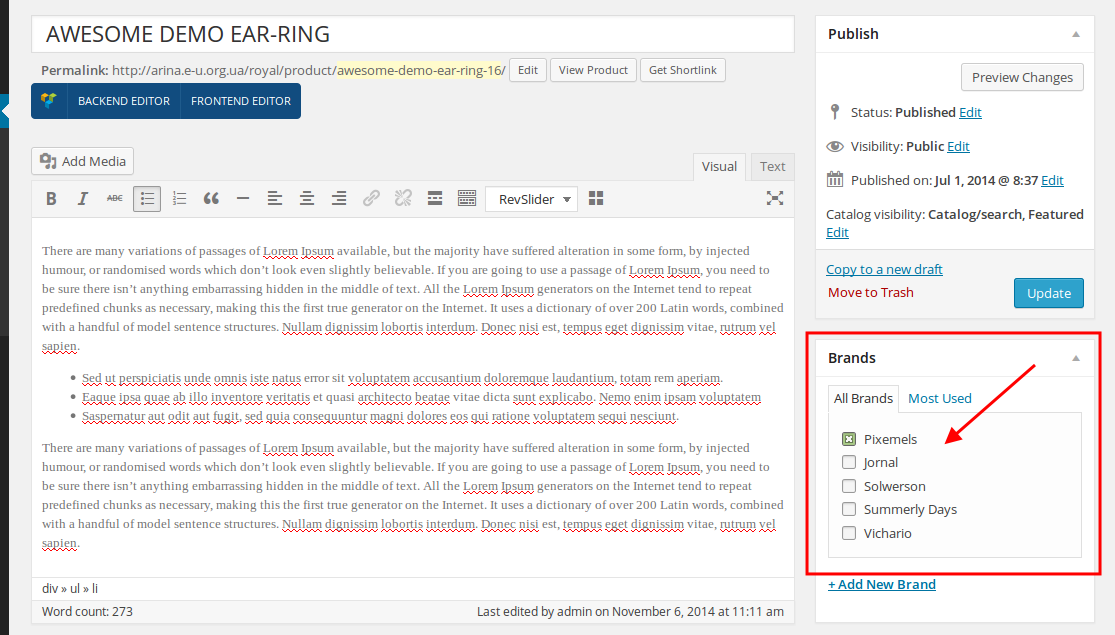
    When editing a product select a brand for it:

    Thank you.
    Regards,
    Eva Kemp.

    Avatar: lorenzo.mortato
    lorenzo.mortato
    Participant
    December 30, 2014 at 16:18

    Ok thanks, work fine.

    Avatar: Eva
    Eva Kemp
    Participant
    December 30, 2014 at 17:52

    Hello,

    You’re welcome.

    Regards,
    Eva Kemp.

  • Viewing 6 results - 1 through 6 (of 6 total)

The issue related to '‘Footer and Single Product Widgets’' has been successfully resolved, and the topic is now closed for further responses

We're using our own and third-party cookies to improve your experience and our website. Keep on browsing to accept our cookie policy.