Failed to update theme from 2.3v to 2.5 - by Trendyfeel

This topic has 8 replies, 2 voices, and was last updated 10 years, 10 months ago ago by Eva Kemp

  • Avatar: Trendyfeel
    Trendyfeel
    Participant
    January 22, 2015 at 14:50

    Hi, have followed the instruction as per video to try to update the latest theme through filezilla without success. This happened before and you got it fixed. Can you please kindly advise what I should do to get it right? Thanks

    7 Answers
    Avatar: Eva
    Eva Kemp
    Participant
    January 22, 2015 at 15:03

    Hello,

    Sorry, but we don’t know what you’re doing incorrectly.
    You can follow the instructions in our video tutorial how to update the theme:
    https://www.youtube.com/watch?v=KdWESIIPU1k

    Also we can update the theme for you.
    Please provide us with FTP and wp-admin panel credentials in Private Content.

    Thank you.
    Regards,
    Eva Kemp.

    Avatar: Trendyfeel
    Trendyfeel
    Participant
    January 23, 2015 at 18:20

    Hi Eva

    I have indeed followed the video tutorial but I never seemed to make it work. But one thing I noticed is, one the remote site, the screen shot above is showing /wp-content/themes, but when I used FileZilla to get access to my server, it shows “/public_html/wp-content/themes” instead. Would this be the problem resulting in failing to update the theme? When I inserted “/wp-content/themes” directly on the bar at the bottom right hand corner, it told me that no such a directory found?

    thanks

    Avatar: Eva
    Eva Kemp
    Participant
    January 23, 2015 at 19:41

    Hello,

    That’s not the problem. In your case you should update theme in the directory /public_html/wp-content/themes.
    Please provide us with wp-admin panel and FTP credentials to check the issue.

    Thank you.
    Regards,
    Eva Kemp.

    Avatar: Trendyfeel
    Trendyfeel
    Participant
    January 24, 2015 at 17:36

    Hi please find the required info in the private message and advise what the solution could be so as to allow me to update it myself in the future.

    Also, can you please have a look at my product catagories on the shop page or product page on the left hand column just as below? As you can see, subcategories of Tiaras & Headbands/ Hair Combs & Hair Clips/ Hair Flowers & Corsages/Fascinators are under the parent category HAIR ACCESSORIES. With the same setting, how come my another parent category, named jewellery, does not include the subcategories,
    NECKLACES/ EARRINGS/ BRACELETS & BANGLES/ RINGS/ CUFFLINKS in the same fashion as Hair Accessories? The parent category “jewellery” is missing and another subcategory “brooches” is not shown either? What to do to sort this out please? Many thanks.

    CATEGORIES

    HAIR ACCESSORIES
    Tiaras & Headbands
    Hair Combs & Hair Clips
    Hair Flowers & Corsages
    Fascinators
    BELTS & SASHES
    BRIDAL VEILS & GLOVES
    EVENING BAGS
    NECKLACES
    EARRINGS
    BRACELETS & BANGLES
    RINGS
    CUFFLINKS

    Please, contact administrator
    for this information.
    Avatar: Eva
    Eva Kemp
    Participant
    January 24, 2015 at 18:00

    Hello,

    I’ve updated the theme via FTP, just overwritten the files and also updated Visual Composer and Revolution Slider plugins. Perhaps the problem was caused by old plugins versions when you tried to update the theme. Please check your site now.

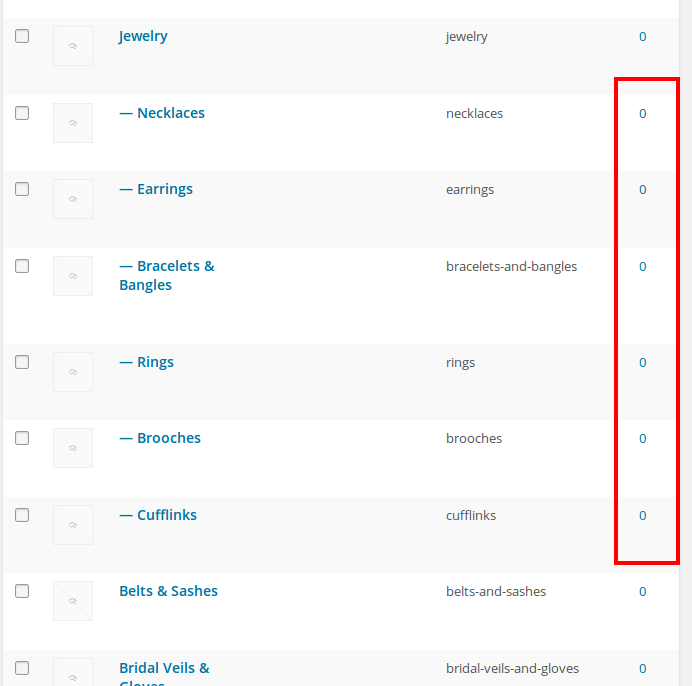
    Other subcategories aren’t shown because they don’t have any products:

    You should add some products to the subcategories to make them appear in the sidebar.

    Thank you.
    Regards,
    Eva Kemp.

    Avatar: Trendyfeel
    Trendyfeel
    Participant
    January 25, 2015 at 00:23

    Looks alright now, thanks so much!

    Avatar: Eva
    Eva Kemp
    Participant
    January 25, 2015 at 13:23

    Hello,

    You’re welcome.

    Regards,
    Eva Kemp.

  • Viewing 8 results - 1 through 8 (of 8 total)

The issue related to '‘Failed to update theme from 2.3v to 2.5’' has been successfully resolved, and the topic is now closed for further responses

We're using our own and third-party cookies to improve your experience and our website. Keep on browsing to accept our cookie policy.