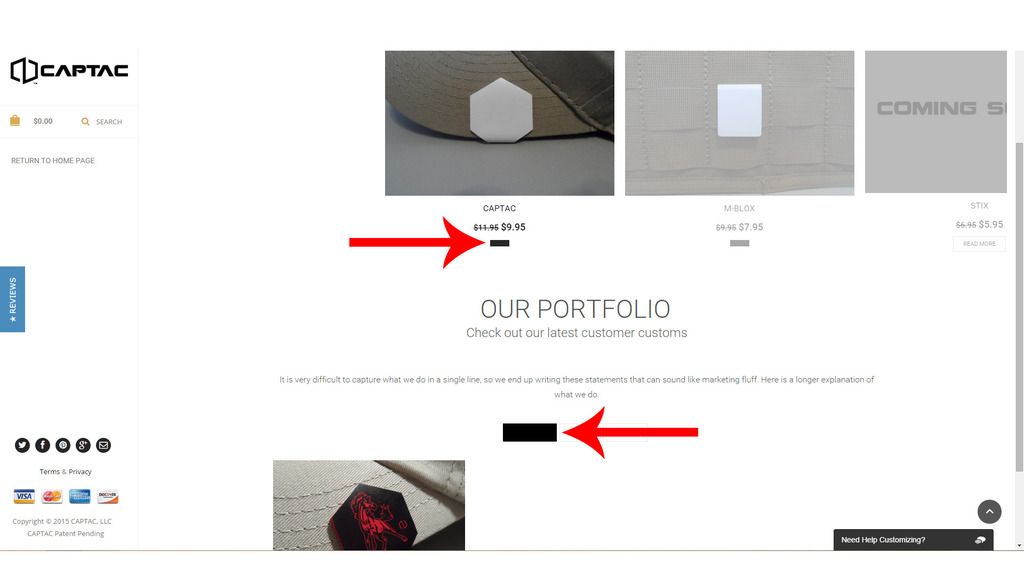
For some reason I have dark black buttons on my Portfolio catagories and products within my home page. I am unable to read the text within the buttons. Reference photo. How do I fix this, please advise….
This topic has 9 replies, 4 voices, and was last updated 10 years, 7 months ago ago by Robert Hall
For some reason I have dark black buttons on my Portfolio catagories and products within my home page. I am unable to read the text within the buttons. Reference photo. How do I fix this, please advise….

Hello,
Please add this code in custom.css file:
.minimal-light .esg-filter-wrapper .esg-filterbutton.selected span {
color: grey !important;
}
.button.product_type_simple {display: none;}
Regards,
Eva Kemp.
Eva,
Thanks for the reply, the code you provided doesn’t seem to be working. Am I doing something wrong?
Hello
Please provide us also with ftp credentials and let us know if you have customized by you wocommerce files.
With best regards
Brian Johnson
Sure. Here are my SFTP Credentials.Thanks
Any updates? Thanks for your time
Hello,
I’ve edited the code.
Please clear browser cache and check.
Regards,
Eva Kemp.
That worked. Thank you very much.
Hello,
You’re welcome!
If you have any questions don’t hesitate to contact us.
Regards,
Robert Hall.
The issue related to '‘Dark Black Buttons’' has been successfully resolved, and the topic is now closed for further responses










