
Demo Content "Corporate: Flat Retailer" Not found…

This topic has 10 replies, 5 voices, and was last updated 10 years, 2 months ago ago by Eva Kemp

  • Avatar: Evelyn
    Evelyn
    Participant
    September 26, 2015 at 16:37

    Hi+
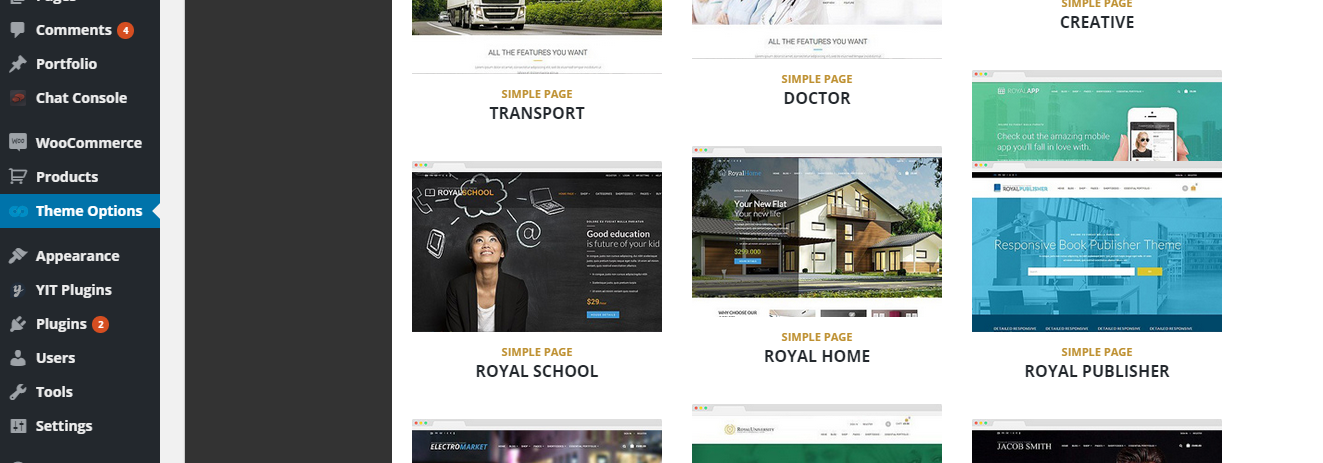
    I have successfully installed the newest version Royal Theme and Basic Demo Content. My client would like to change the look of his site; I am not attempting to install your “Corporate” Theme Version “Flat Retailer” as promoted and displayed on ThemeForest – where I purchased and downloaded your Royal Theme from….I do not find any “Corporate” section/tab on the Demo Option (only “all”, “simple page”, “one page”, & “landing page”). I am looking under “all” and I do not find the “Flat Retailer”…Please advise.
    Thank you, +ES
    9 Answers
    Avatar: stan
    Stan Russell
    Participant
    September 26, 2015 at 19:19

    Hello Evelyn,

    please make backup of your theme folder, update your theme to latest version, navigate to Theme options > Import/Export and select Simple Page ‘ROYAL HOME’

    Please do not forget to update plugins too.

    To update theme through FTP:

    Download the zipped package from ThemeForest and extract to your desktop.
    In the extracted package you will find archive Royal_v2.2.zip, which is the WordPress theme.
    Extract zip file and upload only extracted royal folder to /wp-content/themes/ folder on your server with overwriting.
    Please, re-save your Royal options after upgrading the theme. Navigate to admin panel > Theme Options and hit Save changes.

    Plugins bundled with theme can be downloaded here: http://www.8theme.com/download-plugins/
    If you have any questions left – feel free to ask.

    Regards,
    Stan Russell.

    Avatar: Evelyn
    Evelyn
    Participant
    September 27, 2015 at 20:47

    Hi+

    Thank you for the instructions. I have successfully located & installed the appropriate demo theme content.

    I followed your provided link for the updated Plugins. However, your system is not recognizing me as me…I am logged in and it says, “Hello, Evelyn! You can download available plugins here.” I input my Purchase Code & get this message, “SORRY, THIS KEY IS ALREADY IN THE DATABASE. REGISTERED FOR EMAIL ***LYN@MSDESIGNGRAPHICS.COM” – which is me!

    I am attempting to install/activate the latest version of the Ultimate Addons for Visual Composer. WP does give me the successful install & activation, but when I click to go to another page I get the following error:

    Fatal error: Allowed memory size of 67108864 bytes exhausted (tried to allocate 786432 bytes) in /home/msdg15/public_html/wp-content/plugins/js_composer/config/map.pjp on line 2200

    I have the memory in wp-config.php & through the hosting set to 256 max memory.

    I thought maybe I had a bad copy of the Ultimate Addons for Visual Composer Plugin, which is why I was following your provided link but your system won’t recognize my Purchase Code as belonging to me!

    So I am very confused…Please advise.
    Thank you, +ES

    Avatar: Jack Richardson
    Jack Richardson
    Support staff
    September 28, 2015 at 10:06

    Hello,

    I’ve sent the plugin to your email address.
    Please check it.

    Best regards,
    Jack Richardson.

    Avatar: Evelyn
    Evelyn
    Participant
    September 28, 2015 at 14:39

    Hi+

    Thank you very much! I will let you know how it goes…

    +ES

    Avatar: Robert Hall
    Robert Hall
    Participant
    September 28, 2015 at 14:49

    Hello,

    You’re welcome!

    Regards,
    Robert Hall.

    Avatar: Evelyn
    Evelyn
    Participant
    September 28, 2015 at 20:49

    Hello+

    Thank you for the plugin…I have installed & activated it. But now the site has an error that is talking about “js_composer” but I’m not certain which plugin that is as none of them are called “js composer”…?

    I do notice that the WPBakery Visual Composer Plugin states that it needs to be updated, but it is not giving me an “update” link…could you provide the most recent version of that plugin? (hopefully that will solve this error issue!)

    Thanks! +ES

    Avatar: Jack Richardson
    Jack Richardson
    Support staff
    September 30, 2015 at 15:30

    Hello,

    You can download the plugin at this link https://www.8theme.com/download-plugins/ and update it via FTP in wp-content/plugins directory.

    Best regards,
    Jack Richardson.

    Avatar: Evelyn
    Evelyn
    Participant
    September 30, 2015 at 21:49

    Hi+

    Thank you very much for the plugins link. I have successfully installed & activated the plugin and that seems to have fixed the issue…

    Avatar: Eva
    Eva Kemp
    Participant
    October 1, 2015 at 09:32

    Hello,

    We’re glad to hear it.

    If there are any questions feel free to contact us.

    Regards,
    Eva Kemp.

  • Viewing 10 results - 1 through 10 (of 10 total)

The issue related to '‘Demo Content "Corporate: Flat Retailer" Not found…’' has been successfully resolved, and the topic is now closed for further responses

We're using our own and third-party cookies to improve your experience and our website. Keep on browsing to accept our cookie policy.




