Hello,
Please provide us with wp-admin and FTP credentials in Private Content.
Regards,
Robert Hall.
14 replies4 participantsUpdated by Eva Kemp
Hello,
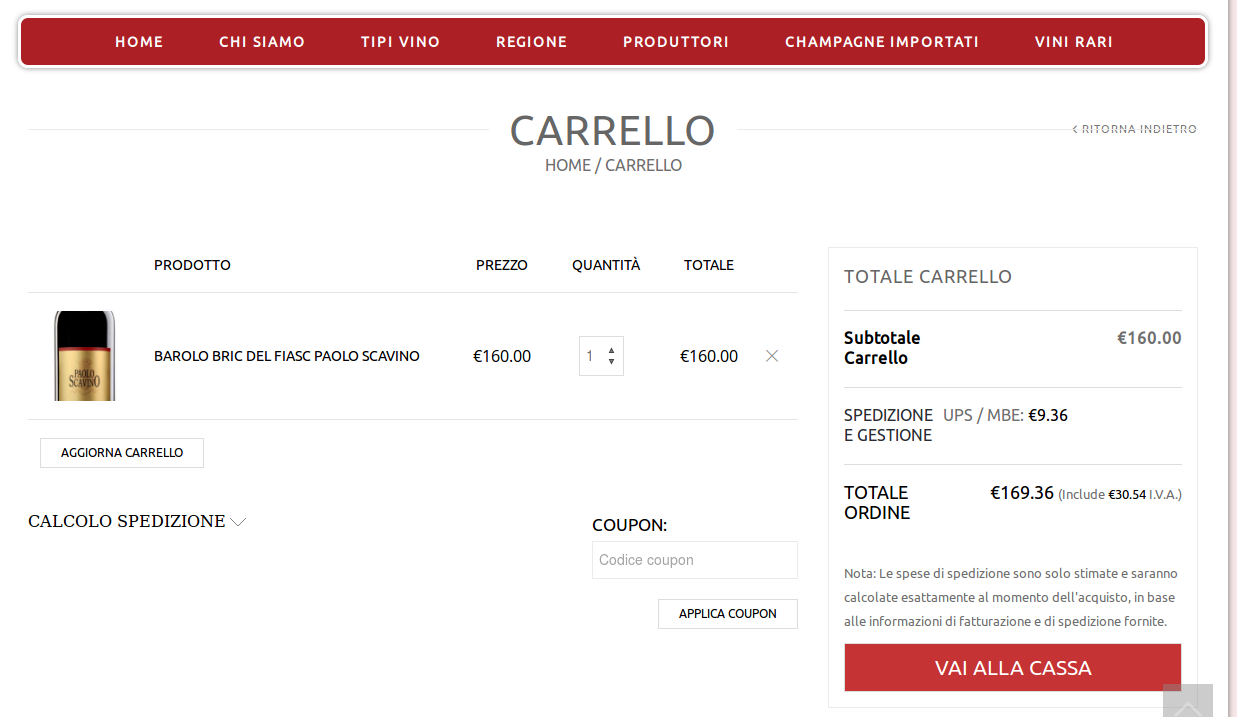
after upgrading to legenda 2.7 on our test enviroment I have a problem on the cart page, as you can see from this screenshot
https://d1x0mwiac2rqwt.cloudfront.net/4bac2abd185172cc9809042a95456640/as/ScreenClip.png
the whole total and go to the checkout part is missing…
Any ideas?
thx
Hello,
Please provide us with wp-admin and FTP credentials in Private Content.
Regards,
Robert Hall.
Hello
Please provide us with wp-admin and ftp credentials to your site.
With best regards
Brian Johnson
Hi Brian, thank you 🙂
Here you go.
Since it’s a test enviroment I’ve included instruction to change your host file to access the website.
Best
Hello,
Sorry, but your credentials isn’t correct. Please change password and provide us again.
Regards,
Robert Hall.
There was a problem with the forum’s form: the ampersand gets convertend in &
I’ve pasted a new psw without special characters
Hello,
Unfortunately we still can connect nor to wp-admin panel neither to FTP.
Please check the credentials and provide us with correct link to wp-admin.
Thank you.
Regards,
Eva Kemp.
Hi Eva,
Regarding wordpress: just to be sure, have you modified your hosts file as indicated in the previous messages?
Your user exists only on the staging server and not in production, to make it work you have to configure your hosts file by adding this line:
fonsvinum.com 81.201.5.181
Regarding FTP, what client are you using? Can you tell me how it’s configured?
Because I’ve tested and double checked it and I can access both FTP and WP dashboard with those credentials
Hello,
I’ve checked your site and Cart page is working fine:
https://s3.amazonaws.com/fvd-data/notes/168674/1431335631-Il7eZx/screen.png
Please clear browser cache and check again.
Thank you.
Regards,
Eva Kemp.
Hi Eva, please carefully read the thread 🙂
We have updated legenda ONLY on our staging enviroment before upgrading it on the live site. You see the cart working because you are navigating on the live version.
To access the staging enviroment you need to change your host file for the domain fonsvinum.com by adding this line in it:
fonsvinum.com 81.201.5.181
Once you save the file, when you’ll type fonsvinum.com in the browser bar, you’ll be automatically taken to the staging server.
That’s also the reason why you’re not able to login (the 8theme user exists only on the staging server)
best
Hello,
I was able to connect to wp-admin panel.
You had to write correct content for hosts file. It should be
81.201.5.181 fonsvinum.com and not
fonsvinum.com 81.201.5.181.
Please specify what folder your site files are located in via FTP and what the destination of the theme directory is.
Please give us correct path.
Thank you.
Regards,
Eva Kemp.
Hi Eva,
thank you 🙂
THEME files are located in /wp-content/themes/legenda/
MEDIA files for the fonsvinum.com website are located in /wp-content/blogs.dir/142
best
Hello,
I’ve reuploaded “woocommerce” folder in theme directory.
Please clear your browser cache and check Cart page.
Thank you.
Regards,
Eva Kemp.
Hi Eva,
it’s working now…
Just for my information, what files where missing/wrong?
Hello,
Old files in “woocommerce” folder weren’t overwritten, so I deleted it and reuploaded the folder from new version of the theme.
Regards,
Eva Kemp.
Want to reply? Log in, or register with your ThemeForest purchase code, to reply to this topic.

Free AI store scan · SalesMax
Paste your store address. SalesMax AI shows which upsell moments are missing. No signup.

Free AI speed test · FlashMax
Paste your site address. FlashMax runs Google Lighthouse for phone and desktop, checks Core Web Vitals and lists what to fix. No signup.
 Minimal Fashion 03 StoreFashion
(live demo, opens in a new tab)
 Niche Market 03Marketplace
(live demo, opens in a new tab)
 DeliveryWPBakery
(live demo, opens in a new tab)
 Headphone StoreElectronics
(live demo, opens in a new tab)
 InteriorFurniture
(live demo, opens in a new tab)
 Wedding StoreFashion
(live demo, opens in a new tab)
 NFT Crypto MarketplaceElementor
(live demo, opens in a new tab)
 Digital Marketing AgencyElementor
(live demo, opens in a new tab)
 Underwear StoreFashion
(live demo, opens in a new tab)
 Glasses StoreFashion
(live demo, opens in a new tab)
 Painting studioElementor
(live demo, opens in a new tab)
 BarbershopBeauty
(live demo, opens in a new tab)
 SpaBusiness
(live demo, opens in a new tab)
 KidsstoreBusiness
(live demo, opens in a new tab)
 Games StoreToys & games
(live demo, opens in a new tab)
 Furniture StoreFurniture
(live demo, opens in a new tab)