Breadcrumb Implementation for Case Study Pages

This topic has 10 replies, 2 voices, and was last updated 15 minutes ago ago by Jack Richardson

  • Avatar: Mirza Ahtsham
    Mirza Ahtsham
    Participant
    April 21, 2026 at 09:02

    Hello Support Team,

    I am currently working on designing a Case Study page and facing an issue with implementing a breadcrumb.

    At the moment, there is no dedicated breadcrumb widget available for Case Study pages in the theme builder (Elementor).

    Requirement:
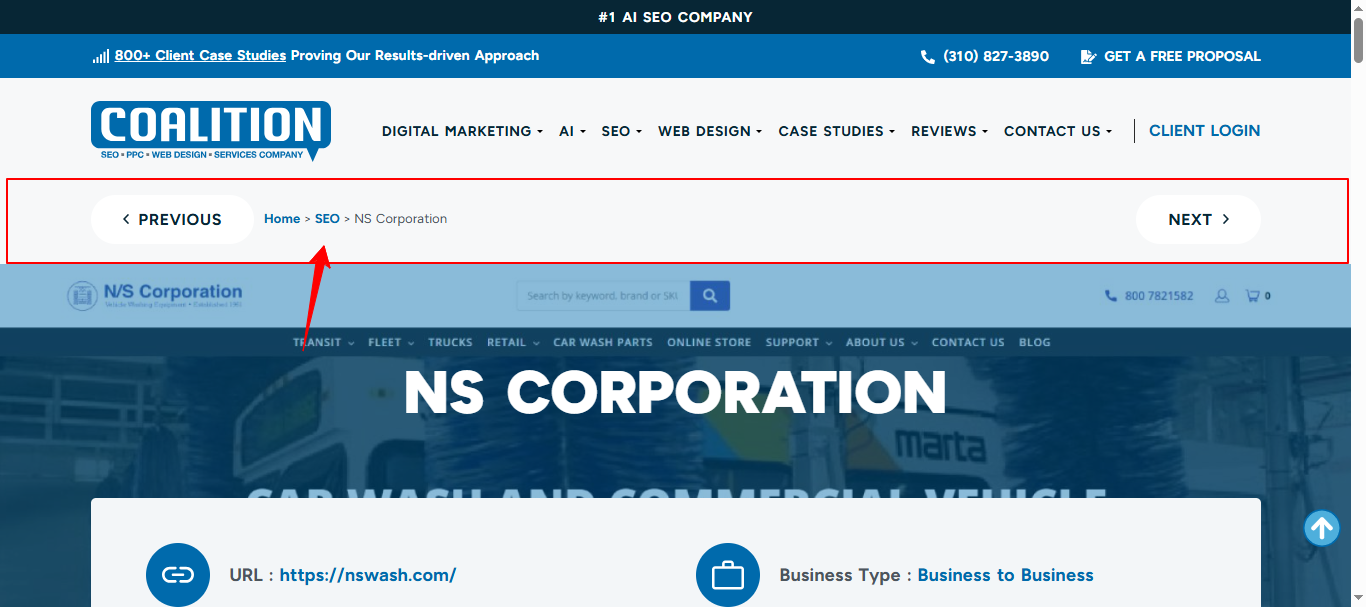
    I need to display a breadcrumb on the Case Study detail page similar to the following structure:
    Home > Case Studies > The Leather Jacket Company USA

    Reference:
    My page:
    https://adaptable-sapphire-cheetah.162-0-216-6.cpanel.site/case-studies/the-leather-jacket-company-usa/
    Design reference:
    https://userimg.8theme.com/storage/2026/04/14/34730-Compitetor-Design-reference.png

    Expected Behavior:
    Breadcrumb should dynamically reflect the hierarchy (Home → Case Studies → Current Post Title)
    It should be compatible with Elementor
    It should support styling (alignment, spacing, typography)
    Preferably reusable across all Case Study pages

    Questions:
    1. Is there a built-in way to enable breadcrumbs for custom post types (Case Studies)?
    2. If not, what is the recommended approach to implement this (shortcode, hook, or custom widget)?
    3. Can you guide how to integrate it properly within Elementor templates?

    Looking forward to your guidance.

    9 Answers
    Avatar: Jack Richardson
    Jack Richardson
    Support staff
    April 21, 2026 at 10:54

    Hello @Mirza Ahtsham,

    You can add the following snippet to your child theme’s functions.php file:

    add_shortcode('etheme_child_page_heading', 'etheme_page_heading');

    After that, you can use the Elementor shortcode widget on any of your pages with the value: [etheme_child_page_heading]
    Settings: https://prnt.sc/i46qWbYT77OI
    Frontend example: https://prnt.sc/lMtDzQWGByUc.

    This breadcrumb style will inherit its design from your Theme Options -> Breadcrumbs settings.

    If you still require our assistance, please provide temporary wp-admin and FTP access in the private content section.

    Best regards,
    Jack Richardson
    The 8Theme’s Team

    Avatar: Mirza Ahtsham
    Mirza Ahtsham
    Participant
    April 23, 2026 at 07:29

    Hello Jack,

    Thank you for your response.

    I have tested the provided shortcode [etheme_child_page_heading], but it does not work as expected for my use case.

    Issue:

    I am building a single Case Study template using Elementor (Theme Builder), and the shortcode:

    Does not display the breadcrumb correctly inside the custom post type template
    Outputs the default page heading instead of a clean breadcrumb structure
    Does not match the design or structure I shared in the reference

    Clarification:
    My requirement is specifically:

    Breadcrumb inside Elementor Single Template for a custom post type (Case Studies)
    Structure like:
    Home → Case Studies → Post Title
    Fully controllable within Elementor (placement & styling)
    Question:

    Is there a way to:

    Enable breadcrumbs specifically for custom post types in Elementor templates?
    Use a dedicated breadcrumb function/shortcode (not page heading) that works dynamically for CPT?
    Or hook into the theme breadcrumb function separately (without page title wrapper)?

    Right now, the provided solution seems limited to default page layouts and not Elementor-built templates.

    Looking forward to your guidance.

    Best regards,
    Mirza Ahtsham

    Avatar: Jack Richardson
    Jack Richardson
    Support staff
    April 23, 2026 at 07:47

    Hello @Mirza Ahtsham,

    At this time, we have provided you with a solution that displays breadcrumbs on your custom templates using shortcode. However, if you would like to add additional widgets that offer more breadcrumb functionality, you may install and use plugins that provide such features.

    Alternatively, if you would like us to review the functionality of the current shortcode we provided, please attach temporary wp-admin and FTP access in the private content section, along with screenshots showing the desired result on your template’s frontend. This will allow us to check whether such an implementation is possible.

    Best regards,
    Jack Richardson
    The 8Theme’s Team

    Avatar: Mirza Ahtsham
    Mirza Ahtsham
    Participant
    April 23, 2026 at 08:00

    Please See the Attached Image.

    Content is visible for topic creator and
    support staff only.
    Files is visible for topic creator and
    support staff only.
    Avatar: Jack Richardson
    Jack Richardson
    Support staff
    April 23, 2026 at 08:46

    Hello @Mirza Ahtsham,

    Please note that this email address is no longer active. You may share the following email address: 8themes@gmail.com.

    Best regards,
    The 8Theme Team

    Avatar: Mirza Ahtsham
    Mirza Ahtsham
    Participant
    April 23, 2026 at 08:54

    Please Use This Access

    Content is visible for topic creator and
    support staff only.
    Avatar: Jack Richardson
    Jack Richardson
    Support staff
    April 23, 2026 at 09:42

    Hello @Mirza Ahtsham,

    After reviewing your setup, we found that you are using the default layouts from Theme Options -> Blog -> Single post settings for your custom post type items. Therefore, the breadcrumbs section is displayed on these posts if it has been configured in “Theme Options → Breadcrumbs”. Once we enabled this option, the breadcrumbs appeared correctly: https://gyazo.com/d7286ff6da07451d4cd5123fa4c67cbd.

    Please note that these breadcrumbs settings are global (https://gyazo.com/d971e6588a1928c7a3b1c027a21ebfcd). If you wish to disable them on specific pages, you can do so in the “XStore Layout settings” within the page or post backend: https://gyazo.com/57cc02537faa323df367f095ebe7491b.

    Additionally, the background image in the breadcrumbs section is displayed when your post has a featured image. If you prefer to disable this background, you can add the following custom CSS in “Theme Options → Theme Custom CSS”:

    .single .page-heading {
        background: no-repeat;
        margin: 0;
    }

    We would like to confirm whether this solution meets your requirements.

    If you wish to create more advanced layouts with specific conditions, we recommend exploring our “XStore Builders”: https://www.8theme.com/documentation/xstore/xstore-builders/

    Best regards,
    Jack Richardson
    The 8Theme’s Team

    Avatar: Mirza Ahtsham
    Mirza Ahtsham
    Participant
    April 23, 2026 at 11:31

    Both Screenshot images are not seenable pleae see the image. can you send these screenshots as an image

    Files is visible for topic creator and
    support staff only.
    Avatar: Jack Richardson
    Jack Richardson
    Support staff
    April 23, 2026 at 12:20

    Hello @Mirza Ahtsham,

    Please, check now. We updated our previous reply.

    Kind regards, Jack Richardson
    The 8theme’s team

  • Viewing 10 results - 1 through 10 (of 10 total)

You must be logged in to reply to this topic.Log in/Sign up

We're using our own and third-party cookies to improve your experience and our website. Keep on browsing to accept our cookie policy.