Hello 8Theme Team,
Thank you for your response.
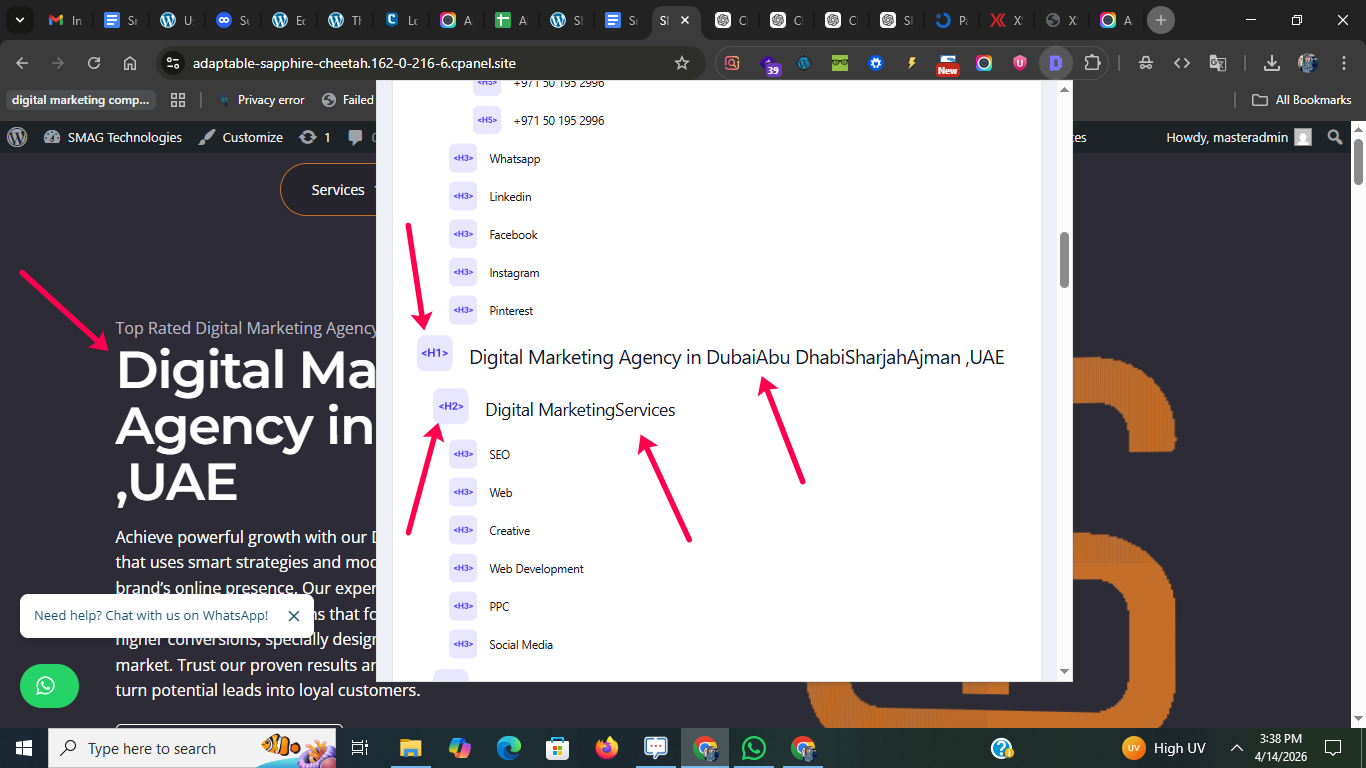
However, the issue I reported is not related to the page title or SEO plugin configuration. It is specifically related to how the Animated Heading and Advanced Heading widgets render text in the DOM.
Currently, the widget outputs text like this:
DubaiAbu DhabiSharjahAjman
and
MarketingServices
Because there is no space or separator between these inline elements in the HTML, SEO tools read the content as:
DubaiAbu DhabiSharjahAjman
MarketingServices
This negatively affects SEO analysis and content readability.
I tested adding ” ” but:
In Animated Heading, it partially works
In Advanced Heading, it breaks the front-end layout by adding unwanted visual spacing
So this is clearly a markup/output issue from the widget itself, not an SEO configuration issue.
I would like to request:
A proper fix in the widget output so that text nodes include spacing (e.g., “Dubai, Abu Dhabi, Sharjah, Ajman”)
Or an option in the widget to define a separator (space or comma) between animated/advanced text items
Or guidance on how to safely modify the widget output without affecting UI
This is important because search engines and SEO tools rely on the DOM text, not visual rendering.
Looking forward to your solution.
Image I attached Before: https://userimg.8theme.com/storage/2026/04/14/34730-My-Project-Heading-SEO-Tool-Detect.png