Blogs Page setting I am not able to configure As like I want to do.

This topic has 16 replies, 2 voices, and was last updated 2 months, 3 weeks ago ago by Luca Rossi

  • Avatar: Mirza Ahtsham
    Mirza Ahtsham
    Participant
    September 7, 2025 at 07:25

    I am Trying to fix some Blog Page setting As Like I want to do. But I am not Make Sure How to Do These. Please guide Me. I will Share The Screenshot that What Actually the Page Is Looking and What I want to convert with

    1 Blogs Page: current looking this
    What I want to do: i want to do this card type. Also Want Hover Shadow effect on Card. I also want to add search filter in the blog. i also want a button filter in this page like when click on the specific category button then show that specific category blogs only. that type of things i want to add in my blogs page.

    2 Author Page:
    What I want to do: In Author page i want to add author profile as well as i want to show the group post like a main post show in big image and then other post show in this relative group and then i want to create new category group hope you understand what actually i am discribing. like we can see every blog or news website. I need Search Bar in this page according to the author blogs search only.

    3 Blog Single Page:
    What I want to do: In Single Blog I need Add Social MEDIA Icons in the Left or write stiky after one main heading start. that type of thing i want to use. can you guide me how i can do this?

    Please, contact administrator
    for this information.
    Files is visible for topic creator and
    support staff only.
    15 Answers
    Avatar: Justin
    Luca Rossi
    Support staff
    September 8, 2025 at 06:58

    Dear @Mirza Ahtsham,

    We hope this message finds you well.

    We would like to inform you of the recent updates made to your website:

    1. Blog Page:
    Your blog page has been updated to match the layout and design of our Business 02 demo: https://learnwith.ahtsham.me/blogs/.
    If you wish to make further customizations, you may do so by navigating to the “Style” tab, where you can adjust styles related to images, post titles, and more.

    2. Author Page:
    The styling of the author page has been aligned with that of the blog page.
    Please note that it is not possible to include a search form that filters posts by a specific author. The search functionality will always redirect to a general search results page displaying all relevant posts across all authors.

    3. Single Post Page:
    To add a social share button to your single post pages, please edit your “Single Post Builder” template and place the button wherever you prefer. For your reference, here is a screenshot: https://prnt.sc/GJ5pURUFg8gt.

    We hope this information is helpful. Should you have any further questions or require assistance, please do not hesitate to reach out.

    Best regards,
    The 8Theme Team

    Avatar: Mirza Ahtsham
    Mirza Ahtsham
    Participant
    September 8, 2025 at 16:41

    Please see the Screenshot
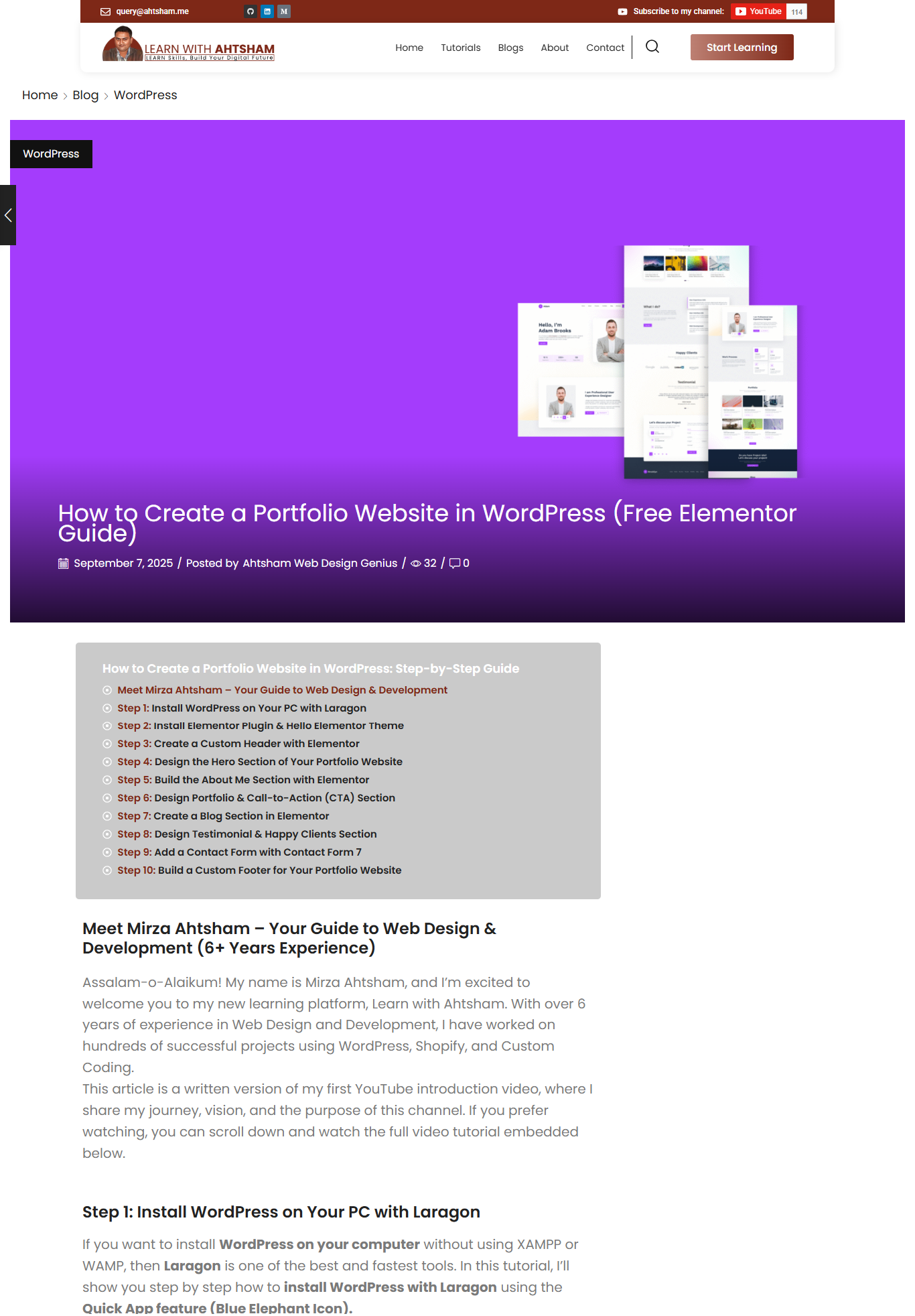
    1 image name is this Show
    Currently This Preview is Live on my Blog but I do nt Want this Big Image
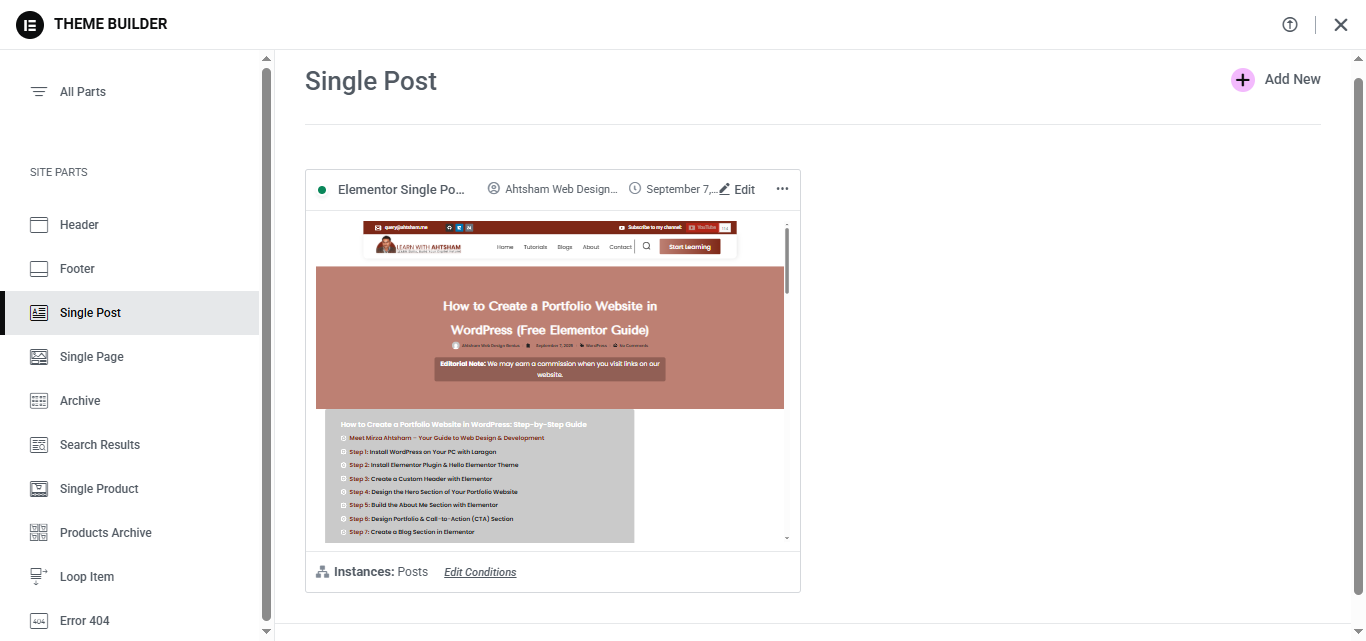
    I want this template which is I designed for Single Posts But i want breadcrumb and all other setting as is it.
    Below Screenshot name what exactly i want to set this.

    2 Image name is I want this

    Above message you ask for style option but please share screenshot that which option you are reffereing for furthure customization.

    Files is visible for topic creator and
    support staff only.
    Avatar: Justin
    Luca Rossi
    Support staff
    September 9, 2025 at 09:00

    Dear @Mirza Ahtsham,

    Thank you for your message.

    We apologize, but we are still unclear about the specific points you are referring to.

    Currently, the single post is displayed as shown in the following link: https://tinyurl.com/2ywpq3xg.

    Could you please confirm if you would like to reduce the width of the featured image?

    We appreciate your clarification and look forward to your response.

    Best regards,
    The 8Theme Team

    Avatar: Mirza Ahtsham
    Mirza Ahtsham
    Participant
    September 10, 2025 at 06:17

    I am talking About https://userimg.8theme.com/storage/2025/09/08/34730-i%20want%20to%20show%20this%20on%20single%20post%20page.png
    This Layout Which Is I created for single post and now currently i can see this https://userimg.8theme.com/storage/2025/09/08/34730-This%20Show.png
    On Single Post. How I can Apply This Layout. I want to keep remain social icons which are availble in the end of the post static post navigator

    how i can do this. pleaase see the single pag post
    https://learnwith.ahtsham.me/how-to-create-portfolio-wordpress/

    I noticed one more Thing. When You visit this post. when you try to srcoll down after some time the page jump on start and it will happen again and again. Also I can’t see the button jump on front in this page. please help me in this regards.

    Avatar: Justin
    Luca Rossi
    Support staff
    September 10, 2025 at 09:53

    Dear @Mirza Ahtsham,

    We hope this message finds you well.

    We have noticed that the post in question has been edited using Elementor, as shown in the following screenshot: https://prnt.sc/tXRhxh-EsnQD. Please note that using Elementor in this case overrides the default template, which means it is no longer utilizing the standard template builder.

    To ensure proper functionality and consistency, we kindly ask you to switch back to the default WordPress editor. Once you do so, you will be able to edit the global template via the following link:
    https://learnwith.ahtsham.me/wp-admin/post.php?post=3113&action=elementor.

    Thank you for your understanding and cooperation.

    Best regards,
    The 8Theme Team

    Avatar: Mirza Ahtsham
    Mirza Ahtsham
    Participant
    September 10, 2025 at 14:17

    If I want to Design It Using Elementor then how I can Add the Breadcrumb In it and How I can Configure all Other things Like Social Icons and Side Bar Static post navgation Etc.

    Files is visible for topic creator and
    support staff only.
    Avatar: Justin
    Luca Rossi
    Support staff
    September 10, 2025 at 16:09

    Dear @Mirza Ahtsham,

    Kindly update the global template builder for Posts using the following link:
    https://learnwith.ahtsham.me/wp-admin/post.php?post=3113&action=elementor

    Please include the following elements in the template:

    – Share Icons: https://prnt.sc/Bo50S4BhYJAv
    – Breadcrumb: https://prnt.sc/m0HfLSjBO2nu
    – Sidebar/Static Blocks:
    https://prnt.sc/1ryn4MO4gZoE
    https://prnt.sc/HTTXbShgrbbT

    Thank you in advance for your assistance.

    Best regards,
    The 8Theme Team

    Avatar: Mirza Ahtsham
    Mirza Ahtsham
    Participant
    September 10, 2025 at 19:05

    How i can do This
    Kindly update the global template builder for Posts using the following link:
    Can You help me in this regards. I check the link but here is no option for global setting.

    Avatar: Justin
    Luca Rossi
    Support staff
    September 11, 2025 at 06:59

    Dear @Mirza Ahtsham,

    We kindly request that no further modifications be made to the global template builder available at the following link:
    https://learnwith.ahtsham.me/wp-admin/post.php?post=3113&action=elementor.

    At this point, you only need to add the new elements we mentioned in our previous response to this template. Once added, these changes will automatically apply to all of your posts.

    Thank you for your cooperation.

    Best regards,
    The 8Theme Team

    Avatar: Mirza Ahtsham
    Mirza Ahtsham
    Participant
    September 12, 2025 at 09:21

    I add Widgets Which I need but This is Not Apply On My All Blog Post. have you any Tutorial about on it. How to play with blog Section Setting. Like Blog Page, Single Blog page, Author Blog Page.

    Avatar: Justin
    Luca Rossi
    Support staff
    September 12, 2025 at 10:42

    Dear @Mirza Ahtsham,

    We kindly ask that you refrain from editing any posts directly using the Elementor Builder. This is to ensure that the global template is properly applied across all posts for consistency.

    For your reference, please see the following resources:
    https://elementor.com/help/single-post-site-part/
    https://elementor.com/help/create-archive-template/

    We hope you find this information helpful.
    Thank you for your understanding and cooperation.

    Best regards,
    The 8Theme Team

    Avatar: Mirza Ahtsham
    Mirza Ahtsham
    Participant
    September 13, 2025 at 09:58

    I follow the instructions but it is not working please see the video.

    Please contact administrator
    for this information.
    Files is visible for topic creator and
    support staff only.
    Avatar: Justin
    Luca Rossi
    Support staff
    September 14, 2025 at 16:20

    Dear @Mirza Ahtsham,

    We hope this message finds you well.

    It appears there may have been a misunderstanding regarding our previous communication. Kindly allow us to clarify the difference between the two posts in question:

    1. https://learnwith.ahtsham.me/how-to-create-contact-us-form-in-blogger-html-and-css/
    This post is not edited using Elementor. Instead, it utilizes the default Single Post Template.

    2. https://learnwith.ahtsham.me/how-to-create-portfolio-wordpress/
    This post is edited directly with Elementor. You can confirm this by the presence of the Elementor label next to the post title, as shown in this screenshot: https://prnt.sc/LbWmOtIEGRkT. This indicates that the post does not use the default Single Post Template.

    If you wish to revert to the global template, please open each post individually and click the “Back to WordPress Editor” button. You can refer to this screenshot for guidance: https://prnt.sc/9xiGZpcITOVt.

    We hope this information is helpful. Should you have any further questions, please do not hesitate to reach out.

    Best regards,
    The 8Theme Team

    Avatar: Mirza Ahtsham
    Mirza Ahtsham
    Participant
    September 15, 2025 at 06:24

    Okay
    Now i understand That I only Can use elementor on One Place At Once.
    If I use elementor on Single post Archive Then I do can’t Use elementor in Single Post.
    and vise Virsa. Am I right?

    Avatar: Justin
    Luca Rossi
    Support staff
    September 15, 2025 at 06:49

    Dear @Mirza Ahtsham,

    Yes, that is correct. You may override the global template for specific posts(edit them directly with Elementor) if needed.

    Best regards,
    The 8Theme Team

  • Viewing 16 results - 1 through 16 (of 16 total)

The issue related to '‘Blogs Page setting I am not able to configure As like I want to do.’' has been successfully resolved, and the topic is now closed for further responses

We're using our own and third-party cookies to improve your experience and our website. Keep on browsing to accept our cookie policy.