Pending Items - by Libardo - on WordPress WooCommerce support

This topic has 38 replies, 4 voices, and was last updated 10 years, 7 months ago ago by Eva Kemp

  • Avatar: Libardo
    Libardo
    Participant
    February 25, 2015 at 13:23

    Good Day All,

    We are pushing for the website to be launch next week in which I would need your assistance to finalize the following points below:

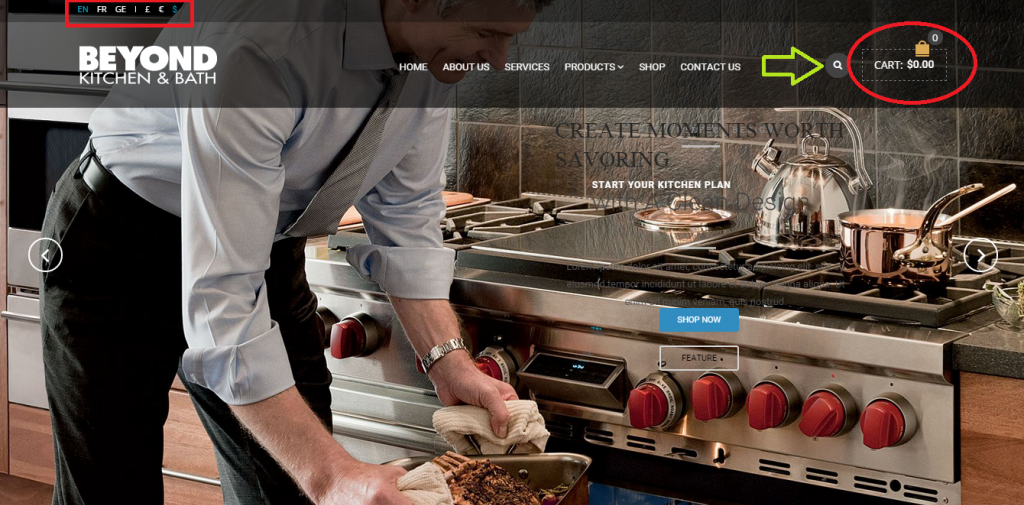
    – For now we would like to disable the currency/language/cart option until the next launch. How can we do this?

    Please refer to image below:

    http://i1340.photobucket.com/albums/o728/LibardoBarreto/JUNK/ITEMS_zpse8972e35.png

    P.S Can there be a option that we will only have the search engine available?

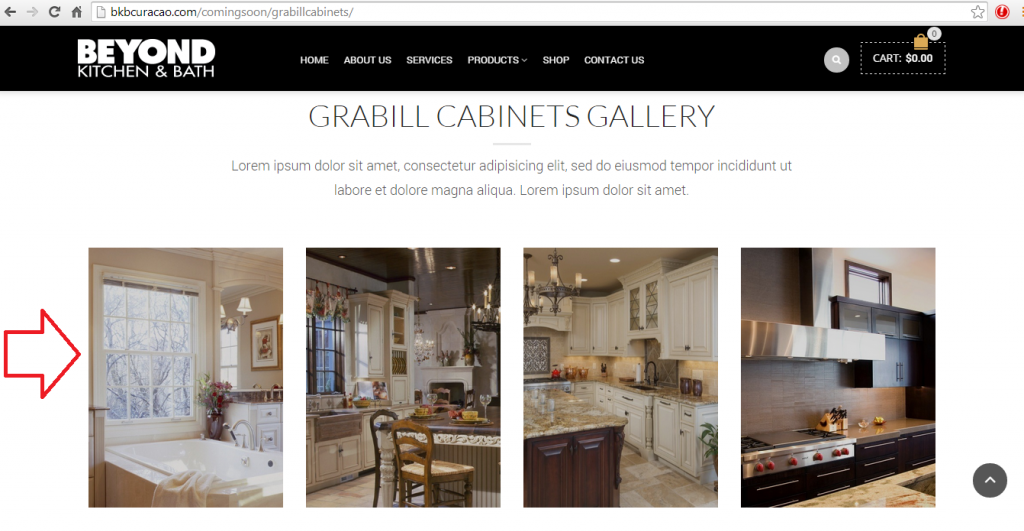
    On the other hand we also have something else pending which is the image gallery. At the moment we don’t have the option to click on each image and then make it bigger. Can you help us do this? What we would like to achieve is that when a client clicks on the picture the picture turns bigger.

    Please refer to image below:

    http://i1340.photobucket.com/albums/o728/LibardoBarreto/JUNK/asdasd_zps4c1044fc.png

    Please let me know ..

    Lee

    Please, contact administrator
    for this information.
    37 Answers
    Avatar: Robert Hall
    Robert Hall
    Participant
    February 25, 2015 at 17:27

    Hello,

    1) Please add this code into custom.css file

    .languages-area{
    display:none;
    }
    .shopping-container{
    display:none;
    }

    2) Sorry, but your credentials isn’t correct.

    Regards,
    Robert Hall.

    Avatar: Libardo
    Libardo
    Participant
    February 25, 2015 at 19:11

    Hi Robert Hall,

    Thanks. The changes looking good. However can we add like a transparent field which the users can see that here they can search? See in red below:

    http://i1340.photobucket.com/albums/o728/LibardoBarreto/111_zps0gewsp6z.png

    Also can you provide the code to leave the top bar and include the social media icons?

    http://i1340.photobucket.com/albums/o728/LibardoBarreto/2222_zpseospcazk.png

    http://i1340.photobucket.com/albums/o728/LibardoBarreto/33333_zps0njkdkx0.png

    With regards to the image gallery I would like the same options as below, for all my pages that have the image gallery. See a print screen how it looks at the moment ( http://i1340.photobucket.com/albums/o728/LibardoBarreto/JUNK/asdasd_zps4c1044fc.png )

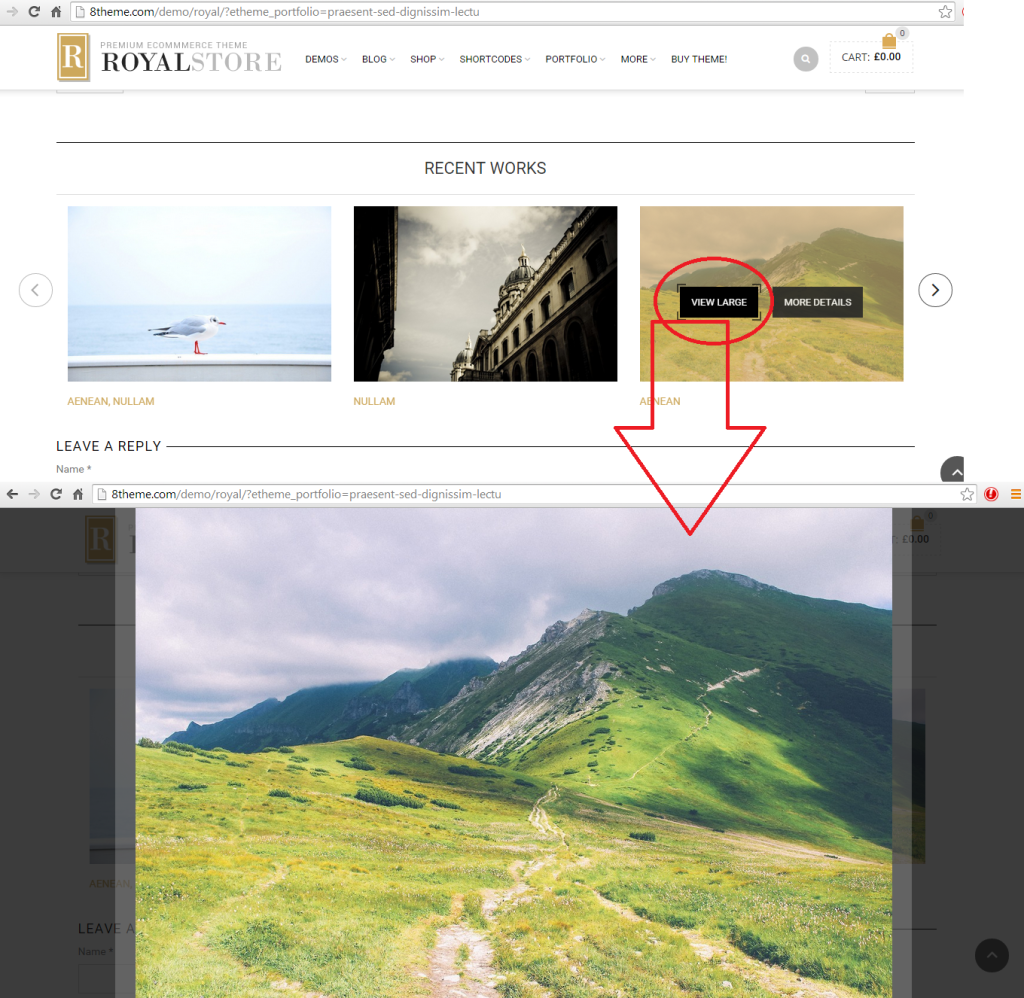
    This is how I would like it to be. When client howver there mouse over the image it will provide the View Large option which upon click it will open bigger:

    http://i1340.photobucket.com/albums/o728/LibardoBarreto/44444_zpsc69ooxyy.png

    See link and login credentials in private.

    Please, contact administrator
    for this information.
    Avatar: Eva
    Eva Kemp
    Participant
    February 26, 2015 at 13:51

    Hello,

    Unfortunately there is no such possibility to add search field next to the search icon.
    To add share icons at the top you need insert [share] shortcode in Text widget and place it in “Place in header top bar” area in Appearance > Widgets.

    “View Large” option can be used in Posts Slider element, not for Image Gallery.

    Thank you.
    Regards,
    Eva Kemp.

    Avatar: Libardo
    Libardo
    Participant
    February 26, 2015 at 14:51

    Thanks Eva.

    I am looking for the Post Slider but cannot find this. Can you do a test for me on the Kohler Page ( http://bkbcuracao.com/comingsoon/kohler/ ) and I will copy the same to the other pages?

    Avatar: Libardo
    Libardo
    Participant
    February 26, 2015 at 15:30

    Hi Eva,

    Now that I checked … I have the post slider and the option to link to bigger image is set. But still the image is showing as this :

    http://i1340.photobucket.com/albums/o728/LibardoBarreto/JUNK/asdasd_zps4c1044fc.png

    Please take a look at : http://bkbcuracao.com/comingsoon/kohler/ and scroll all to the bottom in order to see the Post Slider.

    Avatar: Libardo
    Libardo
    Participant
    February 26, 2015 at 16:49

    Good Day,

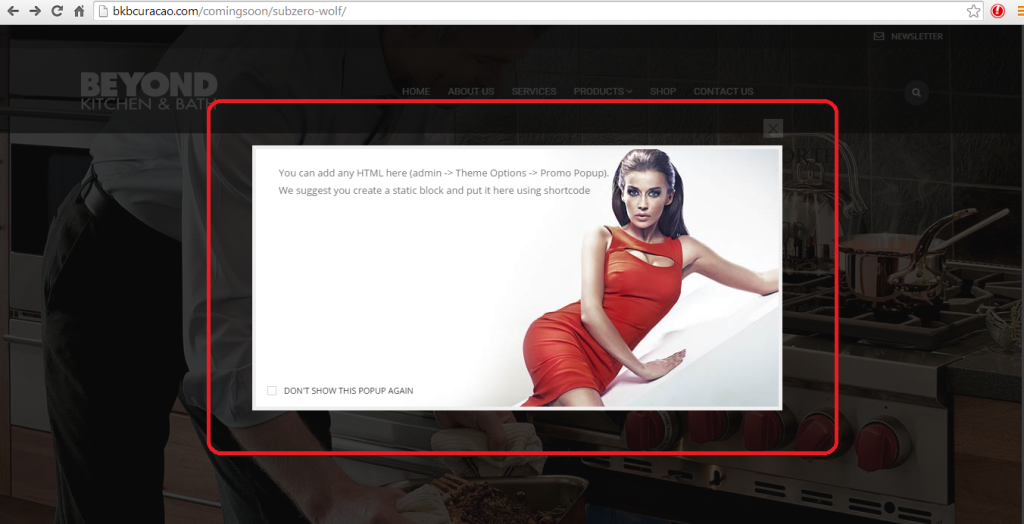
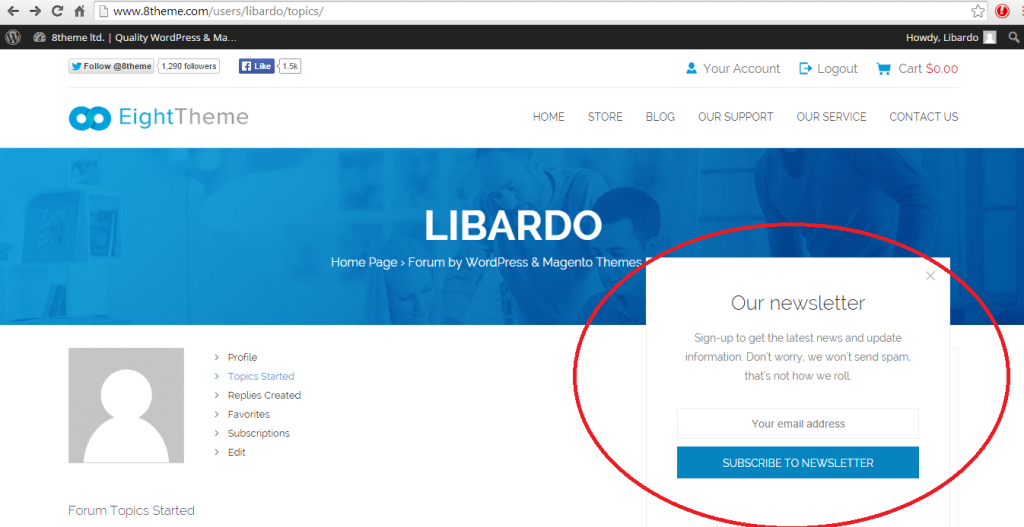
    At the moment I have the following when I activate the news letter option.

    http://i1340.photobucket.com/albums/o728/LibardoBarreto/44444_zps9ftmtqke.png

    However how can I change it like the one below?

    http://i1340.photobucket.com/albums/o728/LibardoBarreto/555555_zpssfk8phtx.png

    =====================================================================================

    As a future option which I like to use how to activate this one?

    http://i1340.photobucket.com/albums/o728/LibardoBarreto/3333_zpsgknhdy70.png

    =====================================================================================

    Also for the search option, since there is no bar at the end of the micro glass how can I include when I user hover there mouse over the search button that it will look like this :

    http://i1340.photobucket.com/albums/o728/LibardoBarreto/66767_zpsxgic7lhu.png

    Avatar: Eva
    Eva Kemp
    Participant
    February 26, 2015 at 20:03

    Hello,

    To modify search form go to Theme Options > Header > Search view and select “Form on hover”.
    Sorry, but Newsletter option on 8theme site is created only for our site.
    To have Newsletter form in pop up window you need install MailChimp plugin http://wordpress.org/plugins/mailchimp-for-wp/ . More information you can find in our documentation:
    https://www.8theme.com/demo/docs/royal/#!/1_static_blocks
    What version of Visual Composer plugin are you using?

    Thank you.
    Regards,
    Eva Kemp.

    Avatar: Libardo
    Libardo
    Participant
    February 26, 2015 at 21:55

    Hi Eva,

    ——>>>>> What version of Visual Composer plugin are you using?

    I am using the latest Visual Composer you have on your website for download. ( https://www.8theme.com/download-plugins/ )

    Avatar: Libardo
    Libardo
    Participant
    February 26, 2015 at 22:03

    Hi Eva,

    I believe its better you login and see the Visual Composer. The image is still showing Wrong. I need this fix ASAP… Please check ASAP. After this I will change all the other pages … Need this fix plss…

    Avatar: Eva
    Eva Kemp
    Participant
    February 26, 2015 at 23:43

    Hello,

    In the new update Visual Composer team removed some elements and modified some of them completely. So the functions you were using may not persist in the latest version of the plugin.
    They should receive other update where some bugs will be fixed.

    Please take our apologies for inconveniences.
    Regards,
    Eva Kemp.

    Avatar: Libardo
    Libardo
    Participant
    February 27, 2015 at 02:34

    Hello can someone assist with the visual composer????? I need the image in the post slider to have the option to open bigger as the photo above. Everytime someone reply i need to wait 24 hours to get another respond. And when i look which version is the visual composer. I need action takennnnnn… this is not support. I need to this this asap. I believe this is a simple change and i will di the rest in the other pages. If you take the iniative to see the website you will know what i am talking about instead of asking the versio of the plugins… common 8theme.

    Avatar: Libardo
    Libardo
    Participant
    February 27, 2015 at 02:36

    This will delay the website to launch. is anybody understanding me? Website Launch

    Avatar: Eva
    Eva Kemp
    Participant
    February 27, 2015 at 09:09

    Hello,

    We can’t log in to wp-admin panel with the credentials you provided previously.
    Please give us correct login details and FTP credentials as well.

    Thank you.
    Regards,
    Eva Kemp.

    Avatar: Libardo
    Libardo
    Participant
    February 27, 2015 at 13:37

    Hello,

    Please see private. I will await on your confirmation.

    Please, contact administrator
    for this information.
    Avatar: Eva
    Eva Kemp
    Participant
    February 27, 2015 at 15:04

    Hello,

    We need access to your wp-admin panel.
    Please provide us with login details to it as well.

    Thank you.
    Regards,
    Eva Kemp.

    Avatar: Libardo
    Libardo
    Participant
    February 27, 2015 at 15:30

    This was already provided in my early posts.. see in private

    Please, contact administrator
    for this information.
    Avatar: Brian Johnson
    Brian Johnson
    Member
    February 27, 2015 at 15:48

    Hello.
    I have added an example of gallery created with Essential grid plugin below your post slider and pictures expand after click.
    This was done with new grid element in
    Essential grid->add new(i used name ‘pictures’).
    Then i have added shortcode of the grid to the http://bkbcuracao.com/comingsoon/kohler-2/.

    Please update Essential grid plugin before your customization from https://www.8theme.com/download-plugins/.

    This tutorial will explain how to customize grid layout. https://www.youtube.com/watch?v=gBsLWMj_HJw

    With best regards
    Brian Johnson

    Avatar: Libardo
    Libardo
    Participant
    February 27, 2015 at 15:57

    Good Day Brian Johnson,

    I appreciate what you presented. But this is NOT what I need or want. As stated since the beginning of this ticket I want something like this :

    Where you see ” More Details ” it should be ” View Large “. After click the ” View Large ” Button the image should present bigger like the other print screen shots taken from 8theme website below:

    http://i1340.photobucket.com/albums/o728/LibardoBarreto/Untitled_zpsrrr9faih.png

    http://i1340.photobucket.com/albums/o728/LibardoBarreto/44444_zpsc69ooxyy.png

    http://i1340.photobucket.com/albums/o728/LibardoBarreto/44444_zpsc69ooxyy.png

    P.S We are going back and forth back and forth PLEASE read the post and the client request and adjust accordingly. Sooner or later you guys will go home and will have to wait again till Monday to proceed and chances are the whole week working on this ticket. Can you image the frustration of the client? Right now I have 10:55 A.M you can be 6 hours difference.

    Hope this helps and to clarify this request to make it as the client wish. Thank you in advance Brian /Eva/Robert.

    Avatar: Eva
    Eva Kemp
    Participant
    February 27, 2015 at 17:13

    Hello,

    As I told you before, some elements were customized and some were removed in the new Visual Composer update. Our demo site has old theme version and old plugins versions that’s why “View large” button is shown there. Sorry, but that’s not our fault, but new modifications from Visual Composer team. We contacted them and asked for some changes. So currently we’re waiting for a new update from them where some bugs are to be fixed.
    That’s why you were suggested to use Essential Grid plugin to create images gallery where you are able to view large images. Please try to use such variant for now.

    We’re very sorry for the issues you had to experience.

    Thank you for your understanding.

    Regards,
    Eva Kemp.

    Avatar: Libardo
    Libardo
    Participant
    February 27, 2015 at 17:54

    Hi Eva,

    Then can i suggest for you to install the old version of this plug in, in which the view large option is available?

    Can you switch to the old plug in version do a test for me to see in the same page created by Brian Johnson?

    Avatar: Libardo
    Libardo
    Participant
    February 27, 2015 at 20:50

    Hi Eva,

    Where you able to make the changes using the old plugin you have on file? If not I have a copy of the old plugin before I updated the website with the latest version.

    Please let me know ..

    Avatar: Eva
    Eva Kemp
    Participant
    February 27, 2015 at 21:27

    Hello,

    Unfortunately older versions of VC aren’t compatible with the latest versions of the theme and Woocommerce plugin. In this case we have to wait for a new update only.

    Please take our apologies.

    Regards,
    Eva Kemp.

    Avatar: Libardo
    Libardo
    Participant
    February 28, 2015 at 20:50

    Ok Eva. I will then have compromise with what we have. However can you do a test for me with the same Height/Width like the image below:

    http://i1340.photobucket.com/albums/o728/LibardoBarreto/Untitled_zpsrrr9faih.png

    I also would like 4 images shown and the left/right arrow to scroll true the images like I have it setup at the moment for all the other products pages.

    WP/FTP Login credentials can be find in this same ticket in early private replies.

    Avatar: Libardo
    Libardo
    Participant
    February 28, 2015 at 21:34

    Hello Eva,

    May I ask of your team has locked anything on my website? Currently I cannot edit or upload non of the pictures on the website. If I give a example I am trying to edit a part of a page on my website and getting the following message(See in private).

    Please, contact administrator
    for this information.
    Avatar: Eva
    Eva Kemp
    Participant
    February 28, 2015 at 22:17

    Hello,

    Are you unable to edit the default text that is included when Text element is added?
    I’ve just checked it and it’s working fine.
    Sorry but there is no possibility to add arrows for Essential Grid images. They are shown in grid view.

    Regards,
    Eva Kemp.

    Avatar: Libardo
    Libardo
    Participant
    March 1, 2015 at 04:01

    Hi Eva,

    That is correct. All pages or all text or all content that I would like to edit in the website I cannot access. For instance If I click on edit a text I get the following message ( I am text block. Click edit button to change this text. Lorem ipsum dolor sit amet, consectetur adipiscing elit. Ut elit tellus, luctus nec ullamcorper mattis, pulvinar dapibus leo.)

    Avatar: Libardo
    Libardo
    Participant
    March 1, 2015 at 04:02

    What has happen to the website recently? No editing can be done right now .. I am on HOLD at the moment.

    Avatar: Libardo
    Libardo
    Participant
    March 1, 2015 at 04:05

    Hi Eva,

    Can you look into this issue for me? I really need to start moving with the website … Nothing can be edit accordingly. I have like limited access to the site, however I do see I am the administrator.

    Avatar: Libardo
    Libardo
    Participant
    March 1, 2015 at 04:10

    Hi Eva,

    Since I don’t have the option to add the images as should, is there a way to leave the image as a standalone? For example I would like the image to stay as is without the option to ” View Large or More Details ” IS this possible?

    http://i1340.photobucket.com/albums/o728/LibardoBarreto/Untitled_zpsrrr9faih.png

  • 1 2
    Viewing 30 results - 1 through 30 (of 38 total)

You must be logged in to reply to this topic.Log in/Sign up

We're using our own and third-party cookies to improve your experience and our website. Keep on browsing to accept our cookie policy.