
Sticky Add to Product in Bottom - by Schlee

This topic has 2 replies, 2 voices, and was last updated 4 years, 8 months ago ago by Rose Tyler

  • Avatar: Schlee
    Schlee
    Participant
    April 17, 2021 at 13:27

    Hi Team

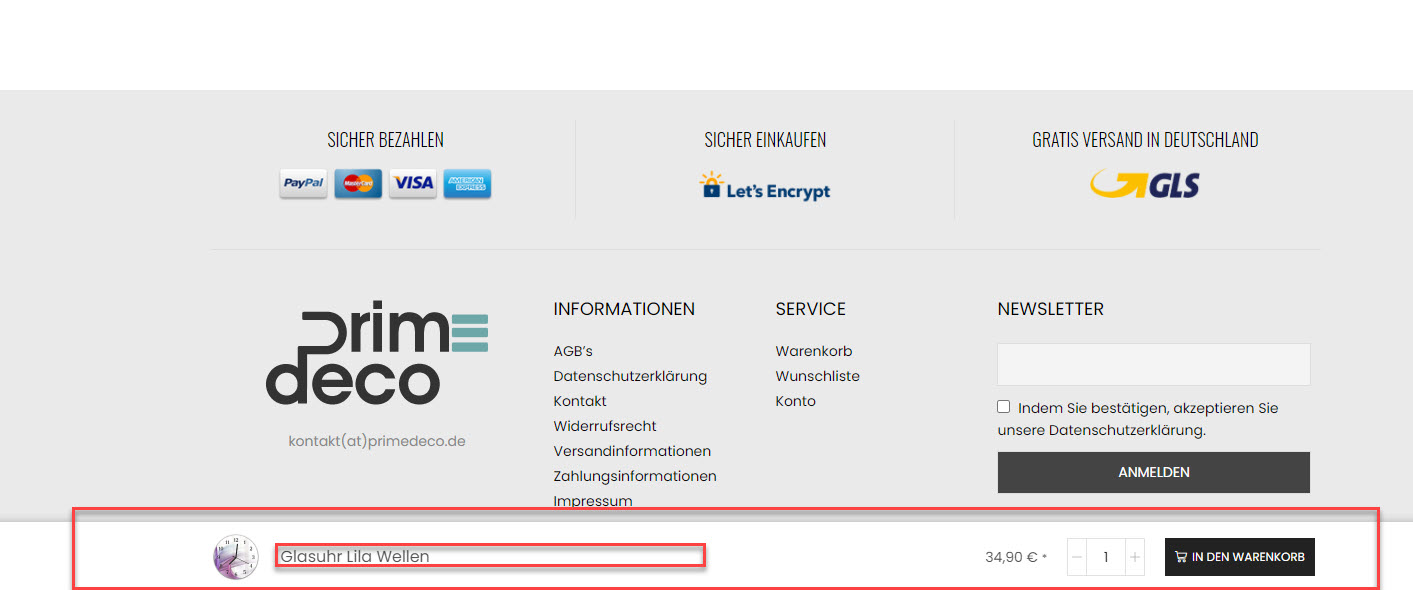
    We have your sticky “add to cart” at the bottom (screenshot). As on the footer we have a important price notice which needs to be visible everytime it, the sticky does overlay this information.

    How can we manage that thsi will be visible?

    Also how can we manage that the text in sticky will be not truncate (….) or only will be truncate after XX symbols?
    Thank you

    David

    Please, contact administrator
    for this information.
    1 Answer
    Avatar: Rose Tyler
    Rose Tyler
    Support staff
    April 17, 2021 at 14:45

    Hello,

    1) Try to add the next code in Theme Options > Theme custom CSS:

    .single-product .footer-info {
        margin-bottom: 70px;
    }

    2) There is no such possibility.

    Regards

  • Viewing 2 results - 1 through 2 (of 2 total)

The issue related to '‘Sticky Add to Product in Bottom’' has been successfully resolved, and the topic is now closed for further responses

We're using our own and third-party cookies to improve your experience and our website. Keep on browsing to accept our cookie policy.



